1
LORD USER MANUAL
G-Link2®-LXRS®
Wireless Accelerometer Node
MicroStrain® Sensing Systems
459 Hurricane Lane
Suite 102
Williston, VT 05495
United States of America
Phone: 802-862-6629
Fax: 802-863-4093
http://www.microstrain.com
[email protected]
[email protected]
Copyright © 2015 LORD Corporation
3DM® , 3DM-DH® , 3DM-DH3™, 3DM-GX1® , 3DM-GX2® , 3DM-GX3® , 3DM-GX4-15™, 3DM-GX4-25™, 3DM-GX4-45™,
3DM-GX4™, 3DM-RQ1™, 3DM-GQ4™, AIFP® , Ask Us How™, Bolt-Link® , DEMOD-DC® , DVRT ® , DVRT-Link™, DEMODDVRT ® , EH-Link® , EmbedSense® , ENV-Link™, FAS-A® , G-Link® , G-Link2™, HS-Link® , IEPE-Link™, Inertia-Link® , Little
Sensors, Big Ideas.® , Live Connect™, LXRS® , MathEngine® , MicroStrain® , MVEH™, MXRS® , Node Commander ® ,
PVEH™, RHT-Link® , RTD-Link™, SensorCloud™, SG-Link® , Shock-Link™, Strain Wizard® , TC-Link® , Torque-Link™, VLink® , Watt-Link™, Wireless Simplicity, Hardwired Reliability™, and WSDA® are trademarks of LORD Corporation.
Document 8500-0037 Revision B
Subject to change without notice.
G-Link2®-LXRS® Wireless Accelerometer Node User Manual
Table of Contents
1.
Wireless Sensor Network Overview
6
2.
Node Overview
7
3.
4.
2.1 Components List
8
2.2 Interface and Indicators
9
2.3 Node Operational Modes
10
System Operational Overview
11
3.1 Software Installation
12
3.2 System Connections
13
3.3 Gateway USB Communication
14
3.4 Connect to Nodes
15
3.4.1 Adding a Node by Address
15
3.4.2 Using Node Discovery
16
3.5 Channel Configuration
17
3.6 Sampling Settings
19
3.7 Data Acquisition
20
3.8 Data Handling
25
3.8.1 Connecting to SensorCloud™
26
3.8.2 Sensor Data Files
29
Node Installation
30
4.1 Mounting Recommendations
30
4.2 Sensor Frame
31
4.3 Optimizing the Radio Link
32
4.3.1 Range Test
5.1 Connecting External Sensors
33
34
G-Link2®-LXRS® Wireless Accelerometer Node User Manual
6.
Powering the Node
35
6.1 Internal Node Battery
35
6.2 Connecting an External Power Supply
36
7.
Sensor Settings and Operation
37
7.1 Node Channels Designations
37
7.2 Measurement Units
38
7.3 Sensor Conversion Values
39
7.4 Operational Considerations
41
7.4.1 Measurement Range
41
7.4.2 Node Sampling Rates
41
7.4.3 Gravity Offset
42
7.5 On-board Temperature Sensor
8.
Troubleshooting
42
43
8.1 Troubleshooting Guide
43
8.2 Device Status Indicators
47
8.3 Updating Node Firmware
48
8.4 Repair and Calibration
50
8.5 Technical Support
51
9.
Maintenance
10.
Parts and Configurations
52
53
10.1 Standard Nodes
53
10.2 Node Accessories
54
10.3 Wireless System Equipment
55
10.4 Product Ordering
56
11.
Specifications
57
G-Link2®-LXRS® Wireless Accelerometer Node User Manual
11.1 Physical Specifications
57
11.2 Operating Specifications
58
11.3 Radio Specifications
60
12.
Safety Information
61
12.1 Battery Hazards
61
12.2 Power Supply
62
12.3 ESD Sensitivity
62
12.4 Disposal and Recycling
63
13.
References
64
13.1 Reference Information
64
13.2 Glossary
65
G-Link2®-LXRS® Wireless Accelerometer Node User Manual
1.
System Overview
Wireless Sensor Network Overview
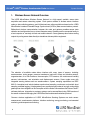
The LORD MicroStrain ® Wireless Sensor Network is a high- speed, scalable, sensor data
acquisition and sensor networking system. Each system consists of wireless sensor interface
nodes, a data collection gateway, and full-featured user software platforms based on the LORD
MicroStrain® Lossless Extended Range Synchronized (LXRS ® ) data communications protocol. Bidirectional wireless communication between the node and gateway enables sensor data
collection and configuration from up to two kilometers away. Gateways can be connected locally to
a host computer or remotely via local and mobile networks. Some gateways also feature analog
outputs for porting sensor data directly to standalone data acquisition equipment.
The selection of available nodes allows interface with many types of sensors, including
accelerometers, strain gauges, pressure transducers, load cells, torque and vibration sensors,
magnetometers, 4 to 20mA sensors, thermocouples, RTD sensors, soil moisture and humidity
sensors, inclinometers, and orientation and displacement sensors. Some nodes come with
integrated sensing devices such as accelerometers. System sampling capabilities are IEEE
802.15.4-compliant and include lossless synchronized sampling, continuous and periodic burst
sampling, and data logging. A single gateway can coordinate many nodes of any type, and multiple
gateways can be managed from one computer with the Node Commander ® and SensorCloud™
software platforms. Integration to customer systems can be accomplished using OEM versions of
the sensor nodes and leveraging the LORD MicroStrain® data communications protocol.
Common wireless applications of LORD MicroStrain ® Sensing Systems are strain sensor
measurement, accelerometer platforms, vibration monitoring, energy monitoring, environmental
monitoring, and temperature monitoring.
6
G-Link2®-LXRS® Wireless Accelerometer Node User Manual
2.
Node Overview
Node Overview
The G-Link2®-LXRS® wireless sensor node features the option of either an integrated tri-axial or
external single axis micro- electro- mechanical (MEMS) accelerometer, and an internal
temperature sensor. Either option can be factory configured to measure acceleration values up to
± 200 g. The node has 16-bit resolution with a measurement bandwidth of 0 to 100 Hz standard,
and custom nodes are available with a bandwidth greater than 1000 Hz. The node can log data to
internal memory and transmit real-time, synchronized data at a wide range of sample rates and
intervals.
To acquire sensor data, the G-Link2 -LXRS is used with a LORD MicroStrain data gateway such
as the WSDA®-Base or WSDA® -1500 - LXRS®.
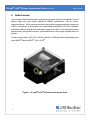
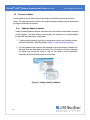
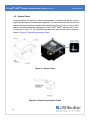
Figure 1 - G-Link2®-LXRS® Wireless Accelerometer Node
7
G-Link2®-LXRS® Wireless Accelerometer Node User Manual
2.1
Node Overview
Components List
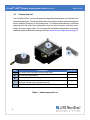
The G-Link2®-LXRS® can be purchased with integrated accelerometers or an interface for an
external accelerometer. The configurations cannot be combined, and the external configuration
has an additional connector for the accelerometer. The external accelerometer is purchased
separately from the node. Both configurations have an internal antenna, and come with a
battery and power supply cable. For a complete list of available configurations, accessories,
additional system products and ordering information see Parts and Configurations on page 53.
Item
A
B
C
---
Description
1
3.6 Volt AA Lithium battery
1
Power supply cable
External accelerometer assembly
(optional, external sensor configuration only)
User Manual, Quick Start Guide and Calibration Certificate
1
Table 1 - Node Components List
8
Quantity
G-Link2®-LXRS® Wireless Accelerometer Node
1
1
G-Link2®-LXRS® Wireless Accelerometer Node User Manual
2.2
Node Overview
Interface and Indicators
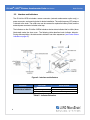
The G-Link2 ® -LXRS ® includes a sensor connector (external accelerometer option only), a
power connector, and mounting holes for device installation. The radio frequency (RF) antenna
is internal to the node. The node cover can be removed to replace the battery inside, and the
external power connector includes a dust cap.
The indicators on the G-Link2 ®-LXRS ® include a device status indicator that is visible (when
illuminated) under the clear cover . The following table describes basic indicator behavior.
During data acquisition, the device status indicator has other sequences (see Device Status
Indicators on page 47).
Figure 2 - Interface and Indicators
Indicator
Behavior
Node Status
Device status indicator
OFF
Rapid flashing on start-up
1 (slow) pulse per second
Node is OFF
Node is booting up
Node is idle and waiting for a command
Table 2 - Indicator Behaviors
9
G-Link2®-LXRS® Wireless Accelerometer Node User Manual
2.3
Node Overview
Node Operational Modes
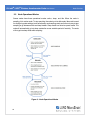
Sensor nodes have three operational modes: active , sleep , and idle. When the node is
sampling it is in active mode. To stop sampling, the node is put into idle mode. Idle mode is used
for configuring node settings (such as frequency and sampling rates) and is the only way to stop
sampling or go between active and sleep modes. Sleep mode is an ultra low power mode. The
node will automatically go into sleep mode after a user-settable period of inactivity. The node
will not go into sleep mode while sampling.
Figure 3 - Node Operational Modes
10
G-Link2®-LXRS® Wireless Accelerometer Node User Manual
3.
System Operational Overview
System Operational Overview
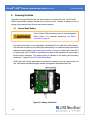
The G-Link2®-LXRS® contains an internal, non-rechargeable
Lithium battery . For important precautions see Safety
Information on page 61.
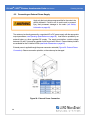
The G- Link2 ® - LXRS ® is susceptible to damage and/or
disruption of normal operation from Electrostatic Discharge
(ESD). For important precautions see Safety Information on
page 61.
To acquire sensor data, nodes are used with any LORD MicroStrain ® data gateway, such as the
WSDA® -Base -10x -LXRS® or WSDA® -1500 - LXRS®, and a software interface.
LORD MicroStrain ® has two software programs available for data acquisition from the wireless
sensor network: SensorCloud™ and Node Commander ® . SensorCloud™ is an optional webbased data collection, visualization, analysis, and remote management platform based on cloud
computing technology. Node Commander® is used for configuring gateways and nodes, selecting
sampling modes and parameters, initializing data acquisition, and viewing and saving data.
The operational overview describes system hardware and software setup, and the basic
navigation of Node Commander® used to configure the node and begin data acquisition. A brief
overview of porting data to SensorCloud™ is also included. This section is included as a quick start
guide and is not a complete demonstration of all system and software capabilities.
11
G-Link2®-LXRS® Wireless Accelerometer Node User Manual
3.1
System Operational Overview
Software Installation
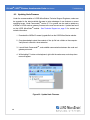
To install Node Commander ® Software Suite on the host computer, run the installer
executable file and follow the on-screen prompts. The software is provided with all gateways
and is available on the LORD MicroStrain® website (see References on page 64).
NOTE
The Node Commander ® software includes hardware drivers required for use with
USB gateways. Once installed, the software will automatically detect and configure
any USB gateways that are plugged into the host computer.
The suite includes the following programs:
l
l
l
Node Commander is used for configuring nodes and acquiring, viewing, and
saving data. Live Connect™ is a TCP/IP-to-serial conversion tool that translates the
communications between Node Commander and an Ethernet gateway.
WSDA® Data Downloader is used to download acquired data from the flash
memory card embedded in an applicable gateway, to a host computer.
SensorCloud™ is an optional data collection, visualization, analysis, and remote
management tool. It is based on cloud computing technology and is accessed directly from a
web connection. Automatic, real- time data collection is available through Ethernet
gateways, such as the WSDA® -1500 - LXRS®. Data files can also be easily uploaded. For
more information see Data Handling on page 25.
Users can also design custom programs with the open source data communications
protocol (see References on page 64).
12
G-Link2®-LXRS® Wireless Accelerometer Node User Manual
3.2
System Operational Overview
System Connections
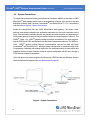
To acquire sensor data the following components are needed in addition to the node: a LORD
MicroStrain® data gateway and a local or networked host computer with access to the data
acquisition software (such as Node Commander ® and SensorCloud™). For a connections
overview refer to Figure 4 - System Connections .
Nodes will communicate with any LORD MicroStrain ® data gateway. The sensor, node,
gateway, and software selection are application-dependent, but the basic interfaces are the
same. Communication protocols between the gateway and host computer vary depending on
which model gateway is used, but they all require interface to a host computer or network. The
WSDA® -Base -10x -LXRS ® gateway utilizes local serial connections to the host computer,
such as RS232 and USB, and interfaces with the Node Commander® software. The WSDA® 1500 - LXRS ® gateway utilizes Ethernet communications and can be used with Node
Commander ® and SensorCloud™, although system configuration is completed using Node
Commander® . Gateways with analog outputs can be connected directly to stand-alone data
acquisition devices for data collection, however system configuration will still occur through a
USB interface to Node Commander®.
Users can also write custom programs by utilizing the LORD MicroStrain ® Wireless Sensors
Network Software Development Kit (see References on page 64).
Figure 4 - System Connections
13
G-Link2®-LXRS® Wireless Accelerometer Node User Manual
3.3
System Operational Overview
Gateway USB Communication
The WSDA-Base USB gateway is used as an example in this quick start guide. For information
on how to use other gateways, refer to the gateway or Node Commander ® user manual (see
References on page 64).
Drivers for the USB gateways are included the Node Commander® software installation. With
the software is installed, the USB gateway will be detected automatically whenever the
gateway is plugged in.
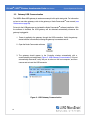
1. Power is applied to the gateway through the USB connection. Verify the gateway
status indicator is illuminated, showing the gateway is connected and on.
2. Open the Node Commander software.
3. The gateway should appear in the Controller window automatically with a
communication port assignment (Figure 5 - USB Gateway Communication). If it is not
automatically discovered, verify the port is active on the host computer, and then
remove and re-insert the USB connector.
Figure 5 - USB Gateway Communication
14
G-Link2®-LXRS® Wireless Accelerometer Node User Manual
3.4
System Operational Overview
Connect to Nodes
Several methods can be used in Node Commander® to establish communication with the
nodes. This quick start section covers the two simplest methods; adding a node by address and
by using the node discovery feature.
3.4.1
Adding a Node by Address
Adding a node by address requires the node to be on the same communication frequency
as the gateway. The node address and frequency are indicated in the documentation
included with the node when it is purchased.
1. To add a node by address, right-click on the gateway name in the Controller window,
and select Add Node > Add Single Node (Figure 6 - Adding a Node by Address).
2. The node address and frequency are indicated in the documentation included with
the node. Enter the node address, and select OK. If the node is not found, a message
will appear and provide the option to scan for the node on other frequencies.
Alternately, the Node Discovery feature can be used.
Figure 6 - Adding a Node by Address
15
G-Link2®-LXRS® Wireless Accelerometer Node User Manual
3.4.2
System Operational Overview
Using Node Discovery
The Node Discovery feature allows connection between the gateway and node to occur
even if they are on different frequencies. To connect to nodes using node discovery, begin
by making sure the node is powered off.
NOTE
Automatic node discovery may not work in some boot-up modes. If the node is
not in normal boot up mode, the assigned one can be bypassed to enable node
discovery. For more information see Troubleshooting Guide on page 43.
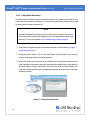
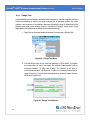
1. Right-click on the gateway name and select Add Node > Node Discovery (Figure 7 Using Node Discovery).
2. Using the power switch, turn on the node. Within a few seconds, the node will
transmit a message with its operating frequency.
3. When the device status indicator on the node ends the rapid flash sequence and
begins pulsing at one-second intervals, the node has completed the normal boot-up
sequence and is running in idle mode. At this point the node should be listed in the
Controller window; scanning can be stopped by selecting the Stop button in the Node
Discovery window.
Figure 7 - Using Node Discovery
16
G-Link2®-LXRS® Wireless Accelerometer Node User Manual
3.5
System Operational Overview
Channel Configuration
The sensor settings are stored in the node memory, and each sensor is assigned a
corresponding channel number. The configuration menus will only show the channels and
configuration options that are available for the type of node being used.
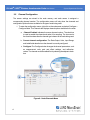
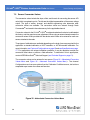
1. To enter the configuration menu, right-click on the node name, and select Configure >
Configure Node. The Channels tab displays channel options available for the node.
a. Channel Enabled: indicates the sensor channel number. The check box
is used to enable the channel and select it for sampling. The icon next to
the check box describes the channel type inherent to the node being used.
b. Current channel configuration: The Data Output, Units, Input Range,
and Label fields describe how the channel is currently configured.
c. Configure: The Configure button changes the channel parameters, such
as measurement units, gain and offset settings, and calibration
values. The channel must be enabled first by selecting the adjacent check
box.
Figure 8 - Node Channels Menu
17
G-Link2®-LXRS® Wireless Accelerometer Node User Manual
System Operational Overview
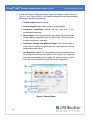
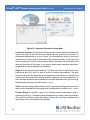
2. To enter the channel configuration menu, select the Configure button as shown in
Figure 8 - Node Channels Menu. The channel configuration menu options change
depending on the sensor type selected.
a. Channel Label: names the channel
b. Channel diagram: shows channel electronics and data flow
c. Conversion Coefficients: defines the type and units of the
measurement being made
d. Sensor Slope: is the sensor sensitivity value used to convert the sensor
voltage reading to engineering units. For the G-Link2 -LXRS this value is
provided via the factory calibration.
e. Conversion Formula and Effective Range: is the formula used to
convert sensor readings to engineering units. It also shows the resulting
sensor measurement range.
f. Low Pass Filter Cutoff: This setting determines what sampled readings
will be reported based on the frequency of the signal. Any frequency
above the selected setting will be omitted. For best performance select a
Low Pass Filter Cutoff that is no more than half of the sample rate.
Figure 9 - Channel Setup
18
G-Link2®-LXRS® Wireless Accelerometer Node User Manual
3.6
System Operational Overview
Sampling Settings
Sampling settings are accessed through the Configure Node menu. There is a tab for each
sampling mode available for the particular node (Figure 10 - Sample Settings Menu).The GLink2® -LXRS ® has three primary sampling modes: Synchronized Sampling, Low Duty Cycle
Sampling, and Datalogging. Some modes have user- configurable settings for sample rate,
sample duration, and related features. Other settings are automatic, depending on number of
active channels and other variables. For more information on sampling modes, refer to the
Node Commander user manual (see References on page 64).
Figure 10 - Sample Settings Menu
In general, when determining what sample mode and rate is most suitable for the application,
refer to the following guidelines;
l
l
l
Use a sample rate at least twice the value of the target measurement frequency. This is the
minimum sample rate required to produce an accurate digital representation of the
measured signal. The higher the sample rate, the more accurate the digital representation.
Using the minimum required sample rate will increase battery life and minimize the
allocated network bandwidth.
Using periodic burst sampling in place of continuous sampling will increase battery life, and
the longer the sample interval, the more power and network bandwidth will be saved.
For synchronized sampling, use the online calculator to evaluate network bandwidth at different
sampling settings :
http://www.microstrain.com/configure-your-system
19
G-Link2®-LXRS® Wireless Accelerometer Node User Manual
3.7
System Operational Overview
Data Acquisition
When data acquisition is started, each of the sampling modes has different menu options and
views. Some open a settings menu before data acquisition begins and may include a data list
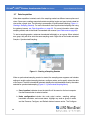
view and/or a graph view. The following is an example of Synchronized Sampling (Figure 11 Starting a Sampling Session). For more information about synchronized sampling and using
the gateway beacon see Data Acquisition on page 20. For more information about other
sampling modes, refer to the Node Commander® user manual. (see References on page 64).
To start a sampling session, nodes can be selected individually or as a group. When selected
as a group, they will all be set to the same sampling mode. Right-click on the nodes and select
Sample > Synchronized Sampling.
Figure 11 - Starting a Sampling Session
When a synchronized sampling session is started, the sampling menu appears and includes
settings to enable optional sampling features, configure nodes, and to specify where the data
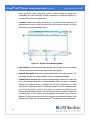
will be saved. The built-in bandwidth calculator displays the total bandwidth used by the nodes
selected for synchronized sampling (Figure 12 - Synchronized Sampling Menu).
a. Save Location: indicates where the data file will be saved on the host computer.
Use the Browse button to select a location.
b. Node configuration: includes the node serial number, sampling settings,
bandwidth calculation, and current status. Highlight any node or group of nodes,
and the Remove, Configure, and Refresh buttons become active. The Configure
20
G-Link2®-LXRS® Wireless Accelerometer Node User Manual
System Operational Overview
button opens the node configuration menus to adjust settings as needed and
recalculates the node bandwidth. Multiple nodes can be configured together by
using the Shift or Ctrl key to select them.
c. Lossless: enables the lossless data protocol. The protocol enables buffering and
retransmission of data in order to provide 100% data collection success. Using this
feature may increase data display latency.
Figure 12 - Synchronized Sampling Menu
d. High Capacity: optimizes bandwidth and power use for nodes with slower sample
rates by reducing the transmit rates. May increase data latency.
e. Network Bandwidth: is the total calculated bandwidth used by all the nodes. The
bandwidth changes as nodes are added, removed. and settings changed.
f. Enable Beacon on Start: When synchronized sampling is started the nodes wait
for the first beacon transmission to initiate sampling. When this option is selected
(default), the gateway beacon is enabled and will begin transmitting at a fixed
interval when sampling is started. Disabling the beacon on start (unchecking the
box) will set the nodes to wait for the beacon, but it does not actually start the
beacon when sampling is started. This can be used if there is a need for sampling to
be initiated later, or if the beacon is being received from another source than the
gateway. Enabling the beacon in this way is the same as enabling the beacon in the
gateway menu Refer to the Node Commander® User Manual for more information.
21
G-Link2®-LXRS® Wireless Accelerometer Node User Manual
System Operational Overview
g. Apply settings and start sampling: Before acquisition can begin, use the Apply
Network Settings to save the session settings to the node. When completed, select
Start Sampling to begin.
h. Close sampling window (with the red "X") to exit sampling or, once the sampling
has been started, to view the data window behind it.
Synchronized sampling features two data views: Grid view and Graph view. Once sampling
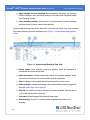
has started, the data grid view is the default view (Figure 13 - Synchronized Sampling Data
View).
Figure 13 - Synchronized Sampling Data View
a. Device status: Node sampling mode and gateway status are displayed in
parentheses next to the device name.
b. Node information: includes node serial number and sampling statistics. Rightclick on the node name for more menu options such as Stop Nodes.
c. Data: is a display of the sampled data with each channel in its own column.
d. Radio strength: indicates the strength of the communication between the gateway
and node. See Range Test on page 33.
e. Data file: the location and size of the data file, as data is added. View the data in
.CSV format with the Open File button.
f. View menu: Select between Data Grid and Graph views.
g. End sampling: The red "X" is used to exit the sampling window and/or end
sampling.
22
G-Link2®-LXRS® Wireless Accelerometer Node User Manual
System Operational Overview
NOTE
When synchronized sampling is set to slower sample rates it may take several
seconds after sampling is initiated for the first sample to appear.
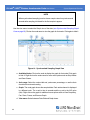
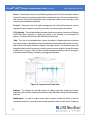
Use the view menu to select the Graph view of the data (see Synchronized Sampling Graph
View on page 23). Click on the node name to view the graph for that node. Click again to hide it.
Figure 14 - Synchronized Sampling Graph View
a. Available Nodes: Click on the node to display the graph for that node. Click again
to hide it. Right-click on the node name for more menu options such as Stop Nodes
and Save Stream.
b. Axis range: Select the x-axis width and y-axis zoom percentage, or use the Auto
check box for automatic scaling.
c. Graph: The node graph shows the sampled data. Each active channel is displayed
in a different color. The x-axis is time in seconds and the y-axis is the A/D value
(bits). Right-click on the graph for additional menu options such as View Graph Key,
Pan, Zoom, Pause, and Remove Graph.
d. View menu: Select between Data Grid and Graph views.
23
G-Link2®-LXRS® Wireless Accelerometer Node User Manual
System Operational Overview
e. Data file: The location and size of the data file as data is added. View the data in
.CSV format with the Open File button.
f. End sampling: The red "X" is used to exit the sampling window and/or end
sampling.
NOTE
Once sampling has started it will continue as configured without the need to leave
Node Commander ® open. However, if the node is powered off and is not configured
to sample on boot- up, data acquisition will end and must be restarted in Node
Commander®.
24
G-Link2®-LXRS® Wireless Accelerometer Node User Manual
3.8
System Operational Overview
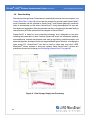
Data Handling
Data acquired through Node Commander ® is automatically saved on the host computer (see
Sensor Data Files on page 29) and can also be viewed from the web-based SensorCloud™
portal. Saved data can be uploaded to SensorCloud™ and Ethernet gateways provide the
option to automatically port the data to SensorCloud™ during data acquisition for near realtime display and aggregation. Ethernet gateways can also be configured to save data locally to
internal memory for future upload to the host computer or SensorCloud™.
SensorCloud™ is based on cloud computing technology and is designed for long term
collecting and preservation of data. Features include time series and visualization graphing,
automated alerts, and data interpretation tools such as data filtering, statistical analysis, and
advanced algorithm development with the integrated MathEngine ® interface. Leveraging the
open source API, SensorCloud™ can also be used to collect data from other LORD
MicroStrain ® sensor products or third- party systems. Basic SensorCloud™ services are
available to all users free of charge (see Connecting to SensorCloud™ on page 26).
Figure 15 - Data Storage, Display and Processing
25
G-Link2®-LXRS® Wireless Accelerometer Node User Manual
3.8.1
System Operational Overview
Connecting to SensorCloud™
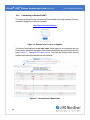
To connect to SensorCloud go to the SensorCloud website log-in page, and enter the log-in
credentials. Register as a new user if needed.
http://sensorcloud.com/log-in/
Figure 16 - SensorCloud™ Log-in or Register
The SensorCloud interface has six main views. When logging in as a registered user, the
Device view is the default. Navigate to other views by clicking the view name at the top of the
page (Figure 17 - SensorCloud™ Menu Views). The Data and Settings views are only
available once a device is selected from the device list.
Figure 17 - SensorCloud™ Menu Views
26
G-Link2®-LXRS® Wireless Accelerometer Node User Manual
System Operational Overview
Device - The device list shows every Ethernet gateway and API device associated with the
SensorCloud account, including owned, shared, and demo devices. This view provides links to
each device’s SensorCloud subscription plan, configuration options, and a summary of last
communications and data transactions.
Account - The account view is for logistic management of the SensorCloud account, such as
changing the log-in password, accessing user email, and reviewing billing information.
CSV Uploader - The data upload feature enables data from any source (such as non-Ethernet
LORD MicroStrain gateways, or third- party sensor) to be uploaded to the SensorCloud
platform. The data must be in the LORD MicroStrain CSV format.
Data - This view is only available after a device is selected. It displays data that is collected
from sensor nodes or uploaded from files. Data selections are listed by node channel or a userdefined label, and can be enabled for display in the graph window. The interactive graph has
navigational features such as panning, zooming, and an overview graph for single-click access
to data points or ranges. There are also use and management features such as viewing the
meta-data and downloading, embedding, and tagging data graphs.
Figure 18 - SensorCloud™ Data View
Settings - The settings view provides options for adding meta- data, configuring the data
displays for each channel, creating alerts based on data thresholds, setting the data timezone,
and more.
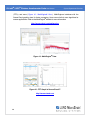
MathEngine ® - is used to analyze sensor data. Functions include the ability to filter out
frequencies, smooth out noisy data, perform math operations such as Fast Fourier Transforms
27
G-Link2®-LXRS® Wireless Accelerometer Node User Manual
System Operational Overview
(FFTs), and more ( Figure 19 - MathEngine® View ) . MathEngine ® interfaces with the
SensorCloud graphing view for faster processing. Users can write their own algorithms for
custom applications. Refer to the MathEngine® website for more information.
http://sensorcloud.com/mathengine
Figure 19 - MathEngine® View
Figure 20 - FFT Graph in SensorCloud™
http://sensorcloud.com
28
G-Link2®-LXRS® Wireless Accelerometer Node User Manual
3.8.2
System Operational Overview
Sensor Data Files
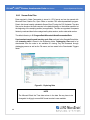
Data acquired in Node Commander is stored in .CSV format and can be opened with
Microsoft Excel, Quattro Pro, Open Office, or another CSV editors/spreadsheet program. Data in this format is easily uploaded to SensorCloud™ using the CSV Uploader. The data
files can be found on the host computer in the default directory or the location specified at
the beginning of the sampling session (as applicable). The files are organized in separate
folders by mode and then further categorized by date, session, and/or node serial number. The default directory is: C:\ProgramData\Microstrain\NodeCommander\Data
Synchronized sampling and low duty cycle files are found in the Sampled Data folder,
and streaming data is stored in the Streaming folder. Datalogging files need to be
downloaded from the node to be available for viewing. They are accessed through
datalogging menus as well as the File menu, and are saved in the Downloaded Triggers
folder.
Figure 21 - Exploring Data
NOTE
The Microsoft Excel the Time data column in the data file may have to be
changed to "m/d/yyyy h:mm:ss:000" format to make it more readable.
29
G-Link2®-LXRS® Wireless Accelerometer Node User Manual
4.
Node Installation
Node Installation
4.1
Mounting Recommendations
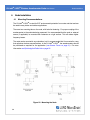
The G-Link2 ®-LXRS ® is rated for IP67 environmental protection from water and dust and can
be used in many indoor and outdoor applications.
There are two mounting tabs on the node, with holes for fastening. For proper coupling of the
accelerometer to the substrate being measured, it is recommended that the node or external
sensor (if applicable) be mounted with fasteners on a rigid surface. This will reduce higher
frequency losses.
The node can be mounted in any orientation, but it is recommended that it is mounted in a way
that optimizes wireless communications. In the G-Link2® -LXRS ® , the accelerometers should
be positioned as required for the application ( see Sensor Frame on page 31 ). For more
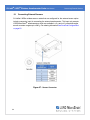
information see Optimizing the Radio Link on page 32. Figure 22 - Mounting the Node
30
G-Link2®-LXRS® Wireless Accelerometer Node User Manual
4.2
Node Installation
Sensor Frame
During installation, the internal or external accelerometer is oriented such that the axis are
aligned appropriately for the measurement application. The axis orientation is referred to as the
sensor frame and is indicated on the device information label (Figure 23 - Sensor Frame). Each
axis has a corresponding channel designation in the G-Link2®-LXRS® software (see Channel
Configuration on page 17). The external accelerometer has only one axis and is oriented as
shown in Figure 24 - External Accelerometer Frame.
Figure 23 - Sensor Frame
Figure 24 - External Accelerometer Frame
31
G-Link2®-LXRS® Wireless Accelerometer Node User Manual
4.3
Node Installation
Optimizing the Radio Link
In ideal conditions, the nodes and gateway can communicate up to two kilometers apart. In
order to accomplish this, the node and gateway must be installed in a manner that optimizes the
wireless transmission. The G-Link2 ® -LXRS ® operates at a 2.4GHz transmission frequency.
The internal antenna has an omni-directional radiation pattern. Using any other antenna with
the node will void FCC compliance.
The best method for ensuring optimal radio communication is to conduct an RF survey of the
installation site. This is easily accomplished in Node Commander ® by using the range test
feature to quantify the radio signal strength (RSSI) in various scenarios. See Range Test on
page 33 for instructions on using Node Commander ® for measuring RSSI. The following are
general guidelines for maximizing transmission range:
l
l
l
l
32
Establish Line of Sight (LOS) between the node and gateway antenna as best
as possible. Try to avoid obstructions between the antennas, such as buildings,
terrain, vegetation, or other physical barriers. Increase the mounting height of the
node to allow a clearer LOS path to the gateway. Height above the ground is also
important because reflections off of the ground can interfere at the receiver.
Generally, the higher above the ground the better.
Minimize Radio Frequency Interference (RFI) such as other equipment
antennas, especially those operating in the same frequency range. This includes
other nodes. If other antennas are required nearby, mount them at different
heights to minimize interference. Additionally, the specific node frequency is
selectable within its operational range using the Node Commander® software. Set
the devices to different transmission frequencies.
Minimize Electromagnetic Interference (EMI) such as that which is generated
by power transmission equipment, microwaves, power supplies, and other
electromagnetic sources.
Metal Objects in close proximity to either antenna, particularly ferrous metals
such as steel and iron, can be problematic for wireless communications. The
larger the object, the greater the influence. G-Link2®-LXRS® Wireless Accelerometer Node User Manual
4.3.1
Node Installation
Range Test
After establishing communication between node and gateway, use the range test feature in
Node Commander ® to monitor the signal strength and to optimally position the nodes,
gateway, and antennas for installation. Maximum achievable range is determined by the
gateway and node power settings (found in the device Configure menu) and is highly
dependent on the physical environment surrounding the devices.
1. Right-click on the node header, and select Communicate > Range Test.
Figure 25 - Range Test Menu
2. The total RSSI range for the node and gateway is -90 to 0dBm. The higher
the value (closer to zero), the better, but reliable communication can be
achieved between - 75 dBm and 0 dBm. The devices is still able to
communicate between -90 dBm and -75 dBm, but it could be intermittent or
result in data loss. Position the node and gateway antennas where the best
RSSI value is observed.
Figure 26 - Range Test Statistics
33
G-Link2®-LXRS® Wireless Accelerometer Node User Manual
5.1
Connecting External Sensors
Connecting External Sensors
G-Link2 ® -LXRS ® wireless sensor nodes that are configured for the external sensor option
include a connector input for connecting the external accelerometer. This input only accepts
LORD MicroStrain® accelerometers, which are available in ±2 g and ±10 g standard ranges,
as well as custom ranges up to ±200 g. For ordering information see Parts and Configurations
on page 53.
Figure 27 - Sensor Connector
34
G-Link2®-LXRS® Wireless Accelerometer Node User Manual
6.
Powering the Node
Powering the Node
The node can be powered with either the internal battery or an external source. The G-Link2®LXRS ® automatically switches between the two sources when it detects a voltage (or lack of
voltage) on the external input. No user intervention is required.
6.1
Internal Node Battery
The G-Link2®-LXRS® contains an internal, non-rechargeable
Lithium battery . For important precautions see Safety
Information on page 61.
The node is powered by a non-rechargeable, replaceable 3.6 V dc, 2600 mAH lithium battery. If the node will not power on, the battery may need replacing. To replace the battery remove the
node cover and the battery (see Interface and Indicators on page 9). Install a new Lithium 3.6 V
AA type battery (Saft LS14500 or equivalent)in the place of the depleted one, observing the
correct polarity orientation. The positive polarity is indicated on the battery and the battery
holder by a "+" symbol (Figure 28 - Battery Orientation).
Node battery life is highly dependent on operational parameters such as sample mode and
rate. More active channels and higher sample rates equate to decreased battery life. Figure 28 - Battery Orientation
35
G-Link2®-LXRS® Wireless Accelerometer Node User Manual
6.2
Powering the Node
Connecting an External Power Supply
Apply only the input voltage range specified for the node in the
polarity indicated. Failure to do so could result in personal
injury and permanent damage to the node ( see Safety
Information on page 61).
The node may be directly powered by a regulated AC to DC power supply with the appropriate
output parameters, see Operating Specifications on page 58). It can also be powered by an
external battery or other regulated DC supply. The supply must deliver a stable voltage
between 2.2 and 5 V dc and be capable of sourcing at least 100 mA. External battery holders
are available for the G-Link2®-LXRS® (see Node Accessories on page 54).
External power is applied through the power connector and cable (Figure 29 - External Power
Connection). Observe connection polarities, or the node may be damaged.
Figure 29 - External Power Connection
36
G-Link2®-LXRS® Wireless Accelerometer Node User Manual
7.
Sensor Settings and Operation
Sensor Settings and Operation
The node configuration interface includes settings for measurement units and conversion values.
The G-Link2 ®-LXRS® internal and external sensors are calibrated at the factory and require no
user adjustment of the conversion values. There are preset measurement units, as well as a userdefined field. Because the wireless sensor system is digital, the analog voltage readings from the
sensors are converted into a digital equivalent value based on the volt-to-bit scale of the internal
analog- to- digital voltage converter (A/D converter). Sensor readings can be displayed and
recorded in A/D value (bits) directly or further converted to engineering units by applying
conversion values and a conversion formula. For more information see Sensor Conversion Values
on page 39, and for instruction of adjusting units see Measurement Units on page 38.
7.1
Node Channels Designations
Sensors are assigned to a specific channel number at the factory and cannot be changed. For
sensor orientation information see Sensor Frame on page 31.
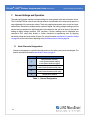
Channel
1
2
3
4
Description
accelerometer channel 1
x-axis (internal sensor option)
z-axis (external sensor option)
accelerometer channel 2
y-axis (internal sensor option only)
accelerometer channel 3
z-axis (internal sensor option only)
temperature channel
Table 1 - Channel Designations
37
G-Link2®-LXRS® Wireless Accelerometer Node User Manual
7.2
Sensor Settings and Operation
Measurement Units
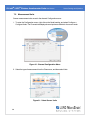
Sensor measurement units are set in the channel Configuration menu.
1. To enter the Configuration menu, right-click on the Node heading, and select Configure >
Configure Node. The Channels tab displays channel options available for the current node.
Figure 30 - Channel Configuration Menu
2. Select the type of measurement from the Class menu, and then select Units.
Figure 31 - Select Sensor Units
38
G-Link2®-LXRS® Wireless Accelerometer Node User Manual
7.3
Sensor Settings and Operation
Sensor Conversion Values
The conversion values include the slope, offset, and formula for converting the sensor A/D
value (bits) to engineering units. The bits are the digital representation of the sensor voltage
output. The type of sensor, channel, and desired engineering units determine what
conversion values are available. The conversion values are entered through Node
Commander® and saved in the node memory for the applicable channel.
Conversion values for the G-Link2®-LXRS® are determined when the device is calibrated at
the factory, and they require no user adjustment. When using an external accelerometer the
conversion values will be provided with the device and will have to be entered for each new
sensor attached to the node.
Three types of calibrations are available depending on the level of accuracy required for the
application: a standard calibration, a NIST-traceable, or ASTM-traceable calibration. For
more information see Parts and Configurations on page 53 and see Specifications on page
57. For applications with unique installation conditions it may be desirable to adjust the
conversion offset value or perform a field calibration. To determine if this is appropriate,
contact LORD MicroStrain® Technical Support (see Technical Support on page 51).
The conversion values can be entered in two menus (Figure 32 - Abbreviated Conversion
Values Menu and Figure 33 - Advanced Conversion Values Menu ) . The channel
Configuration menu has more options than the Calibration Coefficients menu, but both are
acceptable ways to enter the values and formulas.
Figure 32 - Abbreviated Conversion Values Menu
39
G-Link2®-LXRS® Wireless Accelerometer Node User Manual
Sensor Settings and Operation
Figure 33 - Advanced Conversion Values Menu
Conversion Formula: The conversion formula assumes a linear relationship between the
original units (such as A/D bits) and new engineering units (such as g -force ), and it is
expressed mathematically as y=mx+b, where y is the engineering units at a given point
(measurement), m is the slope of the line that represents the linear ratio, x is the original unit
value at a given point, and b is a unit conversion offset (in the case of unit conversions) or the
fixed zero load offset of the sensor (in the case of measurement calibration coefficients).
Negative values may be entered for any coefficient.
Slope: is the linear scaling slope coefficient. The slope is the ratio of original units to new
engineering units (EU), and it is used to convert the sensor measurements. The slope
conversion value will vary depending on the engineering units desired. For example if the
original unit is A/D values (bits), and the desired engineering units are acceleration in gforce, the slope conversion would describe how many bits equal one unit of g-force (bits/g).
Mathematically, the slope is m in the formula y = mx +b.
Offset: is the linear scaling offset coefficient, and it is typically the starting output value of the
sensor with no load applied (in the original units). Mathematically, the offset is b in y = mx +b.
Effective Range: the effective range is the calculated sensor measurement range in
engineering units (EU). The effective range is dependent on the slope, offset and resolution
of the node. The effective range is the number of bits per EU unit (slope) multiplied by the
total number of bits, minus the offset (if applicable).
40
G-Link2®-LXRS® Wireless Accelerometer Node User Manual
7.4
Sensor Settings and Operation
Operational Considerations
7.4.1
Measurement Range
The accelerometer bandwidth limits the range of frequencies that can be measured. As the
measured vibration frequency approaches the upper bandwidth limitation of the
accelerometer, the accelerometer sensitivity decreases. The result is a predictable
reduction in the measured vibration amplitude when measuring beyond the bandwidth limit.
The bandwidth limitation is indicated in the node specifications (see Specifications on page
57).
The low pass filter cutoff frequency setting (see Channel Configuration on page 17) limits
the measured readings that will be reported based on the frequency of the signal.
Frequency readings above the selected setting will decrease in amplitude, just as with the
accelerometer bandwidth limit. For best performance select a cutoff frequency that is no
more than half of the sample rate. For example, if the target measurement is 100 Hz, and
the sample rate is set to 500 Hz, set the cutoff frequency between 100 Hz and 250 Hz.
7.4.2
Node Sampling Rates
The G-Link2 ® -LXRS ® is capable of sampling up to 10 KHz . For measuring vibration it is
recommended to use a sample rate at least twice the value of the target frequency. This is
the minimum sample rate required to produce an accurate digital representation of the
measured signal. For example, if the target measurement is 100 Hz, the sample rate should
be set to 200 Hz or higher.
While the G- Link2 ® - LXRS ® is capable of high sample rates and high resolution
conversions, the integrated accelerometer may limit performance in certain circumstances.
For example, even though the G-Link2® -LXRS ® can sample up to 10 KHz , the integrated
accelerometer (in the standard configuration) only has a bandwidth of100 Hz frequency.
Setting the node to sample at 10 KHz would result in oversampling by a factor of 100, which
is well over typical practices. Oversampling by a factor of 4 times is enough for most
applications.
41
G-Link2®-LXRS® Wireless Accelerometer Node User Manual
7.4.3
Sensor Settings and Operation
Gravity Offset
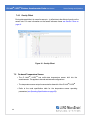
During data acquisition it is normal to see up to -1g offset due to the effects of gravity on the
sensor axis. For more information on the sensor reference frame see Sensor Frame on
page 31.
Figure 34 - Gravity Offset
7.5
On-board Temperature Sensor
l
l
l
42
The G- Link2 ® - LXRS ® has solid- state temperature sensor built into the
accelerometer. This applies to internal and external configurations.
The temperature sensor output is connected to channel 4 of the G-Link2®-LXRS®
Refer to the node specification table for the temperature sensor operating
parameters (see Operating Specifications on page 58).
G-Link2®-LXRS® Wireless Accelerometer Node User Manual
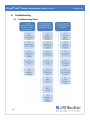
8.
Troubleshooting
8.1
43
Troubleshooting Guide
Troubleshooting
G-Link2®-LXRS® Wireless Accelerometer Node User Manual
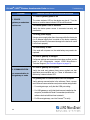
Problem
Troubleshooting
Possible cause and recommended solution
1.1 node or gateway power is off
1. POWER
gateway or node does
not turn on
The status indicator LED on the device may be off. Turn the
device on, and the status indicator LED should illuminate.
1.2 external power is off or miswired
Verify the device power source is connected correctly and
powered on.
1.3 wrong power supply
Using a power supply other than the one specified for the device
(or an external supply that is outside of the device operating
range) could result in permanent damage to the device or cause
it to not work properly.
1.4 node battery is dead
If the node will not power on, the node battery may need to be
replaced.
1.5 node or gateway is damaged
If all power settings and connections have been verified, and the
node is still unresponsive, contact LORD MicroStrain ®
Technical Support (See Technical Support on page 51).
2.1 node or gateway has no power
2. COMMUNICATION
no communication to
the gateway or node
Verify the node and gateway have power applied and that
applicable power switches are on. Power is indicated on both
devices by a status indicator LED.
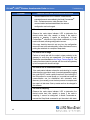
2.2 gateway has no communication with the computer
Verify gateway communication in the software. Check, remove,
and reconnect communications and power cables as applicable. l
l
l
44
For serial gateways, verify that the COM port setting.
For USB gateways, verify that the drivers are installed on the
computer (included with Node Commander®) and that the
software has had sufficient time to detect it.
For Ethernet gateways, use Live Connect™ to verify
G-Link2®-LXRS® Wireless Accelerometer Node User Manual
Problem
Troubleshooting
Possible cause and recommended solution
communications on a DHCP network. Check that the
extended timeouts are enabled in the Node Commander®
Edit > Preferences menu, under Devices. Once
communication has been established, the network
configuration can be changed.
2.3 node cannot be configured
Observe the node status indicator LED to determine the
device's state: boot, idle, sample, or sleep. If the node is
sampling or sleeping, it cannot be configured. In Node
Commander ® , execute the Stop Node command to put the
node in idle state, allowing configuration to occur.
If the user inactivity timeout is set very low, the configuration
menu will have to be entered quickly, before the timeout occurs,
putting the node back in a sample or sleep state.
2.4 node is out of range
Perform a bench test with the node in close proximity to the
gateway to verify they are operational. For range test and
installation recommendations see Range Test on page 33. The
system has been tested to operate with the node and gateway
up to 2 km apart with clear line of sight.
2.5 node is not in normal boot mode
If the node status indicator shows the node booting in a mode
other than the normal boot mode, it can be bypassed by toggling
the node ON/OFF switch rapidly three times, then leaving it in
the ON position for normal power up. In normal boot mode the
communication can be established with automatic node
discovery (or manually) once the boot process is complete and
the node is in idle state. Start-up mode can then be changed in
the software.
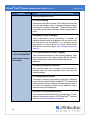
2.6 node is sampling
Observe the node status indicator LED to determine the
device's state: boot, idle, sample, or sleep. If the node is
sampling, it cannot be configured. In Node Commander ® ,
execute the Stop Node command to put the node in idle state,
45
G-Link2®-LXRS® Wireless Accelerometer Node User Manual
Problem
Troubleshooting
Possible cause and recommended solution
allowing configuration to occur.
2.7 node is sleeping
Observe the node status indicator LED to determine what state
it is: boot, idle, sample, or sleep. If the node is sleeping, it cannot
be configured. In Node Commander ® , execute the Stop Node
command to put the node in idle state, allowing configuration to
occur.
2.8 gateway or node is damaged
Verify all connections, power, and settings. If available, try
installing alternate nodes and gateways one at a time to see if
the faulty device can be identified. If no conclusion can be
determined or to send a device in for repair, contact LORD
MicroStrain ® Technical Support ( See Technical Support on
page 51).
3.1 no communication to node or gateway
3. DATA ACQUISITION
sensor data is missing
or incorrect
Verify connections and power to the node and gateway. Verify
they are powered on and communicating with the software.
Enter a configuration menu to verify that the node can be
accessed.
3.2 sampling settings are incorrect
If the sampling mode, rate, or duration are not performing as
expected, enter the node configuration menu, and verify the
sampling settings.
3.3 sampling has not started
If sampling is occurring, the sampling mode will be displayed
next to the node name in Node Commander®. The node device
status indicator will also be flashing the sampling mode code. If
the node is not sampling, activate it in the software or with a
sample on start up boot sequence.
3.4 sensor is not connected correctly
Verify sensors connections and wiring (if applicable). For nonstandard connections contact LORD MicroStrain ® Technical
Support (See Technical Support on page 51).
46
G-Link2®-LXRS® Wireless Accelerometer Node User Manual
8.2
Troubleshooting
Device Status Indicators
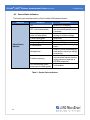
The following is a complete summary of the G-Link2®-LXRS® status indicators.
Indicator
Behavior
OFF
OFF, with occasional flash
Ten rapid flashes green when
power is initially applied
1 second pulse green
Continuously ON green
1 Hz pulse green
Device Status
Indicator
1 Hz pulse blue
ON bright blue
Pulses for each ping
Four to seven slow pulses
when power is initially applied
Node Status
Node is OFF or sleeping
Node is sleeping with radio check
intervals enabled (default is every
5 seconds)
Node is booting normally and
sending out a status message.
Node is idle
Node is logging data
Node is sampling in low duty cycle
Node is in synchronized sampling
mode
Node is in synchronized sampling
mode and is re-syncing or taking a
burst sample
Node is sending out
communication requests (such as
in ping command, range test, or
EEPROM read/write)
Fault condition
Table 3 - Device Status Indicators
47
G-Link2®-LXRS® Wireless Accelerometer Node User Manual
8.3
Troubleshooting
Updating Node Firmware
Under the recommendation of LORD MicroStrain ® Technical Support Engineers, nodes can
be upgraded to the latest available firmware to take advantage of new features or correct
operating issues. Node Commander ® version 2.7.0 or greater can be used to update any
mXRS® or LXRS® node or gateway firmware to the most current version. Updates are found
on the LORD MicroStrain ® website. See Technical Support on page 51 for contact and
website information.
1. Download the LXRS® Firmware Upgrade file from the LORD MicroStrain® website.
2. Once downloaded, extract the contents of the .zip file into a folder on the computer. Verify there is a file with a .zhex extension.
3. Launch Node Commander ® , and establish communication between the node and
gateway as normal.
4. While holding F1 button on the keyboard, right-click the node name, and a drop-down
menu will appear.
Figure 35 - Update Node Firmware
48
G-Link2®-LXRS® Wireless Accelerometer Node User Manual
Troubleshooting
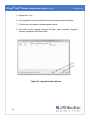
5. Release the F1 key.
6. Click Upgrade Firmware, and the Node Firmware Upgrade window will appear.
7. Click Browse, and navigate to the downloaded .zhex file.
8. Click Write, and the upgrade sequence will begin. When completed, "Upgrade
Success" will appear in the Status column.
Figure 36 - Upgrade Firmware Window
49
G-Link2®-LXRS® Wireless Accelerometer Node User Manual
8.4
Troubleshooting
Repair and Calibration
The G-Link2®-LXRS® is factory calibrated when it is manufactured. No further calibration is
required.
General Instructions
In order to return any LORD MicroStrain ® product, you must contact LORD
MicroStrain ® Sales or Technical Support to obtain a Return Merchandise
Authorization number (RMA). All returned merchandise must be in the original
packaging including manuals, accessories, cables, etc. with the RMA number
clearly printed on the outside of the package. Removable batteries should be
removed and packaged in separate protective wrapping. Please provide the
LORD MicroStrain ® model number and serial number as well as your name,
organization, shipping address, telephone number, and email. Normal turnaround for RMA items is seven days from receipt of item by LORD
MicroStrain®.
Warranty Repairs
LORD MicroStrain ® warrants its products to be free from defective material
and workmanship for a period of one (1) year from the original date of
purchase. LORD MicroStrain ® will repair or replace, at its discretion, a
defective product if returned to LORD MicroStrain® within the warranty period.
This warranty does not extend to any LORD MicroStrain® products which have
been subject to misuse, alteration, neglect, accident, incorrect wiring, misprogramming, or use in violation of operating instructions furnished by us. It
also does not extend to any units altered or repaired for warranty defect by
anyone other than LORD MicroStrain®.
Non-Warranty Repairs
All non- warranty repairs/replacements include a minimum charge. If the
repair/replacement charge exceeds the minimum, LORD MicroStrain ® will
contact the customer for approval to proceed beyond the minimum with the
repair/replacement.
50
G-Link2®-LXRS® Wireless Accelerometer Node User Manual
8.5
Troubleshooting
Technical Support
There are many resources for product support found on the LORD MicroStrain ® website,
including technical notes, FAQs, and product manuals.
http://www.microstrain.com/support_overview.aspx
For further assistance our technical support engineers are available to help with technical and
applications questions.
Technical Support
[email protected]
Phone: 802-862-6629
Fax: 802-863-4093
SKYPE: microstrain.wireless.support
Live Chat is available from the website during business hours:
9:00 AM to 5:00 PM (Eastern Time US & Canada)
51
G-Link2®-LXRS® Wireless Accelerometer Node User Manual
9.
Maintenance
Maintenance
The replaceable battery is the only user serviceable part in the G-Link2®-LXRS ®. For instructions
on how to change the battery, see Internal Node Battery on page 35.
For other service or repair needs contact LORD MicroStrain® Technical Support (see Technical
Support on page 51).
52
G-Link2®-LXRS® Wireless Accelerometer Node User Manual
10.
Parts and Configurations
Parts and Configurations
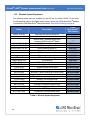
10.1
Standard Nodes
For the most current product information, custom, and OEM options not listed below, refer to
the LORD MicroStrain® website or contact the LORD MicroStrain® Sales Department.
Model Number
Description
l
G-LINK2-LXRS-2G-INT
Internal temperature sensor
l
Ruggedized housing
G-LINK2-LXRS-10G-INT
Internal temperature sensor
l
Ruggedized housing
G-LINK2-LXRS-EXT
6305-4002
Internal ±10 g tri-axial
accelerometer
l
l
53
Internal ±2 g tri-axial
accelerometer
l
l
LORD
MicroStrain®
Part Number
6305-4010
Input for single-axis
accelerometer
l
Internal temperature sensor
l
Ruggedized housing
6305-5000
G-Link2®-LXRS® Wireless Accelerometer Node User Manual
10.2
Parts and Configurations
Node Accessories
The following parts are available for use with the G-Link2 ® -LXRS ® . For the most current
product information, custom, and OEM options not listed below, refer to the LORD
MicroStrain ® website or contact the LORD MicroStrain ® Sales Department. See Product
Ordering on page 56.
Description
LORD MicroStrain®
Part Number
Lithium AA cell battery 2 Ah capacity
Replacement power cable (connector to bare leads)
External ± 2 g single-axis accelerometer on six foot cable
External ± 10 g single-axis accelerometer on six foot cable
6302-0100
9022-0052
6305-5002
6305-5010
Table 4 - Node Accessories
54
G-Link2®-LXRS® Wireless Accelerometer Node User Manual
10.3
Parts and Configurations
Wireless System Equipment
The following system parts are available for use with the G-Link2 ® - LXRS ® . For the most
current standard, custom, and OEM product options, refer to the LORD MicroStrain® website
or contact the LORD MicroStrain® Sales Department. See Product Ordering on page 56.
Model
Description
WSDA-1500-SK
--
Ethernet Data Gateway Starter Kit
Node Commander® Software
SensorCloud™ Software Subscription
(contact LORD MicroStrain® Sales)
USB Gateway Starter Kit
RS232 Gateway Starter Kit.
Analog Gateway Starter Kit
Replacement USB cable
USB Gateway cable extender
Replacement serial cable
Ethernet Data Gateway
USB Gateway
RS232 Serial Output Gateway
Analog Output Gateway
Wireless Accelerometer Node
Wireless 2-Channel Analog Input Sensor Node
Wireless 2-Channel Analog Input Sensor Node
Ruggedized Wireless Analog Sensor Input Node
Wireless 7-Channel Analog Input Sensor Node
Wireless Thermocouple Node
Wireless Displacement Sensor Node
Wireless Environmental Sensor Node
Wireless Energy Monitoring Sensor Node
Wireless RTD Sensor Node
Wireless IEPE Accelerometer Node
-WSDA-BASE-104-SK
WSDA-BASE-102-SK
WSDA-BASE-101-SK
---WSDA-1500
WSDA-BASE-104
WSDA-BASE-102
WSDA-BASE-101
G-Link-LXRS
SG-Link-LXRS
SG-Link-OEM
SG-Link-RGD
V-Link-LXRS
TC-Link-LXRS
DVRT-Link-LXRS
ENV-Link-Pro
Watt-Link-LXRS
RTD-Link-LXRS
IEPE-Link -LXRS
Table 5 - Wireless System Equipment
55
LORD
MicroStrain®
Part Number
6314-1501
6301-0300
-6307-1041
6307-1021
6307-1011
9022-0029
6307-0900
4005-0005
6314-1500
6307-1040
6307-1020
6307-1010
various models
various models
various models
various models
various models
various models
various models
various models
various models
various models
various models
G-Link2®-LXRS® Wireless Accelerometer Node User Manual
10.4
Parts and Configurations
Product Ordering
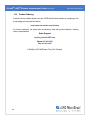
Products can be ordered directly from the LORD MicroStrain ® website by navigating to the
product page and using the Buy feature. http://www.microstrain.com/wireless
For further assistance, our sales team is available to help with product selection, ordering
options, and questions.
Sales Support
[email protected]
Phone: 802-862-6629
Fax: 802-863-4093
9:00 AM to 5:00 PM (Eastern Time US & Canada)
56
G-Link2®-LXRS® Wireless Accelerometer Node User Manual
11.
Specifications
11.1
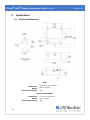
Physical Specifications
Node
Dimensions:
Weight:
Environmental Rating:
68 mm x 85.4 mm x 33.5 mm
Node: 178 grams
IP67
External Accelerometer
Dimensions:
Weight:
Environmental Rating:
57
31 mm x 21 mm x 16 mm
Node: 74 grams
IP67
Specifications
G-Link2®-LXRS® Wireless Accelerometer Node User Manual
11.2
Operating Specifications
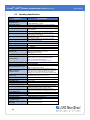
Parameter
Specifications
Sensor input channels
Single-axis MEMS accelerometer (option), 1 channel
Integrated sensors
Triaxial MEMS accelerometer (option), 3 channels
Internal temperature, 1 channel
Data storage capacity
4 M bytes (up to 2,000,000 data points, data type dependent)
Accelerometer Channels (integrated or external)
Measurement range
± 2 g or ± 10 g standard (± 5 g, ± 30 g, ± 50 g, ±100 g, or ± 200 g
options available)
Accelerometer bandwidth
0 to ≤ 100 Hz (-3 dB cutoff), high bandwidth option available
Accuracy and resolution
< 0.3 % error (typical @ 25 Hz, 1/2 of dynamic range with
sinusoidal input), 16 bit resolution
Noise
± 2 g: 130 µ g/√Hz , ± 10 g: 420 µ g/√Hz (typical with 100 Hz
anti-aliasing filter setting)
Anti-aliasing filter bandwidth
Fifth order low-pass Butterworth filter, user programmable
bandwidth from 26 Hz to 1 KHz
Integrated Temperature Channel
Measurement Range
-40 °C to 125 °C
Accuracy and resolution
± 5 °C (over full range) , 16 bit
Sampling modes
Synchronized, low duty cycle, datalogging Sampling rates
Continuous sampling: 32 to 512 Hz
Periodic burst sampling: 32 Hz to 10 KHz
Datalogging: 32 Hz to 10 KHz
Sample rate stability
±3 ppm
Network capacity
Up to 125 nodes per RF channel (and per gateway) depending
on the number of active channels and sampling settings.
Refer to the system bandwidth calculator:
http://www.microstrain.com/configure-your-system
Sampling
Synchronization between nodes
± 32 µsec
Operating Parameters
Wireless communication range
Outdoor/line-of-sight: 2 km( ideal)*, 800 m (typical)**
Indoor/obstructions: 50 m (typical)**
Radio frequency (RF)
transceiver carrier
2.405 to 2.470 GHz direct sequence spread spectrum over 14
channels, license free worldwide, radiated power programmable
from 0 dBm (1 mW) to 16 dBm (39 mW); low power option
available for use outside the U.S.A.- limited to 10 dBm (10 mW)
Power source
Internal: 3.6 V dc, 2.6 Ah, AA replaceable lithium battery (Saft
LS14500 included), External: 2.2 V dc to 5 V dc
Power consumption
1 channel: 20.1 mA (average), 3 channels: 34.9 mA (average)
Operating temperature
-40 ˚C to +85˚C
Acceleration limit
tested to 380 g
MTBF
378,000 hours (Telcordia method, SR332)
Physical Specifications
Dimensions
Node: 68 mm x 85 mm x 33.5 mm with mounting tabs, external
accelerometer (option): 32 mm x 21.5 mm x 16 mm
Weight
Node with internal accelerometer and battery: 178 grams
node with external accelerometer, cable and battery: 252 grams
Environmental rating
IP67
Enclosure material
Aluminum and clear polycarbonate
Compatible gateways
All WSDA® base stations and gateways
Compatible sensors
LORD MicroStrain® accelerometer
( external accelerometer option)
Connectors
M5 screw-on IP67 connector
(external accelerometer option)
Integration
58
Specifications
G-Link2®-LXRS® Wireless Accelerometer Node User Manual
Parameter
Specifications
Software
SensorCloud™, SensorConnect™, Node Commander® ,
WSDA® Data Downloader, Live Connect ™, Windows
XP/Vista/7 compatible
Software development kit (SDK)
Data communications protocol available with EEPROM maps
and sample code (OS and computing platform independent)
http://www.microstrain.com/wireless/sdk
Regulatory compliance
FCC (U.S.), IC (Canada), ROHS
*Measured with antennas elevated, no obstructions, and no RF interferers.
**Actual range varies depending on conditions such as obstructions, RF interference, antenna height, & antenna orientation.
59
Specifications
G-Link2®-LXRS® Wireless Accelerometer Node User Manual
11.3
Specifications
Radio Specifications
The G- Link2 ® - LXRS ® Wireless Accelerometer Node employs a 2.4GHz IEEE 802.15.4
compliant radio transceiver for wireless communication. The radio is a direct-sequence spread
spectrum radio and can be configured to operate on 14 separate frequencies ranging from
2.405 GHz to 2.470 GHz. Following the 802.15.4 standard, these frequencies are aliased as
channels 11 through 24. For all newly manufactured nodes, the default setting is 2.425 GHz
(channel 15). For standard models, radiated transmit power is programmable from 0 dBm (1 mW) to 16 dBm
(39 mW). A low-transmit power option is available (for use in Europe and elsewhere) and is
limited to 10 dBm (10 mW).
The radio complies with FCC Part 15 (USA) and IC (Canada) regulations. The radio is licensefree worldwide. Using antennas and transmission equipment other than what is provided may
void FCC compliance.
NOTE
l
l
60
The gateway can automatically manage nodes operating on different frequencies
by using the Node Discovery feature in Node Commander ® . In this routine, the
gateway listens for node broadcasts on the frequency channel to which it is set. If
the node is in normal boot-up mode, it will provide the broadcast when it is initially
powered-on, and it will broadcast on all channels. As long as the node is poweredon after activating the Node Discovery feature, the gateway will link to it and
remember the channel setting for future node queries.
Manually matching the node and gateway frequency channels is required in some
applications. For example, when sending broadcast messages from the gateway to
multiple nodes (including the synchronized sampling beacon) all nodes must be on
the same channel as the gateway in order to receive the broadcast. Assigning
channels is also a good idea when multiple gateways are attached to one host
computer or when other wireless equipment is nearby and frequency or
transmission interference may occur.
G-Link2®-LXRS® Wireless Accelerometer Node User Manual
12.
Safety Information
Safety Information
This section provides a summary of general safety precautions that must be understood and
applied during operation and maintenance of components in the LORD MicroStrain ® Wireless
Sensor Network.
12.1
Battery Hazards
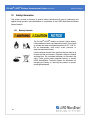
The G-Link2 ® -LXRS ® contains an internal, Lithium battery. Lithium batteries are a fire and explosion hazard. Do not store
or operate the node at temperatures above 212°F (100°C). Do not disassemble, short circuit, crush, puncture, or
otherwise misuse the battery.
Lithium batteries contain toxic chemicals that are harmful to
humans and the environment. Disposal is subject to federal
and local laws. Do not discard the battery or the node in the
trash. Follow proper battery disposal protocol, or contact
LORD MicroStrain ® Technical Support for information on
extracting the battery or returning the product for proper
recycling and disposal.
61
G-Link2®-LXRS® Wireless Accelerometer Node User Manual
12.2
Safety Information
Power Supply
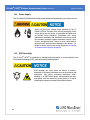
The G-Link2®-LXRS® Wireless Accelerometer Node can be powered by an external source.
Apply only the input voltage range specified for the GLink2 ® -LXRS ® . Connect in the correct polarityto a power
source that is near the device, is accessible, and adheres to
all national wiring standards. Compliance with wiring
standards is assumed in the installation of the power source
and includes protection against excessive currents, short
circuits, and ground faults. Failure to do so could result in
personal injury and permanent damage to the device. For
details on how to connect the power supplysee Connecting
an External Power Supply on page 36.
12.3
ESD Sensitivity
The G-Link2 ® -LXRS ® is susceptible to damage and/or disruption of normal operation from
Electrostatic Discharge (ESD), particularly during data acquisition.
ESD damage can occur when the device is touched,
especially at the device interfaces such as the antenna and
connectors. Use proper grounding techniques when
handling. If an ESD event occurs, and operation has been
interrupted, reset the device by cycling power to it and/or
restarting the operational mode in the system software.
62
G-Link2®-LXRS® Wireless Accelerometer Node User Manual
12.4
Safety Information
Disposal and Recycling
The G-Link2®-LXRS® contains internal batteries, printed
circuit boards, and electronic components. These items
are known to contain toxic chemicals and heavy metals
that are harmful to humans health and the environment. Disposal is subject to federal and local laws. Do not
discard the device or batteries in the trash. Follow proper
electronic and battery waste disposal protocol, as
dictated by federal and local authorities. Some states
also have programs for extracting reusable parts for
recycling.
63
G-Link2®-LXRS® Wireless Accelerometer Node User Manual
13.
References
References
13.1
Reference Information
Many references are available on the LORD MicroStrain ® website including product user
manuals, technical notes, and quick start guides. These documents are continuously updated,
and new applications are added. They may provide more accurate information than printed or
file copies. Document
Where to find it
Online Wireless Network Calculator
http://www.microstrain.com/configure-yoursystem
Node Commander® Software User
Manual
SensorCloud™
Overview
MathEngine® Overview
LORD MicroStrain® Wireless Sensors
Network Software Development Kit
Product Datasheets
Product Manuals and Technical Notes
Product Application Notes
NIST Calibration Procedures
ASTM Testing Procedures
http://www.microstrain.com/support/docs
http://www.sensorcloud.com/systemoverview
http://www.sensorcloud.com/mathengine
http://www.microstrain.com/wireless/sdk
http://www.microstrain.com/wireless/sensors
http://www.microstrain.com/support/docs
http://www.microstrain.com/applications
http://www.nist.gov/calibrations/
http://www.astm.org/Standard/standardsand-publications.html
Table 6 - Related Documents
64
G-Link2®-LXRS® Wireless Accelerometer Node User Manual
13.2
References
Glossary
These terms are in common use throughout the manual:
A/D Value: the digital representation of the analog voltages in an analog- to- digital (A/D)
conversion. The accuracy of the conversion is dependent on the resolution of the system
electronics; higher resolution produces a more accurate conversion. Also referred to as "bits".
ASTM: The Association of Standards and Testing is a nationally-accepted organization for the
testing and calibration of technological devices.
Base Station: The base station is the transceiver that attaches to the host computer and
provides communication between the software and the node(s). It is also referred to as a
“gateway”.
Bits: the digital equivalent of voltage on the node. See 'A/D Value'.
Burst Sampling: a mode of operation in which the node is sampled for a fixed window of time
(burst), and then repeats that window at set intervals. The burst duration and time between
bursts is configurable. Same as periodic burst sampling.
Calibration: to standardize a measurement by determining the deviation standard and
applying a correction (or calibration) factor
Configuration: a general term applied to the node indicating how it is set up for data
acquisition. It includes settings such as sampling mode and rate, number of active channels,
channel measurement settings, offsets, hardware gain, and calibration values. Continuous Sampling: a mode of operation in which the node is sampled continuously until
stopped, or continuously for a fixed amount of time.
Coordinated Universal Time (UTC): the primary time standard for world clocks and time. It
is similar to Greenwich Mean Time (GMT).
Cycle Power: a command transmitted to the node to reboot it, either through a hardware or
software switch
Data Acquisition: the process of collecting data from sensors and other devices
Data Logging: the process of saving acquired data to the system memory, either locally on
the node or remotely on the host computer
65
G-Link2®-LXRS® Wireless Accelerometer Node User Manual
References
DHCP (network): Dynamic Host Configuration Protocol is the standardized networking
protocol used on Internet Protocol (IP) networks, which automatically configures devices that
are attached to it by assigning and configuring the device IP address.
EMI: Electromagnetic Interference is an inductive or radiated disturbance that can create
signal degradation on electrical signals, including loss of data.
ESD: Electrostatic Discharge is the sudden flow of electricity that can occur between two
charged objects of different potential that come in contact or in close proximity of each other.
Static electricity is a common source of ESD.
Event-Based Sampling: a mode of operation in which the node sampling is started when a
sensor measurement value (threshold) is achieved.
Firmware: the code that is programmed onto a microcontroller or similar device in an
embedded system. It includes device operation commands, conditions, memory allocation, and
many other tasks. Gateway: The gateway is a transceiver that attaches to the host computer and provides
communication between the software and the node(s). It is also known as a “base station”.
Host (computer): The host computer is the computer that orchestrates command and control
of the attached devices or networks.
LED: Light Emitting Diode is an indicator light that is used in electronic equipment.
LOS (Line of Sight): is used in radio communications to describe the ideal condition between
transmitting and receiving antennas in a radio network. As stated, it means the antennas are in
view of each other with no obstructions.
LXRS® :Lossless Extended Range Synchronized is the proprietary LORD MicroStrain ® data
communications protocol used in the wireless sensor network.
NIST: The National Institute of Standards and Testing is a nationally-accepted organization for
testing and calibration of technological devices.
Node: The node is the wireless transceiver that the sensor (s) is connected to, providing
communication with the gateway. The G-Link ® -LXRS ® , V-Link ® -LXRS ®, and SG-Link ® LXRS® are examples of nodes manufactured by LORD MicroStrain®.
66
G-Link2®-LXRS® Wireless Accelerometer Node User Manual
References
Node Tester board: The Node Tester board is a device designed by LORD MicroStrain® that
can be plugged into nodes to test their functionality.
Offset: When describing a mathematically-linear relationship, the offset is the value where the
line that represents the relationship in a graph crosses the y-axis. The equation of a straight
line is: y = mx+b, where x is the x-axis coordinate, y is the y-axis coordinate, m is the slope and
b is the offset.
Oversampling: In signal processing, oversampling is a technique used to achieve increased
signal resolution and better noise immunity by recording readings at a higher frequency than
the output of the device being measured. In analog- to- digital conversion, the higher the
oversampling rate, the better the recreated analog signal.
Packet: unit of sampled data
Periodic Burst Sampling: a mode of operation in which the node is sampled for a fixed
window of time (burst), and then repeats that window at set intervals. The burst duration and
time between bursts is configurable. Same as burst sampling.
Ping: a byte transmitted by the gateway to the node. The node responds by echoing the byte,
indicating communication exists between the node and gateway.
Range Test: a continuous string of pings used to validate communication between the
gateway and the node over distance and obstruction
Read/Write EEPROM: commands transmitted to the node to read or write parameters stored
in the node’s operating system
Real Time Clock (RTC): a computer clock that keeps track of the current time
Resolution: in digital systems, the resolution is the number of bits or values available to
represent analog values or information. For example, a 12- bit system has 4,096 bits of
resolution and a 16-bit system has 65,536 bits.
RFI: Radio Frequency Interference is a disturbance in an electrical circuit due to
electromagnetic induction or radiation.
RSSI: Received Signal Strength Indication is a measurement of the transmission power in a
radio signal. It is measured in decibels with reference to 1 milliWatt (dBm).
RS232: a serial data communications protocol
67
G-Link2®-LXRS® Wireless Accelerometer Node User Manual
References
Sensor: a device that physically or chemically reacts to environmental forces and conditions,
producing a predictable electrical signal
Sleep: a command transmitted to the node to put it into sleep configuration
Sampling: the process of taking measurements from a sensor or device
Sampling Mode: the type of sampling that is being utilized, such as event- triggered,
continuous, or periodic. The nodes have several sampling modes that employ these types of
sampling.
Sampling Rate: the frequency of sampling
Slope: When describing a mathematically linear relationship, the slope is the steepness of the
line that represents that relationship on a graph. The equation of a straight line is: y = mx+b,
where x is the x-axis coordinate, y is the y-axis coordinate, m is the slope, and b is the offset.
Streaming: Streaming is a sampling mode in which all active channels (and the sensors
attached to them) are measured, and the acquired data is transmitted to the gateway and
software. The data is not written to non- volatile memory during streaming. Streaming can
either be finite (have a user defined start and end time) or continuous (continued until the power
is cycled on the node).
Synchronized Sampling: a sampling mode that automatically coordinates all incoming node
data to a particular gateway. This mode is designed to ensure data arrival and sequence.
Transmission rate: the number of data packets per transmission window, measured in
seconds. Depending on the sampling mode and settings it will be between 1 and 64
packets/second.
Transmission window: the time allowed for one data transmission at the automatically
determined transmission rate
USB: Universal Serial Bus, a serial data communications protocol
WSN: Wireless Sensor Network describes a distribution of sensors and data acquisition
equipment that autonomously monitors environmental characteristics, such as temperature,
pressure, and strain.
68