1
International Journal of Computer Theory and Engineering, Vol.3, No.1, February, 2011
1793-8201
STEP 3
Now go to /etc folder and type
gedit ~/.bashrc
Add the following lines to the end of it. Remember replace
"/your/path" by something like "/home/kazim". And
accordingly also change the version numbers. This is for ns
2.31.
#LD_LIBRARY_PATHOTCL_LIB=/your/path/ns-allinone2.31/otcl-1.13 NS2_LIB=/your/path/ns-allinone-2.31/lib
X11_LIB=/usr/X11R6/lib
USR_LOCAL_LIB=/usr/local/lib
export
LD_LIBRARY_PATH=$LD_LIBRARY_PATH:$OTCL_L
IB:$NS2_LIB:$X11_LIB:$USR_LOCAL_LIB
#TCL_LIBRARYTCL_LIB=/your/path/ns-allinone-2.31/
tcl8.4.14/library USR_LIB=/usr/lib
export TCL_LIBRARY=$TCL_LIB:$USR_LIB
#PATHXGRAPH=/your/path/ns-allinone-2.31/bin:/your/
path/ns-allinone-2.31/tcl8.4.14/unix:/your/path/ns-allinone2.31/tk8.4.14/unix
NS=/your/path/ns-allinone-2.31/ns-2.31/
NAM=/your/path/ns-allinone-2.31/nam-1.13/
PATH=$PATH:$XGRAPH:$NS:$NAM
Let it take effect immediately
source ~/.bashrc2
Now, the installation has been completed. If you try:
$ ns
Then a "%" will appear on the screen.type "exit" to quit the
mode and back to "$"
Not attached
In this mode, VirtualBox reports to the guest that a
network card is present, but that there is no connection -- as if
no Ethernet cable was plugged into the card. This way it is
possible to "pull" the virtual Ethernet cable and disrupt the
connection, which can be useful to inform a guest operating
system that no network connection is available and enforce a
reconfiguration.
Network Address Translation (NAT)
If all you want is to browse the Web, download files and
view e-mail inside the guest, then this default mode should be
sufficient for you, and you can safely skip the rest of this
section. Please note that the ping utility does not work over
NAT, and that there are certain limitations when using
Windows file sharing.
Bridged networking
This is for more advanced networking needs such as
network simulations and running servers in a guest. When
enabled, VirtualBox sets up an additional, software-based
network interface on the host to which the virtual machine is
connected.
Internal networking
This can be used to create a different kind of
software-based network which is visible to selected virtual
machines, but not to applications running on the host or to the
outside world.
Host-only networking
This can be used to create a network containing the host
and a set of virtual machines, without the need for the host's
physical network interface. Instead, a virtual network
interface (similar to a loopback interface) is created on the
host, providing connectivity among virtual machines and the
host.
For the laboratory work (which requires peer to peer
communication) in education, Bridged Networking mode can
be used.
With bridged networking, VirtualBox uses a device driver
on your host system that filters data from your physical
network adapter. This driver is therefore called a “net filter”
driver. This allows VirtualBox to intercept data from the
physical network and inject data into it, effectively creating a
new network interface in software. When a guest is using
such a new software interface, it looks to the host system as
though the guest were physically connected to the interface
using a network cable: the host can send data to the guest
through that interface and receive data from it. This means
that you can set up routing or bridging between the guest and
the rest of your network.
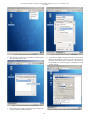
To enable peer to peer communication bridge networking
requires on VirtualBox. Following are the steps for network
configuration on Fedora guest operation.
1) Click on network configuration option (Figure 6) and
popup menu will appear and select edit connection.
V. NETWORK SETUP
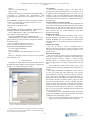
VirtualBox has eight different networking modes. Each of
the eight networking adapters can be separately configured to
operate in one of the following five modes:
Figure 5. Setting Network Adapter for Guest Operating System
2 Note: the step described above is important; otherwise, you cannot run
ns successfully or you can restart your X windows i.e. logout and then login,
or reboot your system, to make it work.
55