1
International Journal of Computer Theory and Engineering, Vol.3, No.1, February, 2011
1793-8201
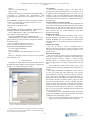
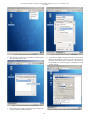
Figure 6. Opening Network Connection Wizard
Figure 8. Editing Ethernet Connection as IPv4 (Manual)
2) The network connection wizard will be opened. Select
auto eth0 and click on edit.
4)
Open network adapter submenu from device main menu
and click on attached to combo box. This will open list of
available networking type in virtual box. By selecting
bridge adapter user can now ping any machine from the
current network.
Figure 7. Opening Default Ethernet setting for Editing
3) From editing auto eth0 wizard select Ipv4 settings tab.
From this tab select manual method.
Figure 9. Changing Network Adapter Setting for Specific Ethernet
56