1
• Before The Race
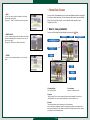
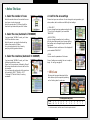
1. Select the number of races
4. Confirm the race settings
Select the number of races. You must set the number of races in order to proceed.
Select the number from [1/3/5 Races] with the
directional key buttons and press the O button.
Please check your race and horse. You can change the racing members, grid
order, weather, track conditions and difficulty-level settings.
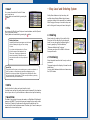
2. Select the race (Automatic if RANDOM)
• RIVAL EDIT
You can change the racing members and grid order.
* This will not be displayed if you’ve selected
"RANDOM."
•RACE OPTION
You can change the weather, track conditions,
difficulty-level settings and type of screen splitting.
Each setting can be changed using the directional
key buttons.
* Weather and track conditions won’t be displayed if
you’ve selected "RANDOM."
If you’ve selected "NORMAL" mode, you’ll enter
the VS Race Selection screen.
Select the race to run using the directional key
buttons, then press the O button.
You can narrow down the list of races by
specifying turf/dirt, grade or distance.
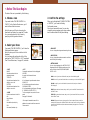
3. Select the racehorse (Automatic if RANDOM)
If you’ve selected "NORMAL" mode, you’ll enter
the Racehorse Selection screen.
Player 1 will choose a horse, followed by Player 2.
Each player should select a horse to ride from the
list provided.
You can change the sorting order of the racehorse
list by selecting "SORT," "MASK" or "LIST."
* See page 20, "Practice Mode," for sorting
commands.
•DATA
You can view the parameters of the horses.
Once all settings are complete, the race is ready to
begin. For racing, see page 27.
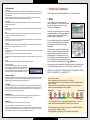
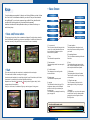
• Win/Loss
Winning and losing are determined by the
total number of points acquired, depending
on the finishing order for each race.
Order
Points
1
20
2
15
3
12
Finishing order and points
4
5
6
7
8
10 8
6
5
4
9
3
* In a five-race match, the final race will have the points doubled.
28
29
10
2
11
1
12
0