1
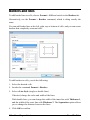
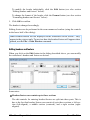
Internet functions PlanMaker provides the following Internet functions: Working with links You can create hyperlinks in PlanMaker documents (e.g., to an Internet address or to another PlanMaker document). Saving HTML documents You can save documents in HTML format using the File > Save as command. See the following pages for detailed information. Working with links You can put hyperlinks in your PlanMaker documents and then follow them by clicking with the mouse. For example, you can place a link to a web page in a document. When the user clicks on it, the web browser starts automatically and presents the page. Creating a link To create a link, proceed as follows: 1. Select the text that is to be made into a link. 2. Invoke the command Format > Link. 3. Enter the target of the link in the URL or file name box; that is, enter the path and name of the internet resource or file to which the selected text is to refer. Links to web pages must be entered as “http://” followed by the address of the page – for example, “http://www.softmaker.com/index.htm”. 4. Below, in the Bookmark field, you can specify, if desired, a position in the target document to be opened (see below). However, this field is normally left empty. 5. Confirm with OK. Manual PlanMaker Internet functions 319