1
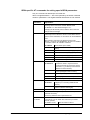
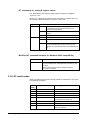
Code Code (text)
(num.)
19
CONNECT 64000
Meaning
Connection established, transfer rate is
64 Kbps.
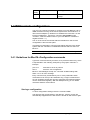
3.4 ISDN remote configuration
You may use a remote computer to configure your local BlueTA+ via an
ISDN connection as long as the remote system also uses a BlueTA+ or
other terminal adapter by Stollmann to establish the connection. To dial
into the local BlueTA+, use the AT command AT<number>e (for
<number>, insert the ISDN number of your local BlueTA+ without the
angled brackets < >.)
The "e" at the end of the number tells the local BlueTA+ that remote
configuration is about to take place.
Any BlueTA+Configuration command (see below) issued by the remote
system after the connection is established will take effect for the local
BlueTA+.
Note: The X.75 (ATB10) protocol must be used for remote configuration.
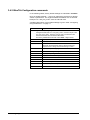
3.4.1 Guidelines for BlueTA+Configuration commands
Type each command exactly as shown, then press the Return key, which
is represented in the following examples by the graphic character “8”.
Example:
prot=10 8
save 8
Switches to the X.75 protocol
Store the new configuration
BlueTA+ acknowledges receipt of a command at ISDN settings with
either a “#” or an error message.
Every command may be followed by one or more parameters. Each
command line can be up to 80 characters long. Longer command lines
are not accepted. Spaces are ignored. Uppercase and lowercase letters
can be used interchangeably. With the Backspace key you can delete
characters inside a command line.
Storing a configuration
To store configuration settings, issue the command save.
This will store the current setting in the BlueTA+ memory so they are
automatically reapplied even if the device is turned off and back on again.
BlueTA+ 1.04/08.2002
Configuring the BlueTA+ • 27