1
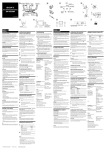
Main Controls
Nomenclature
Incubator temperature
indicator (FV10i-W only)
Cover lock
buttons
Cover
Introduction
The indicator blinks during warm-up and light
steadily when the optimum temperature (34 to
38° C) is reached.
The temperature indicator shows “- - “ when the
heater is OFF.
(Provided on both sides)
Push and hold the bottoms
on the left and right sides to
open the cover.
FV10i-W main unit
(FV10C-W2)
STATUS LEDs
Sub switch
When both the main and sub switches are ON:
Left
LEDs
Right
Lighting
Lighting
Lighting
Lighting
Blinking
Software
Main switch
Power Supply Unit (FV10C-PSU)
: ON
Initializing
: OFF
Not run
Standby
Running
) and right LED (
blink when the cover is open.
Both the left LED (
The operations other than
those available with the
above controls can be
adjusted or set from the
software. (The operations are
easy using the Navigation.)
p. 11
)
Observation/Acquisition Flow
Blinking
Laser
Main Controls
FV10i-O main unit
(FV10C-O2)
3