1
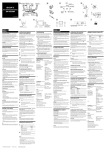
Installing the specimen holder
Push and hold the cover lock buttons
(on both sides), and lift the cover.
7
Install the specimen holder carrying
the specimen to be observed in the
main unit.
6
For details, refer to the User's Manual
[Hardware].
8
The software cannot be launched unless
the specimen holder is installed.
8
Push down the cover until it clicks to
indicate that it is closed.
Main Controls
7
Introduction
6
Observation is not available unless the
cover is closed completely.
Observation/Acquisition Flow
Stable images can be acquired if
acquisition is started after the following
warm-up period.
FV10i-W: 60 minutes
FV10i-O: 30 minutes
Now the system setup is complete.
7