1
AcroGear User Guide
AcroGear User Guide
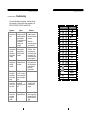
----------------- Troubleshooting
Ensure that all cables are well seated. Label the cable for
each computer to avoid confusion when connected to the
KAG104, KAG104D, KAG108D, and KAG116D.
Symptom
Causes
Solutions
l Keyboard or
l In Auto Scan,
mouse does not
computers using USB
work.
keyboard and mouse
are not operable.
l Too many keyboard or
mouse drivers
installed in one
computer.
l Keyboard or
l The USB computer
mouse does not
does not support
work after
plug-and-play as
switching to a
specified by USB
different USB
standard.
computer.
l Computer
hangs up while
switching
computer.
l USB computer
initialization takes too
much time.
l Auto Scan does l All PCs are off or only
not switch PC
one PC is turned on.
automatically
Scan mode works for
and the switch
power-on computers
beeps.
only.
l Unable to
l The server does not
control a Sun
support USB
server or a HP
plug-and-play or USB
Unix system.
hub.
l Unable to
control a Sun
server while
using OSD
models.
l Sun mark is not
tagged in OSD menu.
20
l Press any front button
to select a computer,
then use the keyboard
and mouse.
l Remove ALL
unnecessary keyboard
and mouse drivers.
l Update that computer's
USB driver. Device
hot plug-and-play is
one of the basic USB
specifications. OSD
models is better suited
for this environment
l Wait at least 5 seconds
before switching from
one USB computer to
another to ensure
proper USB
communication.
l Turn computers on.
l The Sync-Emu™
technology of OSD
models solves this
problem.
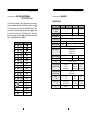
PS/2 keyboard
Sun keyboard
right -
Ctrl
1
right -
Ctrl
2
right -
Ctrl
3
right -
Ctrl
4
right -
Ctrl
F1
Stop
right -
Ctrl
F2
Again
right -
Ctrl
F3
Props
right -
Ctrl
F4
Undo
right -
Ctrl
F5
Front
right -
Ctrl
F6
Copy
right -
Ctrl
F7
Open
right -
Ctrl
F8
Paste
right -
Ctrl
F9
Find
right -
Ctrl
F10
Cut
right -
Ctrl
H
Help
note
right -
right - ♦
left -
left - ♦
Compose
right -
Alt
Alt Graph
left -
Alt
Alt
"
l Make sure each Sun
server is tagged with a
Sun mark in the OSD
menu by Function key
F5 .
21