1
AcroGear User Guide
AcroGear User Guide
----------------- Installation
Features
PC BIOS Notice
l
Manage from 4 to 16 USB-enabled PCs, iMacs from one PS/2
keyboard, one mouse, and one monitor.
l
For computer with USB or PS/2 interface.
l
Front panel push-buttons for easy computer selection.
l
Support keyboard and mouse Plug-and-Play.
l
Buzzer sound for computer switching confirmation.
l
High VGA resolution up to 1920*1440.
l
Activate Auto Scan by front buttons pressing.
l
USB specification compliant.
l
Support the latest DDC2B VGA monitor.
l
OSD menu for server naming and selection. (OSD Models only)
l
Support USB-ready HP Unix and Sun servers. (OSD Models
only)
The following BIOS setup changes are necessary for PC users using
USB and not necessary for Mac users:
1. In STANDARD CMOS, set HALT ON ERROR to ALL BUT
KEYBOARD.
2. In PNP AND PCI SETUP, set PNP OS INSTALLED to YES and set
USB IRQ to ENABLED.
3. For newer computers: in INTEGRATED PERIPHERALS, set USB
CONTROLLER and KEYBOARD SUPPORT to ENABLED.
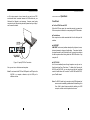
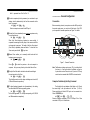
Also, make sure USB is properly selected in Device Manager under
Control Panel, as shown in Figure 1.
Figure 1: PC BIOS Notice
Note: For KAG104, switching from one computer to the other is
equivalent to unplugging the USB device from one computer
and plugging it to another. For certain computers neither
accept plug-and-play nor USB hub, the OSD models deal with
it by the advanced Sync-EmuTM Technology emulating USB
devices at all ports individually.
4
5