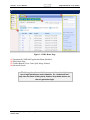
1
Section 1: User’s Manual
Digital Document Access (DDA)
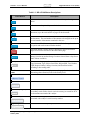
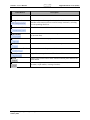
Table 1-1. DDA Field/Button Descriptions.
Fields/Buttons
Description
View
A document’s contents can be viewed with or without performing an
action.
Print
A document can be printed by an authorized user.
Split
Documents with two or more pages can be split into multiple, separate
documents, up to the total number of pages in the document.
Merge
Two or more documents within the same case can be merged to create
one document. The total number of documents to be merged can be up to
the total number of documents contained in the case.
Restore
Deleted or modified documents are held in the Trash Storage Location of
the system and can be restored if/when needed.
Delete
The Delete button is used to delete a document or specific document
pages from a search selection on the DDA Home page.
Move To
The Move To button is used to move a selected document from one
Storage Location to another Storage Location selected from a drop-down
menu of those available).
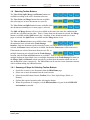
Sort by
Documents on the page can be sorted by Case Number and Document
Type, Document Type, Subject Last Name, Subject SSN, Case Number,
e-QIP Request Number, Storage Location, and Scan Date within
ascending or descending order.
Up / Down Arrows
Buttons to switch the data display in ascending (up direction) order and
descending (down direction) order in the Sort by field.
Advanced Search
Use various criteria to narrow or widen a search for documents.
Case Number
Enter a case number to search for all of its associated documents.
Last Name (Subject)
Enter a subject’s last name (full, last name or the first five characters, plus
a secondary search field to ensure retrieval accuracy) to search for all of
the documents associated with a subject.
Social Security Number
Enter a social security number to search for all of the documents
associated with a subject’s social security number.
e-QIP Request Number
Select to search for an e-QIP request number.
Users_Manual_DDA_011014_DRAFT_v0.1
January 2014
3