1
Software Setup for Custom Firmware
The Commander comes preloaded with a default sketch that works with all demo code, and NUKE's
default sketch. If you want to upload custom firmware to the Commander, you'll need an In-System
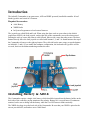
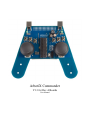
Programmer. The ISP header is next to the left joystick. When plugged in, the ISP cable will be running
upward on the commander. Setup is pretty easy:
●
Install the Arduino IDE, following the instructions at http://arduino.cc/en/Guide/HomePage
●
Download the default firmware from http://www.vanadiumlabs.com/commander
●
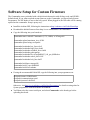
Copy the following into your boards.txt
commander.name=ArbotiX Commander (3.3V, 8 MHz) w/ ATmega168
commander.upload.maximum_size=16384
commander.upload.using=avrispmkii
commander.bootloader.low_fuses=0xc2
commander.bootloader.high_fuses=0xdd
commander.bootloader.extended_fuses=0x00
commander.bootloader.path=atmega
commander.bootloader.file=ATmegaBOOT_168_pro_8MHz.hex
commander.bootloader.unlock_bits=0x3F
commander.bootloader.lock_bits=0x0F
commander.build.mcu=atmega168
commander.build.f_cpu=8000000L
commander.build.core=arduino
●
If using the recommended Pololu ISP, copy the following into your programmers.txt:
avrispmkii.name=AVRISP mkII
avrispmkii.communication=serial
avrispmkii.protocol=stk500v2
Otherwise, visit http://www.arduino.cc/en/Hacking/Programmer for details on using other InSystem programmers with the Arduino environment.
●
You'll then select the correct serial port, and select Commander as the board type before
uploading the sketch.