1
Type management: Create and Remove a Type
New Type or New Basetype?
When editing parameter for the TAS-System, frequent tasks are the Creation or the
Removal of Types. Like mentioned above, already little changes on the transmission
housing can lead to a new type identification from the test stand. But it happens also
that completely new transmissions for a new vehicle platform are built.
For the database, it is uninteresting why there is a new type. If you want to introduce
a new type, at first you need to answer the question whether you need a new base
type as well or not. For the measurement system, a new base type is essential when
there exists no other base type with exactly the same teeth numbers. Usually, if there
exists another base type with the same teeth numbers, you will use that one for the
new type and only relate the new type to the existing base type. Under some
circumstances, it can be desirable to create a new base type although there exists
another one with the same teeth numbers. You will do that if you expect the new type
to behave differently concerning noise than the existing base type.
Creating a New Base Type
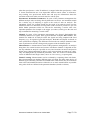
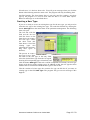
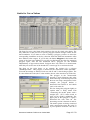
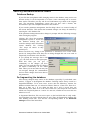
At first we assume that the new
type differs from all existing
base types concerning teeth
numbers. That means, you have
to create a new Base type. You
reach
the
corresponding
function by clicking the topmost
button of the starting form: Add
base type. The form shown on
the right will open:
Enter the new name for the base type in the field „New Base Type“. This name can
contain letters and numbers as well. In the example on the right, the new base type
shall get the name “0815”.
Since it is not useful to start with a completely empty data set for the new base type,
you must specify an existing base type as copy source next. You should select a base
type which fits best to the new type. The less differences the two types have, the less
you need to change for the new type. To be more exact, at the beginning the new base
type will be identical to the existing base type. But it will have its own data set to
allow changes.
If you selected an existing base type from the list, click the button Add. After that, the
new base type is being created and initialized with the data of the source type. At the
end of that process, the program returns with the message Task completed. Clicking
OK closes the message window and the Add Base type – form.
Since a base type alone is not enough to make the data accessible to the measurement
program, creating a base type creates a type with the same name as well. (This means,
when you create a base type “0815” you create a type “0815” as well and the type is
related to that base type.) Since it can happen that the name of the base type already
exists as a name for a type, this process can fail. You will then have a new base type
with the desired name, but the measurement program can not reach it yet. You need
to add another type and relate it to the base type to solve that problem.
In that context, the creation of a base type can fail for two reasons which lead to
corresponding error messages: If you click the button Add without having selected an
existing base type or if you entered a name which already exist for another base type.
Parameter Database-TasForms en 26.06.2009
Page 11 / 29