1
3)
Press the
◀
or ▶
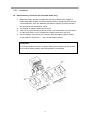
button, it will change to main menu, see Fig3,
Figure
Status
Setting
Command
Fig.3: Main menu
4)
5)
An arrow icon will come out on the LCD when pressing the ENT, then, the data info,
status info, setting info, command control can be selected by pressing the right or left
arrow button, and checking the details by pressing
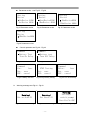
Select and confirm the data info to be viewed in detail. It contains the details of the
AC input /output, inverter, battery, BUS, parallel, temperature. See Fig 4 to 12
below.
Figure
Mains
220.0V
50.0Hz
0.0A
Fig.4:MAIN INPUT INFO
Figure
Invert
220.0V
50.0Hz
Fig.7:INVERT INFO
Figure
BUS
-390V
+390V
Fig.10:BUS INFO
Figure
Output
220.0V
50.0Hz
0.0A
0%
Figure
Output
0.0KW
0.0KVA
PAK: 0.0
Fig.5:OUTPUT INFO
Fig.6:OUTPUT INFO
Figure
PBatt. Discharge
0V
0.0A
0%
0min
Figure
NBatt. Discharge
0V
0.0A
0%
0min Fig.8:BATTERY INFO
Figure
Parallel ID
ID:01
Fig.11:PARALLEL INFO
- 10 -
Fig.9 BATTERY INFO
Figure
Temperature ℃
Inner:24
REC:24
INV:30
Fig.12:TEMPERATURE
INFO