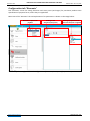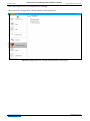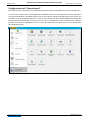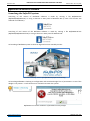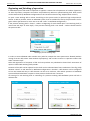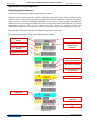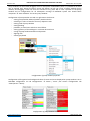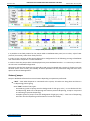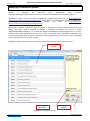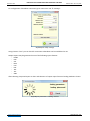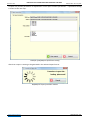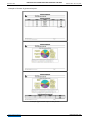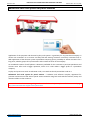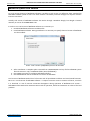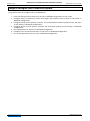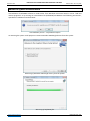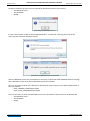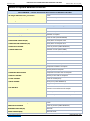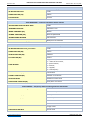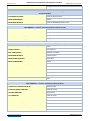
1
NaftaPOS software POS system software for petrol stations USER MANUAL Review date: 21 June, 2015 TECHNOTRADE LTD NAFTAPOS POS SYSTEM SOFTWARE FOR PETROL STATIONS Revision: R07 Review date: 21 June, 2015 CONTENT REVISION HISTORY ................................................................................................................................................ 4 Purpose of the document ..................................................................................................................................... 5 List of terms and abbreviations used in text ......................................................................................................... 6 Purpose, characteristics and area of application of NaftaPOS system ................................................................. 7 Connected equipment .......................................................................................................................................... 8 Requirements to POS terminal for NaftaPOS system installation ........................................................................ 9 NaftaPOS system installation ..............................................................................................................................10 Electronic protection dongle Guardant ..............................................................................................................15 Appointment of Guardant dongle ............................................................................................................... 15 Reading and updating of Guardant dongle permissions ............................................................................. 16 Configuration of NaftaPOS system .....................................................................................................................17 Configuration tab “General”........................................................................................................................ 18 Configuration tab “Database” ..................................................................................................................... 21 Configuration tab “States/Errors” ............................................................................................................... 24 Configuration tab “Drivers” ......................................................................................................................... 25 Configuration of cash registers drivers.................................................................................................... 26 Configuration of pumps controller drivers .............................................................................................. 29 Configuration of ATG system drivers ....................................................................................................... 36 Configuration of barcode scanner drivers ............................................................................................... 40 Configuration of pumps controller service drivers .................................................................................. 42 Configuration of ATG system service drivers .......................................................................................... 44 Configuration tab “Tanks” ........................................................................................................................... 46 Configuration tab “Pumps” ......................................................................................................................... 48 Configuration tab “Payment forms” ............................................................................................................ 49 Configuration tab “Order” ........................................................................................................................... 50 Configuration tab “View” ............................................................................................................................ 53 Configuration tab “Pump modes” ............................................................................................................... 55 Configuration tab “Discounts”..................................................................................................................... 56 Configuration tab “Additional modules” ..................................................................................................... 57 Configuration tab “Users” ........................................................................................................................... 59 Configuration tab “Control panel” .............................................................................................................. 60 Operation in NaftaPOS software.........................................................................................................................61 Launching the NaftaPOS system.................................................................................................................. 61 Exiting / restarting NaftaPOS software ....................................................................................................... 62 General view of NaftaPOS software ............................................................................................................ 62 NaftaPOS system main menu ...................................................................................................................... 66 Beginning and finishing of operation .......................................................................................................... 68 Operations with fuel dispensers.................................................................................................................. 69 Displaying of fuel dispensers ................................................................................................................... 69 States of pumps ....................................................................................................................................... 72 Modes of control over fuel dispensing .................................................................................................... 76 Selection of payment form ...................................................................................................................... 78 Delayed sales of fuel ................................................................................................................................ 79 Control over fuel remains in tanks .......................................................................................................... 81 Adjustment of fuel levels in tanks (input level measurements) .............................................................. 83 Registration of fuel reception at petrol station....................................................................................... 85 Changing of fuel grades and prices.......................................................................................................... 87 www.technotrade.ua page 2 from 134 NAFTAPOS POS SYSTEM SOFTWARE FOR PETROL STATIONS Revision: R07 Review date: 21 June, 2015 Reading fuel dispensers total counters and setting increments ............................................................. 88 Setting of pump relative errors ............................................................................................................... 89 Operations on sales of products in shop ..................................................................................................... 90 Window of product sales ......................................................................................................................... 90 Registration of products reception.......................................................................................................... 93 Review of existing products..................................................................................................................... 94 Review of sales ........................................................................................................................................ 95 Review of reception operations .............................................................................................................. 96 Reporting in NaftaPOS system ............................................................................................................................97 Recommendations on products coding in NaftaPOS system............................................................................103 Formation of receipt from template .................................................................................................................104 File receipt_template.xml.......................................................................................................................... 104 Examples of receipts.................................................................................................................................. 106 Remote data gathering from a petrol station network and monitoring ..........................................................110 NaftaCards fuel card system for petrol stations ...............................................................................................118 NaftaPOS system trial version ...........................................................................................................................119 Things to configure first in NaftaPOS system....................................................................................................120 Backup and restore of configuration and database of NaftaPOS system .........................................................121 NaftaPOS system localization ...........................................................................................................................123 NaftaPOS system uninstallation ........................................................................................................................124 NaftaPOS system database structure ...............................................................................................................126 www.technotrade.ua page 3 from 134 NAFTAPOS POS SYSTEM SOFTWARE FOR PETROL STATIONS Revision: R07 Review date: 21 June, 2015 REVISION HISTORY REV DATE BY SECTION DESCRIPTION R07 2015.06.21 Evgeniy Vasyliev Reporting in NaftaPOS system New release of NaftaPOS 6.7 system built under a new version of compiler with UTF-8 characters encoding and new reporting, R06 2014.07.14 Evgeniy Vasyliev PTS controller configuration utility Updated version of the PTS controller configuration utility R05 2013.01.11 Evgeniy Vasyliev Cash register drivers Added Cash Windows printer (extended) R04 2013.07.29 Evgeniy Vasyliev Delayed sales of fuel Delayed sales of fuel section added Some sections in POSSet updated R03 2013.04.22 Eugene Vasylyev All chapters updated NaftaPOS version with updated graphical interface and enriched functionality R02 2012.08.21 Eugene Vasylyev All chapters updated Drivers of fuel dispensers and ATG systems updated R01 2010.08.10 Eugene Vasylyev All First release of NaftaPOS multi language release version www.technotrade.ua page 4 from 134 NAFTAPOS POS SYSTEM SOFTWARE FOR PETROL STATIONS Revision: R07 Review date: 21 June, 2015 Purpose of the document This User Manual is intended for studying of NaftaPOS software operation and all its basic operations. It contains information regarding installation, configuration and application of the software. Information regarding special customized plug-ins for the software can be found in documentation supplied together with such plug-ins. Information regarding connection to specific peripheral equipment and correspondent configuration of NaftaPOS software can be received upon request to TECHNOTRADE LTD company. Due to a reason that NaftaPOS software is constantly being developed in direction of improvement of its possibilities, changes are possible in final version, which are not described in given User Manual. During the system development process given User Manual is also expanded and updated and new chapters are added. Latest version of this User Manual can be downloaded from the NaftaPOS software web-page: http://www.technotrade.ua/petrol-station-software.html. TECHNOTRADE LTD hereby permits reproduction of this document as may be required by any of the customers or OEMs wishing to use it. This document has been carefully prepared and is believed to be accurate. However TECHNOTRADE LTD, its employees and its agents do not assume responsibility for its use either directly or indirectly. TECHNOTRADE LTD shall not be liable for technical or editorial errors or omissions which may appear in this document. TECHNOTRADE LTD reserves a right to make changes to this document at any time without notice. Prospective users of this document should contact TECHNOTRADE LTD at the time they wish to use NaftaPOS software together with their products to become aware of any updates that may apply. In case if you find any mistakes, omissions in this document or have any suggestions on improvements to this document, please feel free to e-mail them to our support mailbox: [email protected]. We will be grateful to you for this valuable information. All technical questions regarding the NaftaPOS software are welcome to be asked on support mailbox: [email protected]. Our support team will be glad to help you. Also you can call to us or visit us on: TECHNOTRADE LTD Ukraine, 04114 Kiev, Polupanova str. 10, office 1 Tel: +38-044-502-46-55, +38-044-502-46-77 Web: www.technotrade.ua Mail: [email protected] www.technotrade.ua page 5 from 134 NAFTAPOS POS SYSTEM SOFTWARE FOR PETROL STATIONS Revision: R07 Review date: 21 June, 2015 List of terms and abbreviations used in text ATG – automatic tank gauge system, refers to systems for automatic measurement of fuel parameters in tanks (fuel and water level, volume and temperature, fuel density, pressure, others) CPU – central processing unit FD – fuel dispenser or also called pump (under a fuel dispenser it is understood a whole dispenser if it has only 1 side or a fueling place of a dispenser if the dispenser has 2 sides) Fueling place - fuel dispenser side in case if a fuel dispenser has 2 sides or a fuel dispenser in whole if a fuel dispenser has 1 side (same as pump) FM – fiscal module HDD – hard disk drive OEM – original equipment manufacturer (manufactures products or components that are purchased by a company and retailed under that purchasing company's brand name) OPT – outdoor payment terminal OS – operation system PC – personal computer Pump – fuel dispenser side in case if a fuel dispenser has 2 sides or a fuel dispenser in whole if a fuel dispenser has 1 side (same as fueling place) POS system - point of sale system, refers to a POS terminal or more generally to the hardware and software used for checkouts, the equivalent of an electronic cash register. NaftaPOS system relates to software of a POS system RAM – random access memory RDMS – relational database management system RFID – radio frequency identification www.technotrade.ua page 6 from 134 NAFTAPOS POS SYSTEM SOFTWARE FOR PETROL STATIONS Revision: R07 Review date: 21 June, 2015 Purpose, characteristics and area of application of NaftaPOS system POS system software NaftaPOS is complex software for petrol stations intended for: provision of control over technological processes and forecourt equipment (fuel dispensers, ATG systems, price boards, car washes, others) automated measurement and commercial account at petroleum products provision of sales of retails products using various payment forms automated reporting over petrol station operation history during a selected period of time provision and account of personnel operation of petrol station provision of discount-bonus loyalty card system for customers remote monitoring over petrol station operation (optional) remote reporting over operation of a petrol station network (optional) Main purposes of NaftaPOS software are: make petrol station work efficiently and bring maximum profit to its owner reduce the cost of management over the petrol station make activity of cashiers and fuel attendants transparent in order to avoid stealing and frauds by personnel of petrol station make reporting over petrol station operation easy and convenient provide control over fuel dispensers and ATG systems of various brands and models provide multiple payment methods and attract more customers with discount-bonus loyalty programs (optional) make the owner of petrol station concretely master all operations and transactions by remote monitoring of petrol station activity and sales (optional) Main characteristics of NaftaPOS software are: Convenient operation without any professional training because of intuitive, explicit and clear user interface and operations procedures Visualization and monitoring of petrol station activity real-time (locally and remotely) Flexible adjustment of the way of petrol station operation Possibility to customize user interface with selection of a skin, position and size of windows and elements, their details Possibility to flexibly create and configure templates for printed receipts Easy-to-read reporting and graphic statistic Easy localization to any international language Remote data gathering from a petrol station provides a possibility for petrol station owner to supervise petrol station activity everywhere and every moment (optional) Area of application – petrol stations for dispensing of petroleum products, diesel fuel, liquified petroleum gas (LPG), compressed natural gas (CNG), multiproduct fuel petrol stations, petroleum storage depots. NaftaPOS system is developed with account of all modern requirements to systems for automation of petrol stations, at this it is oriented as on small petrol stations, so as on big petrol complexes with organization of several working places of cashiers, administrator (Back-Office) of a petrol station, central Head-Office for management and planning and provision of loyalty card system for customers. NaftaPOS system supports: various forms of payment various modes of control over fuel dispensers (Preset, Full tank, Manual (monitoring)) control over up to 32 fuel dispensers database for up to 100 000 products and services. NaftaPOS software uses MySQL open source relational database management system for storing of all data. Database structure of NaftaPOS software is open and its description can be found section “NaftaPOS database structure” in the end of this User Manual. www.technotrade.ua page 7 from 134 NAFTAPOS POS SYSTEM SOFTWARE FOR PETROL STATIONS Revision: R07 Review date: 21 June, 2015 Connected equipment NaftaPOS software allows connection with the following equipment: forecourt controllers and interface converters – for connection and provision of control over fuel dispensers, ATG systems, price and sign boards, car washes, etc; ATG fuel measurement systems and probes – for automatic measurement of fuel parameters in tanks (fuel and water level, volume and temperature, fuel density and pressure, others); price-boards and sign-boards – for indication of current price for fuel and products; cash registers and receipts printers – for printing-out of fiscal (non-fiscal) receipts in accordance with local legislation requirements; modems – for data transmission to remote Head-Office software; bank payment terminals – for cashless payment using bank cards; card readers – for reading information from cards, used in discount/bonus loyalty card systems; barcode scanners – for automatic reading of products barcodes; printers – for print-out of report documents; cash boxes – for cash money storage; pole displays – for indication of sale information o customers; other equipment Connected equipment to NaftaPOS software www.technotrade.ua page 8 from 134 NAFTAPOS POS SYSTEM SOFTWARE FOR PETROL STATIONS Revision: R07 Review date: 21 June, 2015 Requirements to POS terminal for NaftaPOS system installation NaftaPOS software is to be installed on a POS terminal (or a standard PC) with Microsoft Windows operation system (supports OS Windows 2000, XP, Embedded POSReady 2009, Vista, 7, 8, Server). Minimal requirements to a POS terminal (or a standard PC) include the following: 1 GHz CPU 1 GB RAM 60 GB HDD color display screen with resolution 1024×768 pixels At using NaftaPOS you should in Windows Control Panel in configuration of regional parameters on tabs "Numbers" and "Currency unit" as a "Separator of integer and fractional parts" set ‘.’ (point, dot). Control over pumps and ATG systems in NaftaPOS is made through a PTS controller over fuel dispensers and ATG systems (http://www.technotrade.ua/fuel-pump-controller.html), which is connected to a POS terminal via the RS-232 interface (COM-port) or any of possible interface converters to RS-232 interface (USB-to-COM, Ethernet-to-COM, PCI-to-COM, etc). www.technotrade.ua page 9 from 134 NAFTAPOS POS SYSTEM SOFTWARE FOR PETROL STATIONS Revision: R07 Review date: 21 June, 2015 NaftaPOS system installation NaftaPOS installation files is used for both 32-bit and 64-bit systems. Installation of NaftaPOS software is made by running an installation file and following instructions, specified in installation wizard: NaftaPOS installation configuration – step 1 On second step it is necessary to select a type of system installed: full version trial version NaftaPOS installation configuration – step 1 www.technotrade.ua page 10 from 134 NAFTAPOS POS SYSTEM SOFTWARE FOR PETROL STATIONS Revision: R07 Review date: 21 June, 2015 Third step asks for the place on drive, where the system is to be installed. The system should be installed in folder NaftaPOS on any of the local drives: NaftaPOS installation configuration – step 3 NaftaPOS installation configuration – step 4 www.technotrade.ua page 11 from 134 NAFTAPOS POS SYSTEM SOFTWARE FOR PETROL STATIONS Revision: R07 Review date: 21 June, 2015 NaftaPOS installation configuration – step 5 After this the installation process is started: NaftaPOS installation process During installation process MySQL RDMS will be installed to C:\mysql\ folder and MySQL service starts: www.technotrade.ua page 12 from 134 NAFTAPOS POS SYSTEM SOFTWARE FOR PETROL STATIONS Revision: R07 Review date: 21 June, 2015 NaftaPOS installation process – MySQL DBMS installation Borland Database Engine will be installed during NaftaPOS software installation process, so it is important to agree with a request on its installation: NaftaPOS installation process – Borland Database Engine installation Guardant dongle drivers are installed during NaftaPOS software installation process, so it is important to agree with a request on its installation: Installation process – Guardant dongle drivers installation During installation the following NaftaPOS services will be installed: T&T database server T&T Scheduler www.technotrade.ua page 13 from 134 NAFTAPOS POS SYSTEM SOFTWARE FOR PETROL STATIONS Revision: R07 Review date: 21 June, 2015 NaftaPOS installation process – service installation After installation of NaftaPOS software a logical drive, on which the system is installed, will contain a directory “NaftaPOS” with all files of NaftaPOS software and NaftaPOS system files that track its operation (log-files): main_logfile.txt controller.txt CashErr.txt others Others log files may be created automatically during the system operation. By content of these log-files it is possible to track reasons of possible errors and misoperations arisen during software operation and lead a log of actions performed by cashier of the petrol station. This information is written in logs that at necessity can be sent to TECHNOTRADE LTD company for defining of found errors and their initial reasons with subsequent fixing of these errors. www.technotrade.ua page 14 from 134 NAFTAPOS POS SYSTEM SOFTWARE FOR PETROL STATIONS Revision: R07 Review date: 21 June, 2015 Electronic protection dongle Guardant Appointment of Guardant dongle For protection of NaftaPOS software from unauthorized copying and illegal distribution electronic protection dongle Guardant is applied. Electronic protection dongle Guardant – is a device that is connected to USB port (or a parallel port LPT in older versions), located on a panel of a POS terminal (PC) motherboard. Electronic protection dongle Guardant is necessary for protection of NaftaPOS software from unauthorized copying and illegal distribution. Scope of protection is that the dongle contains part of the code of NaftaPOS software. At launching NaftaPOS the system verifies contents of dongle’s memory and in case if the dongle is absent or it contains data that does not correspond to data demanded by the system, NaftaPOS throws an error of protection system and stops operation. USB Electronic protection dongle Guardant Guardant USB dongle drivers are installed during NaftaPOS software installation process or can be installed/updated any time later: Guardant dongle drivers installation In case if Guardant dongle is removed during operation of NaftaPOS system – NaftaPOS will be switched to Demonstration mode of operation, which has limitations on sales of fuel and products. www.technotrade.ua page 15 from 134 NAFTAPOS POS SYSTEM SOFTWARE FOR PETROL STATIONS Revision: R07 Review date: 21 June, 2015 At system start it checks presence of USB dongle. In case if dongle is not connected – an error will be generated: Error of protection system – Guardant dongle not found Reading and updating of Guardant dongle permissions List of permissions programmed in Guardant dongle can be viewed using a stealth_view.exe tool (location: NaftaPOS\stealth_view.exe): Stealth_view – tool for viewing of Guardant dongle permissions For updating of Guardant dongle programmed permissions stwrite.exe tool is used (location: NaftaPOS\stwrite.exe): Stwrite – tool for updating of Guardant dongle permissions www.technotrade.ua page 16 from 134 NAFTAPOS POS SYSTEM SOFTWARE FOR PETROL STATIONS Revision: R07 Review date: 21 June, 2015 Configuration of NaftaPOS system For configuration of NaftaPOS software it is necessary to have administrator rights in NaftaPOS system (these rights are set in NaftaPOS configuration, person without rights can not configure NaftaPOS). Configuration of NaftaPOS software is made in configuration utility POSSet.exe (location: NaftaPOS\POSSet.exe), which can also be run from NaftaPOS software by selecting an item from main menu ‘Configuration’. In case if the configuration utility was started from inside the NaftaPOS software – then for the made adjustments to enter into force it is necessary to restart NaftaPOS system. At entering the configuration tool a user is requested to authenticate in order to prove his permission to make configurations of the system: Authentication window By defaults after installation there is only 1 user present with the following credentials: - login: Service - password: To avoid system unauthorized access to NaftaPOS system using default login and password it is recommended to change them at once on tab “Users” at once after the system start. After logging inside the configuration utility the following window is shown, where on the left side – there is a selector of tabs to be configured, and on the right side – configurable parameters of the selected tab. POSSet.exe – main view of NaftaPOS configuration tool www.technotrade.ua page 17 from 134 NAFTAPOS POS SYSTEM SOFTWARE FOR PETROL STATIONS Revision: R07 Review date: 21 June, 2015 Configuration tab “General” Tab “General” serves for general configuration of NaftaPOS software. Main view of the “General” tab with settings set by default after the system installation is shown below: NaftaPOS configuration tool – “General” tab www.technotrade.ua page 18 from 134 NAFTAPOS POS SYSTEM SOFTWARE FOR PETROL STATIONS Revision: R07 Review date: 21 June, 2015 Appointment of the fields shown on tab “General” is the following: Field “Name”: name of POS system software, which is displayed in top left corner during system operation. Field “Name of company (petrol station)”: name of a petrol station, which is displayed in reports Field “Currency name”: currency name to be used in system and reports Field “Name of petrol station manager”: name of petrol station manager to be used in system ad reports Field “Petrol station number”: number of petrol station to be used in system ad reports Checkbox “Work as cash register”: used for specifying whether system works as a fiscal cash register (checkbox is checked) or not (checkbox not checked). If this checkbox is checked – it means that NaftaPOS software works on a specialized POS terminal, connected with a fiscal receipts printer, which works in accordance with local fiscal legislation. At this NaftaPOS will operate as the only one software, which can be run on the POS terminal, window of NaftaPOS will not be possible to minimize or hide and in order to access standard Windows operation system possibilities a user should know the administrator password in NaftaPOS system. When NaftaPOS is configured to work with non-fiscal receipts printer driver (configured on tab “Drivers” for Cash registers) – then this checkbox will not be checked. Checkbox “Additional workplace”: used for specifying whether system works standalone and leads its own database (checkbox not checked) or it works together with other systems and uses their databases (checkbox is checked). Checkbox “Shift duration control”: used for specifying whether blocking of system operation is required in case of shift duration is exceeded. It allows to set blocking of NaftaPOS system operation in case of shift duration control is required. At blocking NaftaPOS software will not allow any sales to be made. There are 2 possible options of shift duration control: Till 23:59 – NaftaPOS software will block its operation every day at 23:59 24 hours – NaftaPOS software will block its operation every time when shift duration exceeds 24 hours After blocking is set it is necessary to close a current shift and start a new one. Checkbox “Transfer to summer time and back”: if checked – used for specifying whether automatic transfer to summertime and back should be made in system. It allows automatic transfer to summer and winter time on specified date and time. Checkbox “Request of Z-report printing”: when system is used together with a fiscal printer - this option is used for specifying whether Z-report should be printed automatically at shift closing. Checkbox “Dialog ‘Grades and Prices’ (needs flag ‘Permission to set prices at opened shift’)”: if checked together with a checkbox ‘Permission to set prices at opened shift’ – allows changing of prices within an opened shift on fuel grades and change fuel grades names. Checkbox “Restart after shift closing”: if checked – leads to restart of NaftaPOS software after closing of a shift. Checkbox “Permission to set book-keeping remains at opened shift”: if checked – allows setting of bookkeeping remains on fuel in tanks within an opened shift. Checkbox “Permission to set prices at opened shift”: if checked – allows to change prices on fuel grades and products within an opened shift. Checkbox “Permission on fuel dispensing during fuel reception”: if checked – allows to dispense fuel from the tank, to which fuel is being received. Checkbox “ATG system presence in system”: if checked – then indications of fuel level in tanks and its parameters will be taken from connected ATG system, which driver and parameters are configured on tab www.technotrade.ua page 19 from 134 NAFTAPOS POS SYSTEM SOFTWARE FOR PETROL STATIONS Revision: R07 Review date: 21 June, 2015 “Drivers” “Tanks”. If the checkbox is unchecked – all values on fuel remains in tanks will be entered manually (assumed that meter stock is used for fuel level measurement), Checkbox “Virtual keyboard in window of products sales”: if checked – then virtual keyboard will be indicated in the window of products sale and it will be possible to use NaftaPOS software on POS terminals having a touchscreen to provide sales of products. Checkbox “Virtual keyboard for setting fuel dose and cost”: if checked – then virtual keyboard will be indicated in pump windows for setting of fuel dose and cost and it will be possible to use NaftaPOS software on POS terminals having a touchscreen to provide control over fuel dispensers. In case if any of the checkboxes “Virtual keyboard in form of products sale” and “Virtual keyboard for setting fuel dose and cost” is checked – then a virtual keyboard will be shown for every other window in NaftaPOS system in every field, where information can be inputted. Checkbox “Expanded logging of products’ basket”: if checked – then NaftaPOS will write more extended log “main_logfile.txt”, where extended information on products sales is specified. Checkbox “Prohibition of entry of fractional amount in shop”: if checked – then NaftaPOS will not allow sales of fractional amount of products through sales window (sales will be allowed only on integer amount value). Field “Automatic shift opening”: is used to specify whether a working shift should be opened automatically or not. It is required in those cases when there is no need to lead working shifts in system. But as NaftaPOS software is built to work in shifts and reports in NaftaPOS software are generated in accordance with working shifts – then automatic opening of shift is foreseen. Possible options: Not used (manually) Open a shift at system start Open a shift at system start and after shift close Field “Automatic shift closing”: is used to specify whether a working shift should be closed automatically or not. It is required in those cases when there is no need to lead working shifts in system. But as NaftaPOS software is built to work in shifts and reports in NaftaPOS software are generated in accordance with working shifts – then automatic closing of shift is foreseen. Possible options: Not used (manually) Close shift at system exit Close shift at specified time Radiobutton list “Price change”: allows to specify the source of changing prices in the NaftaPOS system: Manual price setting (from NaftaPOS) Automatic price setting (from Back-Office software) In case if option “Automatic price setting (from Back-Office)” is selected – then it is possible to select a type of price setting in a radiobutton list “New prices setting type”, which has the following options: Free price Intermediate revaluation Price change at closed shift Field “Dongle driver loading timeout, seconds”: specifies a period for keeping checking the Guardant dongle presence in system at starting of NaftaPOS software. If during the specified period dongle is not found in the system – then an error of protection system is thrown. Field “DB driver loading timeout, seconds”: specifies a period for keeping checking the database driver in system at starting of NaftaPOS software. If during the specified period system is unable to use database drive (for example due to a reason that MySQL service is stopped or gone away) – then a corresponding error is thrown. www.technotrade.ua page 20 from 134 NAFTAPOS POS SYSTEM SOFTWARE FOR PETROL STATIONS Revision: R07 Review date: 21 June, 2015 Configuration tab “Database” Tab “Database” serves for operations related with database of NaftaPOS system: its editing and archiving. This tab contains 3 subtabs: Database settings Data review Additionally Subtab “Database settings” contains the following adjustments: NaftaPOS configuration tool – “Database” tab: “Database settings” subtab Appointment of the fields shown on subtab “Database settings” is the following: “Main database” area: Field “Database server”: is used for specification of IP-address of the database server, where remote database of NaftaPOS is lead in case if NaftaPOS uses remote database (checkbox “Additional workplace” is set on tab “General”). Dropdown list “Local database”: is used for selection of the local main database of NaftaPOS (by defaults “AZS.MYSQL”). Field “Parameters”: is used for specification of the access credentials to main database (username, password, etc). Checkbox “Automatic clearing”: if checked – provides automatic clearing of main NaftaPOS database content, which is older than quantity of months, specified in field “Clearing of data older, month(s)”. “Reserve copy of database” area: Dropdown list “Database”: is used for selection of the reserve copy of NaftaPOS main database (by defaults “AZSARC.MYSQL”). Button “Backup/Restore”: is used to launching Backup/Restore utility for backuping of data when making update of NaftaPOS software and restoring of the data back after the update was installed. www.technotrade.ua page 21 from 134 NAFTAPOS POS SYSTEM SOFTWARE FOR PETROL STATIONS Revision: R07 Review date: 21 June, 2015 See more information in section “Backup and restore of configuration and database of NaftaPOS system” on given User Manual. Checkbox “Automatic clearing”: if checked – provides automatic clearing of reserve NaftaPOS database content, which is older than quantity of months, specified in field “Clearing of data older, month(s)”. “Temporary directory” area: Checkbox “Use temporary tables”: sets whether temporary tables should be used or not. Dialog “Directory for storing temporary tables”: is used for specification of the folder, where NaftaPOS temporary tables are to be stored (by defaults “NaftaPOS\Database”). Subtab “Data review” contains the following elements: NaftaPOS configuration tool – “Database” tab: “Data review” subtab “Open database table” area: Dropdown list “Database” allows to select a database from a list. Dropdown list “Table” allows to select a table in a database, selected using a dropdown list “Database”. When database and its table is selected – it is possible to view, edit, insert and delete records in it using buttons in the bottom of the “Open database table” area. Database structure of NaftaPOS software is open and its description can be found in the end of this User Manual in section “NaftaPOS system database structure”. www.technotrade.ua page 22 from 134 NAFTAPOS POS SYSTEM SOFTWARE FOR PETROL STATIONS Revision: R07 Review date: 21 June, 2015 Subtab “Additionally” allows calling of requests to NaftaPOS database with indication of results. NaftaPOS configuration tool – “Database” tab: “Additionally” subtab At sending of a request NaftaPOS will ask for login and password to connect to database: NaftaPOS configuration tool – login to database on “Database” tab: “Additionally” subtab www.technotrade.ua page 23 from 134 NAFTAPOS POS SYSTEM SOFTWARE FOR PETROL STATIONS Revision: R07 Review date: 21 June, 2015 Configuration tab “States/Errors” Tab “States/Errors” serves for settings of colors of pump windows and displayed pump errors. It is possible to adjust a foreground color and background color for each of the pump state and error. Main view of the “States/Errors” tab is shown below: NaftaPOS configuration tool – “States/Errors” tab: settings of colors of pump states and errors Having pressed a right mouse button on the color in color panel leads to setting this color as a foreground for the selected pump state/error, which is indicated with inscription “FG” in color panel. Having pressed a left mouse button on the color in color panel leads to setting this color as a background for the selected pump state/error, which is indicated with inscription “BG” in color panel. If both foreground and background colors match – this is indicated by an inscription “FB” in color panel. www.technotrade.ua page 24 from 134 NAFTAPOS POS SYSTEM SOFTWARE FOR PETROL STATIONS Revision: R07 Review date: 21 June, 2015 Configuration tab “Drivers” Tab “Drivers” serves for configuration of drivers of connected equipment to NaftaPOS software, namely: Cash register (receipt printers) (subtab “Cash register”) Pumps controller (subtab “Pumps controller”) ATG system (subtab “ATG system”) Barcode scanner (subtab “Barcode scanner”) Other POS systems for sharing the same pumps controller (subtab “Pumps controller service”) Other POS systems for sharing the same ATG system (subtab “ATG system service”) Driver for each type of the connected equipment is configured on its own subtab. Configuration of currently set driver Setting of a driver from a driver list Selection of device to configure Selection a driver from outside the system Currently set driver List of available drivers in system NaftaPOS configuration tool – “Drivers” tab www.technotrade.ua page 25 from 134 NAFTAPOS POS SYSTEM SOFTWARE FOR PETROL STATIONS Revision: R07 Review date: 21 June, 2015 Configuration of cash registers drivers Main view of subtab “Cash registers” is shown below: NaftaPOS configuration tool – “Drivers” tab: “Cash register” subtab List of drivers for cash register includes the following: CashWin driver– driver for printing of receipts on a standard printer set in Windows operation system Void cash register driver – simulator of a cash register presence in system, receipts are not printed or displayed other specific drivers can be added optionally upon request In order to set a cash register driver in NaftaPOS it is necessary to focus the required driver and press a button “Set”. In case if cash register driver is in a view of external file (dynamic library file with name “Cash.dll”) and is not present in the list – it is possible to select it using a button “Set from disk”. Configuration of the set driver is made using a button “Configuration”. www.technotrade.ua page 26 from 134 NAFTAPOS POS SYSTEM SOFTWARE FOR PETROL STATIONS Revision: R07 Review date: 21 June, 2015 Cash register driver “CashWin driver” Driver “CashWin driver” is used to print receipts on a standard receipts printer, which driver is installed in Windows OS and this printer is set as a default printer and also to print additional fields in the receipt and save them to the database with usage of formulas in the receipt template. Please read about it in section “Formation of receipt from template” below in this User Manual for more information. In such a way to print receipts it possible to use any model of printer, which has a driver for Windows OS. Driver has a template of the receipt to be printed, which is in XML format and allows modification of its appearance and printed information. It is possible to specify in the template what text and images should be printed in the receipt. Template of the receipt is located in NaftaPOS\CashWinExt\receipt_template.xml file. Receipt template includes rich comments on how the text can be formatted. See section “Formation of receipt from template” below in this User Manual for more information. Template of the receipt in XML format for “Cash printer Windows driver” Configuration of the driver includes the following: Configuration of “Cash printer Windows driver” www.technotrade.ua page 27 from 134 NAFTAPOS POS SYSTEM SOFTWARE FOR PETROL STATIONS Revision: R07 Review date: 21 June, 2015 Field “Path to receipt template” allows selection of a path to a receipt template file on the PC. List “Request to print receipt” sets whether it is necessary to request receipt printing each time after the sale is performed. List “Method of calculating VAT” sets whether VAT is included into price or not. Checkbox “Input of additional information” sets whether additional information fields should be shown for adding these fields in receipt or not. Checkbox “Input of additional information” sets whether additional information fields should be shown for adding these fields in receipt or not. Checkbox “Do not print zero receipts” sets whether receipts with zero amount should be printed or not. Button “Tax rate” opens a new window “Tax groups” for management over tax groups specifies a tax rate (in percents) for VAT to be calculated in the receipt. Field “Paper width” specifies width of the receipts printer paper (generally in conventional units of the receipts printer). In “Tax groups” window it is possible to view, add, edit and delete tax groups. In configuration of each tax group it is necessary to set a tax group number, tax group name and tax rate. Configuration of tax groups in “Cash printer Windows driver” Cash register driver “Void cash register driver” Driver “Void cash register driver” is used when there is no printer connected to NaftaPOS and there is no necessity to print receipts. Application of this driver is required, when NaftaPOS is used to testing or works in a monitoring mode – silently tracks operation of all dispensers and stores information on every performed transaction in its database. www.technotrade.ua page 28 from 134 NAFTAPOS POS SYSTEM SOFTWARE FOR PETROL STATIONS Revision: R07 Review date: 21 June, 2015 Configuration of pumps controller drivers Main view of subtab “Pumps controller” is shown below: NaftaPOS configuration tool – “Drivers” tab: “Pumps controller” subtab List of drivers for controller includes the following: PTS controller driver – is used for controlling fuel dispensers connected through the PTS controller over fuel dispensers and ATG systems for petrol stations (read more on http://www.technotrade.ua/fuel-pump-controller.html) Virtual controller – is used for simulation of fuel dispensers other specific drivers can be added optionally upon request In order to set a controller driver in NaftaPOS it is necessary to focus the required driver and press a button “Set”. In case if controller driver is in a view of external file (dynamic library Controll.dll file) and is not present in the list – it is possible to select it using a button “Set from disk”. Configuration of the set driver is made using a button “Configuration”. Connection of all real fuel dispensers in NaftaPOS software is done using “PTS controller” driver. www.technotrade.ua page 29 from 134 NAFTAPOS POS SYSTEM SOFTWARE FOR PETROL STATIONS Revision: R07 Review date: 21 June, 2015 PTS controller driver Driver “PTS controller” is used to provide control over fuel dispensers using the PTS controller. PTS controller provides conversion of its common UniPump communication protocol into communication protocols of a variety of fuel dispensers protocols of various manufacturers. More information regarding the PTS controller, its configuration and schemes of connection to fuel dispensers can be found on its webpage: http://www.technotrade.ua/fuel-pump-controller.html. Configuration of PTS controller is made by calling Pts_config.exe utility, which is launched from tab “Pumps” by clicking a button “PTS configuration” (location on the disk is NaftaPOS\Pts_config\Pts_config.exe”) – see section “Configuration of PTS controller” for more information. Configuration of PTS controller is done using a PTS controller configuration and testing utility Pts_config.exe, which is can be launched from “Pumps” tab of NaftaPOS configuration tool. Main view of PTS controller configuration and testing utility PTS controller configuration and testing utility Pts_config.exe is a multipurpose utility for PTS controller. It provides the following possibilities: - provision of control over the connected pumps (fuel dispensers) and probes (ATG systems) for testing purposes - configuration of pumps (fuel dispensers) channels and probes (ATG systems) channels - configuration of PTS controller parameters and pumps (fuel dispensers) protocols parameters www.technotrade.ua page 30 from 134 NAFTAPOS POS SYSTEM SOFTWARE FOR PETROL STATIONS Revision: R07 - Review date: 21 June, 2015 update of the PTS controller firmware logging of PTS controller communication exchange with connected equipment self-diagnostics of PTS controller communication ports and switches saving of all configuration of PTS controller to file and loading of all configuration of PTS controller from file More information about this utility please find in the technical guide for PTS controller, which can be downloaded from PTS controller web-page: http://www.technotrade.ua/fuel-pump-controller.html. Pump channels in PTS controller are configured on tab ‘Pumps configuration’ of the Pts_config.exe utility. To read current configuration of the PTS controller use a button “Get pumps configuration”. Pts_config utility: pumps configuration Configuration of pump channels includes setting of communication protocol and baud rate for each of the pump channels and also assigning of pumps to each of the pump channels. Each of the pumps can be assigned to any of the pump channels and requires specification of the pump physical address. Logical address of the pump means the address on which the control system (POS system, cash register, OPT, etc) will see given fueling place. Physical address of the pump means address of the real fueling place, which is programmed or set in configuration of the fuel dispenser fueling place. www.technotrade.ua page 31 from 134 NAFTAPOS POS SYSTEM SOFTWARE FOR PETROL STATIONS Revision: R07 Review date: 21 June, 2015 After configuration is finished it is necessary to click a button “Set pumps configuration”, which will write current pump channels configuration to PTS controller. Information about result of operation of writing of configuration to controller (whether it is made successfully or there was some problem) will be written in the events review field on the form. For some pump protocols it is also necessary to configure parameters, which is to be done on tab “Parameters” of the utility. Configuration of the PTS controller driver includes the following: Selection of quantity of PTS controllers in system Selection of adjustments for all pumps in the system Selection of COM-port with connected PTS controller Testing communication with a connected PTS controller Number of the PTS controller (in case of several PTS controllers connection) Pump numbers to be polled by the NaftaPOS system NaftaPOS configuration tool – PTS controller driver configuration, tab “Controller” Clicking of button “Test” opens a window for checking communication with the current PTS controller on specified COM-port: If response is OK – communication is successful, otherwise various errors will be displayed. Adjustment for the pumps include: - “Show totalizer update button” – enables to update total counters values from pumps at any moment. - “Use pumps electronic total counters” – sets to request total counters from pumps after each performed dispensing - “Quick authorization” – authorization of pumps should be made quickly - “Wait for confirmation of dispensing start” – pump window will show ‘WORK’ state only after real dispensing on pump starts and dispensed volume is bigger than zero - “Nozzle change” – repeated authorization of same pump nozzle is allowed only after the nozzle is returned back - “Authorization by amount” – authorization is made by money amount (if checked) or by volume (if unchecked) - “Forced start” – authorization command is given forced www.technotrade.ua page 32 from 134 NAFTAPOS POS SYSTEM SOFTWARE FOR PETROL STATIONS Revision: R07 Review date: 21 June, 2015 Response type: if “OK” – successful, else – various errros Quantity of received responses Selection of the pump number Test of communication with PTS controller In configuration of “PTS controller” driver only logical addresses of dispensers are set, the physical address of the connected fueling place is specified in PTS controller configuration utility. Notice! Due to a reason of constant development of PTS controller and adding to it communication protocols of new fuel dispensers and ATG systems PTS controller configuration utility is also constantly being developed. That is why in order to have the latest version of the configuration utility and the latest firmware of the PTS controller – request it from “TECHNOTRADE LTD” company. Location of PTS controller configuration utility is NaftaPOS\Pts_config\”. Linking of pump windows numbers to logical addresses of fuel dispensers set in PTS controller configuration utility is made on tab “Pumps” of PTS controller driver: Selection of the logical pump address in PTS controller to be polled (linking to pump in NaftaPOS system) Enabling flexible setting for each of the pumps in NaftaPOS system Flexible setting for each of the pumps in NaftaPOS system Pumps in NaftaPOS system Selecting nozzles for each of the pumps in NaftaPOS system NaftaPOS configuration tool – PTS controller driver configuration, tab “Pumps” Field “Nozzles mask” serves for specification of what nozzles are enabled in selected pump (for normal operation all checkboxes should be checked). Flexible settings are used to enable/disable individual settings for each of the pumps. www.technotrade.ua page 33 from 134 NAFTAPOS POS SYSTEM SOFTWARE FOR PETROL STATIONS Revision: R07 Review date: 21 June, 2015 Tab “Pumps” specifies the pumps in NaftaPOS system, with which NaftaPOS works. To each of these pumps on tab “Pumps” can be linked any pump logical address, which is configured in PTS controller configuration. Pump logical number in PTS controller Pump number in NaftaPOS system Configuration of “PTS controller” driver (tab “Pumps”) – linking of logical pump numbers in PTS controller to pump numbers in NaftaPOS system Tab “Multipliers” specifies quantity of digits in money amount, volume and price fields used on the pump for NaftaPOS software to operate correctly with it. These fields are used in communication protocol with PTS controller, where quantity of digits in each of the values is to be specified: - Authorization multipliers (separate for volume and money) - Intermediate counts multipliers (separate for volume and money) - Transaction multipliers (separate for volume and money) - Total counters multipliers (separate for volume and money) - Price multipliers Multipliers can be set separately for each of the pumps. Clicking on button “Set for all pumps” leads to setting of the current multipliers on currently selected pump for all other pumps. NaftaPOS configuration tool – PTS controller driver configuration, tab “Multipliers” www.technotrade.ua page 34 from 134 NAFTAPOS POS SYSTEM SOFTWARE FOR PETROL STATIONS Revision: R07 Review date: 21 June, 2015 Shown on image above multipliers set that there are 2 digits on the pump in fields of money amount, volume and price and also pump gives out total counters (volume and money) with 2 digits after decimal separator. Other examples of multipliers: Setting multipliers for pump with 0 digit in money amount and 3 digits in volume Setting multipliers for pump with 1 digit in money amount and 2 digits in volume Except setting of multipliers for each of the pumps it is necessary to set multipliers in NaftaPOS system in order to set how data should be accounted in system, stored in database and displayed in reports. Setting of multipliers for NaftaPOS system is made on tab “Order” in configuration utility of NaftaPOS. Virtual controller driver Driver “Virtual controller” is used for simulation of fuel dispensers. At using of this driver NaftaPOS can simulate presence of actual fuel dispensers, but at this no real dispensers are connected to the system. This driver is often used in situations when between all the dispensers on the petrol stations there 1 (or several) dispensers, which can not be automated, but account on these dispensers should be lead. In such a way NaftaPOS will indicate pump windows on the screen and virtual sales through these dispensers will be possible to be made, which will be indicated in the reports. www.technotrade.ua page 35 from 134 NAFTAPOS POS SYSTEM SOFTWARE FOR PETROL STATIONS Revision: R07 Review date: 21 June, 2015 Configuration of ATG system drivers Main view of subtab “ATG system” is shown below: NaftaPOS configuration tool – “Drivers” tab: “ATG system” subtab List of drivers for ATG systems includes the following: - PTS ATG driver – is used for communication with various ATG systems, connected through the PTS controller over fuel dispensers and ATG systems for petrol stations (http://www.technotrade.ua/fuel_pump_controller.html) - Driver of virtual tank – is used for emulation of ATG system presence in system - other specific drivers can be added optionally upon request In order to set a tanks driver in NaftaPOS it is necessary to focus the required driver and press a button “Set”. In case if tanks driver is in a view of external file (dynamic library tank32.dll file) and is not present in the list – it is possible to select it using a button “Set from disk”. Configuration of the set driver is made using a button “Configuration”. Connection of all real ATG systems in NaftaPOS software is done using “PTS ATG” driver. PTS ATG driver Driver “PTS ATG driver” is used for communication with various ATG systems using the PTS controller. PTS controller provides conversion of its common UniPump communication protocol into communication protocols of a variety of ATG systems protocols of various manufacturers. More information regarding the PTS controller can be found on its web-page: http://www.technotrade.ua/fuel_pump_controller.html. www.technotrade.ua page 36 from 134 NAFTAPOS POS SYSTEM SOFTWARE FOR PETROL STATIONS Revision: R07 Review date: 21 June, 2015 In configuration of “PTS ATG driver” driver only logical addresses of ATG system probes (sensors) are set, the original physical addresses of probes are specified in PTS controller configuration utility. Configuration of PTS controller is made by calling Pts_config.exe utility, which is launched from tab “Pumps” by clicking a button “PTS configuration” (location on the disk is NaftaPOS\Pts_config\Pts_conigf.exe”). Tab “Probes configuration” is used for reading and writing of configuration of probe channels in PTS controller. Pts_config utility: probes configuration Configuration of probe channels includes setting of communication protocol and baud rate for each of the probe channels and also assigning of probes to each of the probe channels. Each of the probes can be assigned to any of the probe channels and requires specification of the probe physical address. Logical address of the probe means the address on which the control system (POS system, cash register, OPT, etc) will see given probe. Physical address of the probe means address of the ATG system probe, which is programmed or set in configuration of the ATG system console or probe. After configuration is finished it is necessary to click a button “Set probes configuration”, which will write current probe channels configuration to controller. Information about result of operation of writing of configuration to controller (whether it is made successfully or there was some problem) will be written in the events review field on the form. www.technotrade.ua page 37 from 134 NAFTAPOS POS SYSTEM SOFTWARE FOR PETROL STATIONS Revision: R07 Review date: 21 June, 2015 Notice! Due to a reason of constant development of PTS controller and adding to it communication protocols of new fuel dispensers and ATG systems PTS controller configuration utility is also constantly being developed. That is why in order to have the latest version of the configuration utility and the latest firmware of the PTS controller – request it from “TECHNOTRADE LTD” company. Location of PTS controller configuration utility is NaftaPOS\Pts_config\. Configuration of the PTS controller driver includes the following: In configuration of “PTS ATG driver” driver only logical addresses of ATG system probes (sensors) are set, the original physical addresses of probes are specified in PTS controller configuration utility. Selection of a number of connected PTS controller Selection a place from where the calibration chart of tank should be taken (for calculation of fuel volume in accordance with fuel level) Selection of logical number of ATG probe is PTS controller Fuel level offset, mm – offset from end of probe to bottom of tank Water level offset, mm – offset from end of probe to bottom of tank Configuration of “PTS ATG driver” www.technotrade.ua page 38 from 134 NAFTAPOS POS SYSTEM SOFTWARE FOR PETROL STATIONS Revision: R07 Review date: 21 June, 2015 ATG probe logical number in PTS controller Tank numbers in NaftaPOS system Configuration of “PTS ATG” driver – linking of logical ATG probe numbers in PTS controller to tanks in NaftaPOS system Notice! When “PTS ATG” driver is set in order to make it display probes data in NaftaPOS system it is necessary to set a checkbox “Level meter presence in system” on tab “General” in POSSet. Driver of virtual tank Driver “Driver of virtual tank” is used for simulation of ATG system presence in system. This driver should be set, when there is no ATG system connected. Notice! In this case a checkbox “Level meter presence in system” on tab “General” should be unchecked. www.technotrade.ua page 39 from 134 NAFTAPOS POS SYSTEM SOFTWARE FOR PETROL STATIONS Revision: R07 Review date: 21 June, 2015 Configuration of barcode scanner drivers Main view of subtab “Barcode scanner” is shown below: NaftaPOS configuration tool – “Drivers” tab: “Barcode scanner” subtab List of drivers for barcodes scanners includes the following: - Barcode client driver – is used for communication with barcode scanner - Multi scan driver – is used for communication with barcode scanner - OmniKey – is used for communication with Omni barcode scanner - VKModule reader driver – is used for communication with VK Module barcode scanner - other specific drivers can be added optionally upon request Configuration of the “Scan client driver” includes the following: Configuration of “Barcode client driver” www.technotrade.ua page 40 from 134 NAFTAPOS POS SYSTEM SOFTWARE FOR PETROL STATIONS Revision: R07 Review date: 21 June, 2015 Checkbox “Do not use device functions” should be checked when there is no barcode scanner connected. Area “Communication settings” includes communication settings for the barcode scanner and checkboxes “COM port” and “Baud rate”, which specify communication parameters. Fields “Prefix”, “Suffix” and “Ending” are used to configure scanner. Field “Convertion of barcode to number” is used for conversion of the scanned sequence into number. It is also possible to connect barcodes scanners, which use USB interface for communication. www.technotrade.ua page 41 from 134 NAFTAPOS POS SYSTEM SOFTWARE FOR PETROL STATIONS Revision: R07 Review date: 21 June, 2015 Configuration of pumps controller service drivers Main view of subtab “Pumps controller service” is shown below: NaftaPOS configuration tool – “Drivers” tab: “Controller service” subtab List of drivers for ATG systems includes the following: - Mirror controller service driver – is used for organization of several NaftaPOS systems operation for provision of control over any of the fuel dispensers when each of the NaftaPOS systems has some of the fuel dispensers connected - Master controller service driver – is used for organization of several NaftaPOS systems operation for provision of control over any of the fuel dispensers when all fuel dispensers are connected to one of NaftaPOS systems - other specific drivers can be added optionally upon request Difference between the specified drivers is that driver "Mirror controller service driver" is used when part of fuel dispensers are connected to one of NaftaPOS systems, other part of fuel dispensers – connected to the other NaftaPOS system(s) (each NaftaPOS system has its own fuel dispensers connected) and it is required to provide control over any of the fuel dispensers from each of the NaftaPOS systems. Driver "Master controller service driver" is used only when all fuel dispensers are connected to one NaftaPOS system and the other NaftaPOS system(s) does not have connected fuel dispensers and it is required to provide control over any of the fuel dispensers from each of the NaftaPOS systems. Configurations of drivers "Master controller service driver" and “Mirror controller service driver” are similar and include the following: www.technotrade.ua page 42 from 134 NAFTAPOS POS SYSTEM SOFTWARE FOR PETROL STATIONS Revision: R07 Review date: 21 June, 2015 Configuration of “Mirror controller service driver” “Mode” area: Locally: if given NaftaPOS system has connected dispensers and there is no other NaftaPOS system installed Client: if given NaftaPOS system does not have connected dispensers and it connects to other NaftaPOS system Server: if given NaftaPOS system has connected dispensers (Server can be only one) Checkbox “Dynamically” is to be checked when automatic definition of connection with other NaftaPOS system is required. Field “Name of remote computer (*=all)” sets IP-address a PC with another NaftaPOS system or ‘*’ in case of several NaftaPOS systems working together. Field “Local pumps” sets what fuel dispensers can be controlled only locally (from given NaftaPOS system) and should be inaccessible for control from all other NaftaPOS systems. If there are several NaftaPOS systems used at the petrol station – then it is necessary to specify IPaddresses of each of them for common interconnection. Thus in driver “Master controller service driver” in system, to which all fuel dispensers are connected, flag "Server" is set and if there is only one additional system NaftaPOS – then in field “Name of remote computer (*=all)” it is necessary to IP-address of this additional system, if there are several other systems (3 and more) – then in field “Name of remote computer (*=all)” it is necessary to set a sign ‘*’; in additional systems without fuel dispensers connected it is necessary to set a flag “Client” and set IP-address of server system in field “Name of remote computer (*=all)”. In the similar way it is necessary to set IP-addresses of each of interconnected systems for common connection in driver “Mirror controller service driver” (here flags "Client" и "Server" do not play functional role and are used for specification of address of each of connected systems). If there are no other NaftaPOS systems at petrol station – as a mode value “Locally” should be set. www.technotrade.ua page 43 from 134 NAFTAPOS POS SYSTEM SOFTWARE FOR PETROL STATIONS Revision: R07 Review date: 21 June, 2015 Configuration of ATG system service drivers Main view of subtab “ATG system service” is shown below: NaftaPOS configuration tool – “Drivers” tab: “Tanks service” subtab List of drivers for ATG systems includes the following: - Controllers list includes the driver “Tanks service”, which is used for organization of several NaftaPOS systems operation, when ATG system(s) is connected only to one NaftaPOS system and all other NaftaPOS systems do not have connected ATG system. - other specific drivers can be added optionally upon request Configuration of the “Tanks service” includes the following: Configuration of “Tanks service driver” www.technotrade.ua page 44 from 134 NAFTAPOS POS SYSTEM SOFTWARE FOR PETROL STATIONS Revision: R07 Review date: 21 June, 2015 “Mode” area: Locally: if given NaftaPOS system has connected ATG system(s) and there is no other NaftaPOS system installed Client: if given NaftaPOS system does not have connected ATG system(s) and it connects to other NaftaPOS system Server: if given NaftaPOS system has connected ATG system(s) (Server can be only one) Checkbox “Dynamically” is to be checked when automatic definition of connection with other NaftaPOS system is required. Field “Name of remote computer (*=all)” sets IP-address a PC with another NaftaPOS system or ‘*’ in case of several NaftaPOS systems working together. Driver “Tanks service” – is used when there is one NaftaPOS system, to which ATG system(s) is connected (which is called as Server) and all there are other NaftaPOS systems installed nearby that have to read data on same ATG system(s) measurements (called as Clients). In this case if there is only 1 Client – then in Server configuration in field “Name of remote computer” IP-address of Client is specified and in Client PC – IP-address of Server PC. When there are several Clients – in each of the Clients IP-address of the Server PC is specified in this field and in Server – sign ‘*’ is specified. If there are no other NaftaPOS systems at petrol station – as a mode value “Locally” should be set. www.technotrade.ua page 45 from 134 NAFTAPOS POS SYSTEM SOFTWARE FOR PETROL STATIONS Revision: R07 Review date: 21 June, 2015 Configuration tab “Tanks” Tab “Tanks” serves for: configuration of tanks at petrol station linking of petroleum products to tanks adjusting of calibration chart of tanks Tab “Tanks” contains two subtabs: “Configuration” and “Calibration chart”. “Configuration” subtab is used for adjusting of tanks quantity, linking of petroleum products from database with tanks, setting of fuel name in tanks and its displaying attributes, setting of tanks height, adjusting of Products table in database. Main view of the “Configuration” tab and explanation of its parameters is shown on the image below: Setting quantity of tanks at petrol station Linking of tanks to petroleum products codes Setting of displayed petroleum product name in tank with its foreground and background colors codes Table Products from database Buttons for operation with a table data Tax groups of products NaftaPOS configuration tool – configuration of tanks in system codes codes codes “Calibration chart” subtab is used for entering and adjusting tanks calibration chart table, setting of its height step and optimization of entering, and testing it. Main view of the “Calibration chart” subtab and explanation of its parameters is shown on the image below: www.technotrade.ua page 46 from 134 NAFTAPOS POS SYSTEM SOFTWARE FOR PETROL STATIONS Revision: R07 Review date: 21 June, 2015 Tools for entering a calibration chart of a tank codes Selection of tank by its name Optimization of tank codes Create a new calibration chart input calibration chart table codes Volume in the tank (in mm), corresponding to height of mark in tank (in l) Set tank calibration chart height step codes Test calibration chart (make conversion) NaftaPOS configuration tool – configuration of tanks’ calibration chart tables codes codes www.technotrade.ua page 47 from 134 NAFTAPOS POS SYSTEM SOFTWARE FOR PETROL STATIONS Revision: R07 Review date: 21 June, 2015 Configuration tab “Pumps” Tab “Pumps” serves for: Setting of number of fuel dispensers on the petrol station Setting of quantity of nozzles on each fuel dispenser Linking of petroleum products in tanks to each of the nozzles of fuel dispenser Running PTS controller configuration tool Main view of the “Pumps” tab and explanation of its parameters is shown on the image below: Configuration of nozzles in fuel dispensers and linking them to fuel products in tanks Setting of quantity of pumps in system Run PTS controller codes configuration utility codes NaftaPOS configuration tool – configuration of fuel dispensers and their nozzles in system www.technotrade.ua page 48 from 134 NAFTAPOS POS SYSTEM SOFTWARE FOR PETROL STATIONS Revision: R07 Review date: 21 June, 2015 Configuration tab “Payment forms” Tab “Payment forms” serves for setting of payment forms in the system, their names and pictures for sales of fuel and for sales of retails products. Main view of the “Payment forms” tab and explanation of its parameters is shown on the image below: List of payment forms for sales of fuel Setting to which payment form to return after sale is made Payment forms names List of payment forms for sales of products NaftaPOS configuration tool – configuration of payment forms in the system Names of payment forms can be edited in the table. Payment form with ID equal to 32 serves for technological dispensing of fuel for reasons of dispenser calibration (assumed that fuel is returned to tank after being dispensed). Checkbox “Zero receipt at shift opening”: if checked – leads to printing-out of a zero receipt at opening of a new shift at operation with a fiscal receipts printer. Checkbox “Possibility to change after”: if checked – allows to select a payment form after the fuel was dispensed. www.technotrade.ua page 49 from 134 NAFTAPOS POS SYSTEM SOFTWARE FOR PETROL STATIONS Revision: R07 Review date: 21 June, 2015 Configuration tab “Order” Tab “Order” serves for setting of configuration of actions related to orders, namely: enabling prepayment / postpayment when using various payment forms automatic order closing possibility to change payment form closing of order at form changing rounding of ordered dose of fuel others Main view of the “Order” tab is shown on the image below: NaftaPOS configuration tool – configuration of actions related to orders in the system Area “Dose rounding” serves for selection the direction of rounding of fuel amount in the mode of control “Order/Remains” when order is made on money amount. It includes the following items: To lesser value To nearest value To greater value As an example: assume that we need to dispense fuel on 50 USD (cost) with price 7.97 USD/l and the dispenser has a pulse sensor with discreteness of 10 ml/pulse. In such a way if we divide cost on price we receive that the volume to be dispensed is not an integer value (in 10 th of ml) and equals to 50 / 7.97 = 6.273525…. Dispenser having 10 ml pulse (most of dispensers have such sensor discreteness of the pulse sensor) can dispense fuel volume only in 10 ml portions. Thus it can either dispense 6.27 l (which is lesser value) or 6.28 l (which is bigger value). In case if it dispenses 6.27 l – then cost will be 6.27 l * 7.97 USD/l = 49.97 USD (not 50 USD) In case if it dispensers 6.28 l – then cost will be 6.28 l * 7.97 USD/l = 50.05 USD (not 50 USD) www.technotrade.ua page 50 from 134 NAFTAPOS POS SYSTEM SOFTWARE FOR PETROL STATIONS Revision: R07 Review date: 21 June, 2015 Thus area “Dose rounding” in NaftaPOS at once sets in which direction should be the cost rounded: to lesser, to bigger or to closest. In our example the values will be the following: To lesser value => 49.97 USD To nearest value => 49.97 USD To greater value => 50.05 USD This behavior of NaftaPOS is fair because having a 10 ml pulse sensor in dispenser makes it impossible to dispense fuel on 50 USD with fuel cost of 7.97 USD/l. For a situation when order of fuel is made from the preset keyboard located on the fuel dispenser with amount and price of fuel, which form volume of fuel to be dispensed not an integer value (in 10th of ml) (like in an example with cost of 50 USD and price 7.97 USD/l) and exactly this numbers should be indicated in NaftaPOS – then checkbox “Do not round amount” is to be checked. For the situations when order is to be given from NaftaPOS software with amount and price of fuel, which form volume of fuel to be dispensed not an integer value (in 10th of ml) (like in an example with cost of 50 USD and price 7.97 USD/l) – then checkbox “Do not round amount” is to be checked and in configuration of PTS controller driver it is necessary to check a checkbox “Authorization by amount” (see section “PTS controller driver”). Checkbox “Only non-zero dispensings” is used to set whether zero dispensing on pumps should be displayed and accounted in system or not. Area “Setting of multipliers” sets how many digits after decimal separator in values of money amount, volume, price and total counter values received from pumps should be accounted in NaftaPOS system for calculations, storing in database and displaying in reports. Field “Timeout of order pause (ms)” serves for specifying of time period, after which the dispenser will be stopped if it does not dispense fuel during this period. Checkbox “Blocking of dispensing at absence of counter ticks”: if checked – then if there are not counter ticks from the dispenser during dispensing process during the specified period – it will be automatically stopped. Opendialog “Blocking files common directory” is used for specification of a directory, where files with information regarding blocked dispensers, are to be situated. Checkbox “Possibility to change payment form (postpayment)”: if checked – allows to change a payment form in postpayment mode. Checkbox “Order autoclose in Manual mode“: if checked – allows automatic order closing in the “Manual mode” of control at hanging down the nozzle. This allows to make NaftaPOS work completely automatically in “Manual mode” (without a cashier). Order will be opened at taking up the dispensing the nozzle and closed – at placing the dispensing nozzle down. In such a way NaftaPOS system can work as a monitoring of all fuel dispensers operation, but at this cashier will not have to interfere its work. Checkbox “Postpayment by defaults”: if checked – allows postpayment mode be set as a default mode (prepayment mode is set in opposite case). Checkbox “Close order at form changing”: if checked – closes the order at changing the selected payment form. Checkbox “Splitting of order”: if checked – allows to pay for the selected order using various types of payment form at the same time. www.technotrade.ua page 51 from 134 NAFTAPOS POS SYSTEM SOFTWARE FOR PETROL STATIONS Revision: R07 Review date: 21 June, 2015 Checkbox “Open order when nozzle up”: if checked – leads to automatic opening of a new order at taking up the dispensing nozzle. Area “Limitations for payment forms” allows or denies prepayment and postpayment forms for selected payment forms as well as working in the mode of control “Full tank”. Also it sets whether payment for the selected form should be delayed (placed in delayed payment form) or not. There are special options available for each of the payment forms in area “Limitations for payment forms”: Deny prepay Deny postpay Deny full tank mode Delayed payment Option “Delayed payment” is used for allowing/disallowing delayed payment for fuel dispensing. If this option is enabled then prior to sale of fuel of any dispensing at once after dispensing is finished information about it is added as a new entry to a window of delayed sales specification of information on performed dispensing. Dispensing will be automatically added to window of sales at clicking on the entry in the window of delayed sales. www.technotrade.ua page 52 from 134 NAFTAPOS POS SYSTEM SOFTWARE FOR PETROL STATIONS Revision: R07 Review date: 21 June, 2015 Configuration tab “View” Tab “View” serves for setting of what windows should be displayed on the main panel of NaftaPOS system, through which: Windows of pump Window of pumps table Window of products sales Window Sales Table of tanks Checkbox “Display price / discount / sum” serves for setting whether price, discount and sum fields should be displayed on windows of pumps (not required for petroleum storage deports and for company internal application for private cars park). Checkbox “Show dispensed volume upwards” serves for setting of a direction of counting volume during dispensing process: upwards (if checked) or downwards. Main view of the “View” tab is shown on the image below: Configuration of external view Configuration of the system skin NaftaPOS configuration tool – configuration of set of windows displayed in the main panel of the system Fields for configuration of external view serve for flexible adjustment of user interface of the software. Skins serve for changing of the software appearance to make NaftaPOS software suit to any taste and POS system design. Selection of the skin is made in a dropdown. www.technotrade.ua page 53 from 134 NAFTAPOS POS SYSTEM SOFTWARE FOR PETROL STATIONS Revision: R07 Review date: 21 June, 2015 Examples of skins: Office 2007 Black skin Neutral 3 skin WEB2 skin Retro skin KaraKum skin Windows 8 skin LongHorn skin iOS dark skin www.technotrade.ua page 54 from 134 NAFTAPOS POS SYSTEM SOFTWARE FOR PETROL STATIONS Revision: R07 Review date: 21 June, 2015 Configuration tab “Pump modes” Tab “Pump modes” serves for setting the modes of control over fuel dispensers, to what mode to return after the dispensing is finished, maximum allowed volume dose to authorize fuel dispensers. Main view of the “Pump modes” tab and explanation of its parameters is shown on the image below: Modes of pumps operation Setting to which mode to return after dispensing end Dose of dispensers authorization in Manual mode NaftaPOS configuration tool – configuration of fuel dispensers modes in the system Checkbox “Reset of order” is used for resetting indication on pump windows on NaftaPOS main panel after the dispensing is finished on the fuel dispenser. Checkbox “Request nozzle change” is used for setting a requirement to hang down a nozzle on the dispenser before a possibility to make another dispensing on the same dispenser through the same nozzle. Field “Max. order” is used for setting maximum order for authorization a fuel dispenser. www.technotrade.ua page 55 from 134 NAFTAPOS POS SYSTEM SOFTWARE FOR PETROL STATIONS Revision: R07 Review date: 21 June, 2015 Configuration tab “Discounts” Tab “Discounts” serves for setting discounts and extra prices (surcharges) for petroleum products with specification of payment forms, where they are applicable. Main view of the “Discounts” tab and explanation of its parameters is shown on the image below: Selection of petroleum product Setting of the discount (extra price) Setting of payment forms where the discount is applied NaftaPOS configuration tool – configuration of discounts (extra prices) for petroleum products www.technotrade.ua page 56 from 134 NAFTAPOS POS SYSTEM SOFTWARE FOR PETROL STATIONS Revision: R07 Review date: 21 June, 2015 Configuration tab “Additional modules” Tab “Additional modules” serves for adding to NaftaPOS system new options in the view of connected modules (plug-ins) for widening of system possibilities. It contains 2 subtabs: “Drivers”, where plug-ins can be uploaded, and “Configuration”, where permissions for plug-ins are set. Permission list includes the following options: Changing of prices Add new products Check of all products Main view of the “Additional modules” subtab is shown on the image below: NaftaPOS configuration tool – setting of additional modules to the system It is possible to add plug-ins to the system from the hard disk by clicking on button “Select file”. Configuration of the selected plug-in is made using a button “Properties”. By defaults NaftaPOS system is supplied with several plug-ins: “Station monitoring plugin”, which is intended to lead databases with data, which allows easy and comfortable way to remotely monitor current actions happening online on petrol station. More information about it read it section “Remote data gathering from a petrol station network and monitoring”. “price_upd” – plugin for easy price updating for fuel in NaftaPOS system “TabletInputPanel plugin” – plugin used to run Windows touch keyboard automatically with start of NaftaPOS for input of data when NaftaPOS is installed on tablet or panel PC with touchscreen. other specific plugins can be added optionally upon request www.technotrade.ua page 57 from 134 NAFTAPOS POS SYSTEM SOFTWARE FOR PETROL STATIONS Revision: R07 Review date: 21 June, 2015 Each of the plugins has its own configuration and settings. Main view of the “Configuration” subtab is shown on the image below: NaftaPOS configuration tool – setting of permissions for the plug-ins www.technotrade.ua page 58 from 134 NAFTAPOS POS SYSTEM SOFTWARE FOR PETROL STATIONS Revision: R07 Review date: 21 June, 2015 Configuration tab “Users” Tab “Users” serves for adding and deleting users in the system and for modification of their permissions and credentials. Main view of the “Users” tab is shown on the image below: NaftaPOS configuration tool – configuration of users accounts in the system Changing of user password in the system www.technotrade.ua page 59 from 134 NAFTAPOS POS SYSTEM SOFTWARE FOR PETROL STATIONS Revision: R07 Review date: 21 June, 2015 Configuration tab “Control panel” Tab “Control panel” provides access to Windows OS control panel and possibilities of system configuration. It is made for a reason that in some applications NaftaPOS system can be switched as the only application running on OS Windows. NaftaPOS software has its own shell for Windows OS T&T Shell, which can be run instead of a standard Windows OS shell. In such case at starting a PC with installed NaftaPOS software T&T Shell will launch automatically, it limits access of the user to configuration tools of Windows OS, making it possible to work only in NaftaPOS on such PC. Users with administrative rights have access to all Windows OS configuration tools. NaftaPOS configuration tool – access to Windows OS control panel from the system www.technotrade.ua page 60 from 134 NAFTAPOS POS SYSTEM SOFTWARE FOR PETROL STATIONS Revision: R07 Review date: 21 June, 2015 Operation in NaftaPOS software Launching the NaftaPOS system Launching of full version of NaftaPOS software is made by running a file NaftaPOS.exe (NaftaPOS\NaftaPOS.exe) or using a shortcut in Start panel of Windows OS (in case if full version was selected at installation): Launching of trial version of the NaftaPOS software is made by running a file NaftaPOSTrial.exe (NaftaPOS\NaftaPOSTrial.exe) or using a shortcut in Start panel of Windows OS: At launching of NaftaPOS system it shows its logo and current assembly version: Current assembly version of NaftaPOS displayed at launching At launching NaftaPOS is checking its configuration and Guardant dongle’s list of permissions. In case if the dongle is not present – it will show an error and will now enter the system. NaftaPOS error shown at absence of Guardant security dongle www.technotrade.ua page 61 from 134 NAFTAPOS POS SYSTEM SOFTWARE FOR PETROL STATIONS Revision: R07 Review date: 21 June, 2015 Exiting / restarting NaftaPOS software Options for exiting / restarting NaftaPOS software are specified on its first main menu tab “Exit”: Options for exiting / restarting NaftaPOS software General view of NaftaPOS software General view of NaftaPOS for control over fuel dispensing and sales of products in shop and explanation of its visual elements is shown on image below: NaftaPOS system button Pump windows Product sales window Tanks table with measurement NaftaPOS menu Current language layout Status panel NaftaPOS system general view www.technotrade.ua page 62 from 134 NAFTAPOS POS SYSTEM SOFTWARE FOR PETROL STATIONS Revision: R07 Review date: 21 June, 2015 Main panel of NaftaPOS software can contain the following windows on it: windows of pumps window of pumps table window of products sales window of tanks table other windows These windows can be moved and fixed on any place of the screen, sizes can be changed. Example of another location of windows on the screen: NaftaPOS system general view Set of windows displayed in main panel is adjusted in NaftaPOS configuration on tab ‘View’. NaftaPOS contains a big variety of skins for changing of its graphical user interface appearance. Skins serve for changing of the NaftaPOS software appearance to make NaftaPOS software suit to any taste and POS system design. Selection of the skin is made in a dropdown in a new opened dialog: NaftaPOS system selection of skin www.technotrade.ua page 63 from 134 NAFTAPOS POS SYSTEM SOFTWARE FOR PETROL STATIONS Revision: R07 Review date: 21 June, 2015 NaftaPOS system selection of skin Examples of skins: Office 2007 Black skin Neutral 3 skin WEB2 skin Retro skin www.technotrade.ua page 64 from 134 NAFTAPOS POS SYSTEM SOFTWARE FOR PETROL STATIONS Revision: R07 Review date: 21 June, 2015 KaraKum skin Windows 8 skin LongHorn skin iOS dark skin In NaftaPOS software control over operations can be performed using using a mouse and a keyboard. If NaftaPOS software is installed on a touchscreen POS terminal – then user can control everything with his fingers using a virtual keyboard. Switching on/off virtual keyboard is made in NaftaPOS configuration on tab ‘General’. Virtual keyboard Status panel, located below the main panel of the system, displays various system information. To simplify perception of information it is displayed in red (negative) and green (positive) colors. During operation it is important to control information displayed in status panel to detect failures of the system operation in time (red color). www.technotrade.ua page 65 from 134 NAFTAPOS POS SYSTEM SOFTWARE FOR PETROL STATIONS Revision: R07 Review date: 21 June, 2015 Status of pump controller driver Status of tank controller driver Status of cash register driver Current time Current date Currently logged cashier Status of working shift Status panel NaftaPOS system main menu Main menu of NaftaPOS software is presented by tabs with items situated in top of the screen and includes the following (actually quantity of tabs and items can differ and is adjusted in file NaftaPOS\azspos.menu): TAB Exit Shift Reports Management Fuel Pumps Configuration Products stock Tools View www.technotrade.ua ITEMS Exit Restart NaftaPOS Shutdown computer Continue shift New shift Close shift Temporarily close shift Enter without shift opening Reports 1 Reports 2 Select pump Pump management Form of payment Operating mode Fuel Discount/Extra price Reset of pump Stop all pumps Close active orders Select cost Fuel in tanks Level measurements input Grades and prices Beginning of fuel reception Completion of fuel reception Reception of fuel Totalizers Setting of pump errors Products review Products reception Sales review Receptions review Show pumps table Show sales table Show tanks table Show extended window of sales review Show window of delayed sales page 66 from 134 NAFTAPOS POS SYSTEM SOFTWARE FOR PETROL STATIONS Revision: R07 Review date: 21 June, 2015 Select language Select skin About www.technotrade.ua page 67 from 134 NAFTAPOS POS SYSTEM SOFTWARE FOR PETROL STATIONS Revision: R07 Review date: 21 June, 2015 Beginning and finishing of operation In NaftaPOS system shift mode of operation is applied. It means that all operations of cashiers (operators) on sales of products, receptions and others are possible only within an opened working shift. Shift control can be switched off (in NaftaPOS configuration on tab ‘General uncheck a flag “Shift duration control”). To open a new working shift a cashier should log in the system under his personal login and password. Cashier is able to perform actions in NaftaPOS system, that are enabled for him by the permissions set for given cashier (permissions for users are set on tab “Users” in NaftaPOS configuration). If the previous working shift is closed – cashier at beginning of work should open a new working shift (in main menu tab ‘Shift’ ‘New shift’). If the previous working shift is not closed – cashier should continue the previous shift. Starting of a new working shift In order to enter NaftaPOS under another user (who for example has more permissions allowed) without closing of current shift select “Enter without shift opening” and in order to return to a previous cashier shift select “Continue shift”. Sales and registration of reception of fuel and new products are prohibited at closed shift. Generation of reports is linked with working shifts periods. Duration of the shift can be adjusted. At this shift can last unlimited time frame. Otherwise if the flag “Shift duration control” on tab ‘General’ in NaftaPOS configuration is checked – shift duration can be configured to last until 23:59 each day or shift duration can be set to 24 hours, after which operation of NaftaPOS system will be blocked with a request to close previous shift and start a new one. At starting of a new working shift or continuing of a previous working shift NaftaPOS system will ask to authenticate: Starting of a new working shift www.technotrade.ua Continuing previous working shift page 68 from 134 NAFTAPOS POS SYSTEM SOFTWARE FOR PETROL STATIONS Revision: R07 Review date: 21 June, 2015 Operations with fuel dispensers Displaying of fuel dispensers Control over fuel dispensers is made through windows of pumps. Linking of pump windows with tanks is made in NaftaPOS configuration on tab ‘Pumps’ (linking of pump nozzles to tanks). Linking of pump windows with logical fuel dispensers addresses in forecourt controller is made in driver of controller in NaftaPOS configuration on tab ‘Drivers’. Linking of logical fuel dispensers addresses to physical fuel dispenser addresses is done in configuration utility of PTS controller pts_conf.exe (NaftaPOS\Pts_conf.exe), which can be launched from tab ‘ Pumps’ by clicking on button ‘PTS configuration’ (read more on configuration in section ‘Configuration of forecourt controller drivers’ above). Displayed pump windows are adjusted in NaftaPOS configuration on tab ‘View’. Each side of fuel dispenser is shown by the following pump window: Dispenser side number State of dispenser side Selector of fuel grade Selector of mode of control over fuel dispenser Discount / extra cost selector Payment form switch Order for dispensing in volume (liters/gallons) Set price for fuel grade Order for dispensing in money amount START button STOP button Ordered volume to be dispensed Dispensing progress bar Pump windows www.technotrade.ua page 69 from 134 NAFTAPOS POS SYSTEM SOFTWARE FOR PETROL STATIONS Revision: R07 Review date: 21 June, 2015 Pump windows can be moved (dragged) across a main panel of NaftaPOS system. It is possible to be done only at opened shift. Having pressed a mouse left button on left top corner of pump window (pump number) and dragging it user can move the window to any place. But to save a position of the pump window and its configurations for all subsequent runnings of NaftaPOS system user should select ‘Properties’ ‘Save attributes’ for current pump window. Configuration of pump window is made in a right-mouse click menu: setting pump window indents (borders) width and color selecting of colors of interface for every dispenser state setting scale of pump window setting blinking possibility to show hints and other visual effects setting quantity of decimal digits in a volume dose and cost saving of pump window attributes and position aligning cells showing keyboard Configuration of pump window properties Configuration of foreground and background colors of states and errors displayed on pump window is set in NaftaPOS configuration on tab ‘Configuration’ ‘States / Errors’ (see section ‘Configuration tab “States/Errors”’ above): Configuration of pump window colors www.technotrade.ua page 70 from 134 NAFTAPOS POS SYSTEM SOFTWARE FOR PETROL STATIONS Revision: R07 Review date: 21 June, 2015 By defaults pumps windows display 2 digits after decimal separator in volume and money amount. It is possible to set other values in a right-mouse click menu items “Decimal digits in cost” and “Decimal digits in dose”. Setting quantity of digits in volume field in pump window Setting quantity of digits in money amount field in pump window Instead of pump windows also a table representation of all pumps can be used. In this case all pumps are displayed in a single table, which contains same information regarding every pump as pump windows. To display table of pumps it is necessary to enable it from main menu tab ‘View’ ‘Show pumps table’ or to set its presence on the main panel of NaftaPOS on tab ‘View’ in NaftaPOS configuration: Option to display pumps table Appearance of the pumps table is the following: Pumps table (horizontal view) Similar to pump windows this pumps table also has a number of visual effects, which are adjusted in a menu, called by right-button mouse click: www.technotrade.ua page 71 from 134 NAFTAPOS POS SYSTEM SOFTWARE FOR PETROL STATIONS Revision: R07 Review date: 21 June, 2015 Fuel dispensers table menu Pumps table (vertical view) It is possible to set fixed position for the pumps table on NaftaPOS main panel, set its colors, style of view (vertical / horizontal), select fonts family and size. In order to save a position of the pumps table and its configurations for all following runnings of NaftaPOS user should select ‘Properties’ ‘Save attributes’. In order to have the pumps table to be displayed every time NaftaPOS launches – it is necessary to select it on tab ‘View’ in NaftaPOS configuration. Operations with the fuel dispensers are generally made using a keyboard and a mouse (or fingers on a POS terminal with a touch screen), but actually all these operations can be performed using the main menu options of the tab ‘Management’. States of pumps Pumps in NaftaPOS software have several states depending on operations performed: "IDLE” – state when dispenser is connected to the system, all nozzles are hung down and there is no dispensing process going. State "IDLE" can be of two types: Intermediary (panel of pump state has background of dark grey color) – at not finished till the end dispensing. Next start of dispensing will continue previous dispensing, receipt is not printed at continuing of previous dispensing). Complete (panel of pump’s state has background of light grey color) – next start of dispensing will call a new fuel dispensing and formation of a new cash receipt. www.technotrade.ua page 72 from 134 NAFTAPOS POS SYSTEM SOFTWARE FOR PETROL STATIONS Revision: R07 Review date: 21 June, 2015 Pump is ready for new dispensing Black square means that dispensing is not finished IDLE state of pump "NOZZLE"- state when dispensing nozzle is hanged up on a dispenser but no dispensing is being made and NaftaPOS has not authorized the dispenser yet NOZZLE state of pump "READY" – state when a pump has been authorized by NaftaPOS system, but the dispensing has not started yet. Pump window will show this state until a nozzle is taken up and the nozzle’s trigger is pressed (pump will transfer to state “WORK”) or until authorization is cancelled (button Stop is pressed in pump window). READY state of pump "WORK" – state when dispensing of fuel by dispenser is being performed and we see fuel dispensing process (currently dispensed fuel volume and amount) www.technotrade.ua page 73 from 134 NAFTAPOS POS SYSTEM SOFTWARE FOR PETROL STATIONS Revision: R07 Review date: 21 June, 2015 WORK state of pump "OFF" – state when a pump window is configured to the dispenser, which is not polled by the controller OFF state of pump Emergency (error) states – states of pump, which controller recognizes as emergency. At this controller stops dispensing of fuel by pump "Link error" – state when connection between pump controller and pump was interrupted due to failure of pump controller or pump serial lines "Overfilling" – state when pump controller turned off fuel dispensing, but signals from a pulse sensor continue to come, which says about continuation of dispensing. This state is possible at failures of electromagnetic valves, which control switching off the pumps "No pulses" – counting impulses are absent from the dispenser. State when controller at fuel dispensing did not register counting impulses from pulse sensor “NO PUMP CON.” – the pump does not response to commands sent from the controller “NOZZLE” – after NaftaPOS software authorized a pumps nozzle in IDLE state and it transferred to READY state a wrong nozzle is taken up on the pump others ERROR state of pump www.technotrade.ua page 74 from 134 NAFTAPOS POS SYSTEM SOFTWARE FOR PETROL STATIONS Revision: R07 Review date: 21 June, 2015 "????" – undefined state when controller is not connected to the system (for example specified COM-port for controller does not exist in system) Undefined state of pump Configuration of pump states, displayed colors of states and possible errors is made in NaftaPOS configuration on tab ‘States / Errors’: Configuration of pump window colors www.technotrade.ua page 75 from 134 NAFTAPOS POS SYSTEM SOFTWARE FOR PETROL STATIONS Revision: R07 Review date: 21 June, 2015 Modes of control over fuel dispensing Selection of the mode of control over fuel dispensers is made in pump windows or pumps tables using a switch as shown on image below: Selection of a mode of control over fuel dispenser NaftaPOS system supports three modes of control over fuel dispensing: 1. Preset mode (contracted O/R) Preset mode of control is used when preset order of fuel to be dispensed (in volume or currency units) is given to pump from NaftaPOS software. Order value is entered in pump window and button “Start” is clicked. This mode is used at petrol stations in situations when control over every fuel dispenser is to be made from one place by cashier on known volume or money amount and money is received in advance before the dispensing was made. Preset mode of control over fuel dispensers 2. Full tank mode (contracted FT) Full tank mode of control is used when it is not known in advance how much fuel should be dispensed (capacity of car tank is not known). NaftaPOS does not know in advance fuel volume to be dispensed and authorizes a dispenser with maximum allowed fuel volume (configured in NaftaPOS configuration on tab ‘Order’, field ‘Max. order’). Command on start of dispensing is made by the cashier by clicking on button ‘Start’, which is similar to preset mode. This mode is used at petrol stations in situations when control over every fuel dispenser is to be made from one place by cashier. www.technotrade.ua page 76 from 134 NAFTAPOS POS SYSTEM SOFTWARE FOR PETROL STATIONS Revision: R07 Review date: 21 June, 2015 3. Manual (monitoring) mode (contracted S/S) Manual mode of control is used in case when fuel dispensers should be working as if in standalone mode (dispensing starts automatically when the dispensing nozzle is lifted and trigger is pressed). At his NaftaPOS software is monitoring all the transactions being performed and writes all the data to its database. Also cashier at any time can see activity of every fuel dispenser and in case of necessity can stop any of the dispensers and receive reports on operation remotely from NaftaPOS software. Receipts can be optionally printed after each dispensing. Also in this mode third-party applications are able to use NaftaPOS software database as a storage of all transactions and sales performed (locally or remotely) – then this third party software can find total data on all sales and transactions from NaftaPOS database (structure of NaftaPOS database is described in section “NaftaPOS system database structure” below).. NaftaPOS can be set to work without any working shifts and automatically start at launching PC so that it was possible to start operation with dispensers. Also in this mode it is possible to make fuel order preset (in volume or in money amount) from the dispenser preset keyboard. At taking up a nozzle on the pump NaftaPOS software authorizes this pump with some big volume (volume value is configured in NaftaPOS configuration on tab ‘Order’). At taking up a nozzle the pump will start dispensing of fuel automatically. Dispensing of fuel will last until: - Nozzle trigger is unpressed and nozzle is taken down - Preset order set on dispenser preset keyboard is reached - Volume, with which NaftaPOS authorized a dispenser is reached This mode is used at petrol stations in situations when control over every fuel dispenser is to be made near the fuel dispensers by fuel attendants, who also collect the payment from customers. Also this mode is used at petrol stations in situations when NaftaPOS should work in a mode of monitoring over fuel dispensers: fuel dispensers work as if in manual mode, but at this NaftaPOS monitors every transaction and records it to database and cashier at any time can see activity of every dispenser, stop any of the dispensers and receive reports on operation. Manual (monitoring) mode of control over fuel dispensers Configuration of modes of control over fuel dispensers is made in NaftaPOS configuration on tab ‘Pump modes’. www.technotrade.ua page 77 from 134 NAFTAPOS POS SYSTEM SOFTWARE FOR PETROL STATIONS Revision: R07 Review date: 21 June, 2015 Selection of payment form Sales of fuel support various payment forms. Payment form is set using a payment form switch. Pictures of various payment forms are shown on image below. Selection of a payment form Configuration of payment forms is made in NaftaPOS configuration on tab ‘Payment forms’. Names of payment forms can be edited. Payment form with ID equal to 32 (Act by defaults) serves for technological dispensing of fuel for reasons of dispenser calibration (assumed that fuel is returned to tank after being dispensed). www.technotrade.ua page 78 from 134 NAFTAPOS POS SYSTEM SOFTWARE FOR PETROL STATIONS Revision: R07 Review date: 21 June, 2015 Delayed sales of fuel By defaults NaftaPOS software closes a sale and prints a receipt at once after fuel dispensing process is finished on the fuel dispenser. For a reason to support a way of operation when fuel sale is done together with products in the same receipt (sale is closed not at once after dispensing is finished) and thus to enable fuel dispensing to be added to a same receipt together with products from a shop and also make it possible to add several fuel dispensings to the same receipt a window of delayed sales is to be used. Switching of option whether to use or not to use delayed dispensing is made in NaftaPOS configuration on tab ‘Order’ by checking a checkbox “Delayed payment” for the required payment forms. If this checkbox is set – then at once after a fuel dispensing is done using the selected payment forms information about the dispensing will be automatically added to the window of delayed sales. In order to have the window of delayed sales to be displayed every time NaftaPOS launches – it is necessary to select it on tab ‘View’ in NaftaPOS configuration. Window of delayed sales Window of delayed sales displays dispensing of fuel per pumps in an order sequence. At once after clicking on any entry in the window of delayed sales – this fuel dispensing will be added to a window of products sales as a separate product, where it is possible to add also other products from petrol station shop: Window of products sales together with entries from window of delayed sales www.technotrade.ua page 79 from 134 NAFTAPOS POS SYSTEM SOFTWARE FOR PETROL STATIONS Revision: R07 Review date: 21 June, 2015 Entries will be removed from window of delayed sales only when the receipt is closed in window of products sales. In window of delayed sales it is possible to display various information regarding each dispensing (e.g. fuel name, fuel price, dispensing cost, dispensed volume, receipt number, etc): Window of delayed sales properties In order to save a position of the window of delayed sales and its configurations for all following runnings of NaftaPOS user should select ‘Save attributes’. www.technotrade.ua page 80 from 134 NAFTAPOS POS SYSTEM SOFTWARE FOR PETROL STATIONS Revision: R07 Review date: 21 June, 2015 Control over fuel remains in tanks Information on current amount of fuel contained in tanks and its parameters can be received from a window “Fuel in tanks”, which is called from a main menu ‘Fuel’ ‘Fuel in tanks’ and contains graphical picture of the tanks: Fuel in tanks Form “Fuel in tanks” contains windows of tanks. Position and dimensions of each tank window can be changed using a right-button mouse menu. Fuel in tanks window properties Every window of tank contains information about: type of fuel in tank height of tank full volume of tank volume of fuel in tank temperature compensated volume of fuel in tank (to 15 degrees Celcius) height of fuel in tank www.technotrade.ua page 81 from 134 NAFTAPOS POS SYSTEM SOFTWARE FOR PETROL STATIONS Revision: R07 Review date: 21 June, 2015 volume of underproduct water in tank height of underproduct water in tank temperature of fuel in tank density of fuel in tank If there is a fuel level meter system (ATG system) installed in tanks at petrol station and connected to NaftaPOS – all values on measurements are taken from it. In case of absence of such automatic system – current remains of fuel in tanks are automatically calculated by NaftaPOS in accordance with account documents on received volumes of fuel to tanks and volumes of dispensed fuel through fuel dispensers. Configuration of tanks and their calibration charts is made in NaftaPOS configuration on tab ‘Tanks’. At connection of the ATG system a flag “Level meter presence in system” on tab ‘General’ in NaftaPOS configuration should be checked and corresponding driver of the ATG system should be chosen on tab ‘Drivers’ ‘Tanks’. For convenience of operation a table, displaying tanks, can be fixed on the main panel of NaftaPOS. Tanks table has the following view: Tanks table Tanks table as well as “Fuel in tanks” window contains information about each tank and its filling with fuel and water. Set of columns, position and dimension of the table columns can be changed using a rightbutton mouse menu: Tanks table properties Tanks table can be moved (dragged) across a main panel. To save a position of the window of products sales and its configurations for all following runnings of NaftaPOS user should select ‘Properties’ ‘Save attributes’ in right-button menu. To display the tanks table it is necessary to enable it from main menu tab ‘View’ ‘Show tanks table’: www.technotrade.ua page 82 from 134 NAFTAPOS POS SYSTEM SOFTWARE FOR PETROL STATIONS Revision: R07 Review date: 21 June, 2015 Option to display tanks table In order to have the tanks table be displayed every time NaftaPOS launches – it is necessary to select it on tab ‘View’ in NaftaPOS configuration. Adjustment of fuel levels in tanks (input level measurements) For cases of absence of an ATG system which automatically measures fuel level in tanks NaftaPOS system supports automatic calculation of fuel remains in tanks in accordance with volumes of received fuel volumes in tanks and volumes of dispensed fuel through fuel dispensers. Due to a reason that such account of manual leading of fuel remains is not precise and due to possible nonconformity between calibration charts of tanks (that are input in NaftaPOS) to real calibration charts calculated fuel remain values in tanks can differ from actual fuel remain values in tanks. At this periodical measurements of fuel level is tanks are required. In this case cashier of the petrol station should perform measurement of physical level of fuel in tanks using a meter-stock (meter bar) and input measurements of level in NaftaPOS. It is recommended to enter values of real remains of fuel in tanks each time before closing a daily working shift. Necessity of inputting measured levels before closing a daily working shift is called to make fuel levels on beginning of the next working shift be equal to actual. Input of measured levels is made from a “Fuel in tanks” window from main menu ‘Fuel’ ‘Level measurements input’: Level measurements input Together with factual remains of fuel in tanks NaftaPOS system leads book-keeping account of fuel in tanks to measure difference between actual fuel remains in tanks and remains of fuel in tanks in accordance with book-keepings documents (waybills on reception of fuel in tanks). Book-keeping account serves for indication of inventory reconciliation of fuel. www.technotrade.ua page 83 from 134 NAFTAPOS POS SYSTEM SOFTWARE FOR PETROL STATIONS Revision: R07 Review date: 21 June, 2015 In case of book-keeping remains differ from factual remains – in the end of the working shift a window for correction of book-keeping accounts will be shown, where it is necessary to indicate a reason of correction (to make book-keeping accounts be equal to actual). It is possible to enter book-keeping account to the system at opened working shift at a checkbox “Permission to set book-keeping remains at opened shift” checked in NaftaPOS configuration on tab ‘General’ for a user having permission “Book-keeping remains input”. Window of correction of book-keeping remains www.technotrade.ua page 84 from 134 NAFTAPOS POS SYSTEM SOFTWARE FOR PETROL STATIONS Revision: R07 Review date: 21 June, 2015 Registration of fuel reception at petrol station There are two possible ways of registration of fuel reception in the system: 1. Single-step (without entering data on fuel parameters) Window “Reception of fuel” is called from a main menu ‘Fuel’ ‘Reception of fuel’ and has an input for entering amount of received fuel in the specified tank: Reception of fuel 2. Two-steps (with entering of data on parameters of received fuel) Reception of fuel is made in 2 steps: start of reception and end of reception. In order to start reception open a window “Reception of fuel”, which is called from a main menu (‘Fuel’ ‘Beginning of fuel reception’), where it is necessary to select a required tank and make sure that tank’s data correspond to actual (edit if necessary): Beginning of fuel reception www.technotrade.ua page 85 from 134 NAFTAPOS POS SYSTEM SOFTWARE FOR PETROL STATIONS Revision: R07 Review date: 21 June, 2015 Second, after actual fuel reception is done and fuel truck has dispensed all its fuel in tank – open a window “Completion of fuel reception”, which can be called from a main menu (in tab ‘Fuel’ ‘Completion of fuel reception’): Completion of fuel reception In window “Completion of fuel reception” it is necessary to input invoice number, select a supplier, storage depot, input number of fuel truck, and number of a route. After this it is necessary to input volume of received fuel (in liters), mass (kg), temperature (°C) and density (kg/l) according to a waybill. After inputting it is necessary to make sure that all data is inputted correctly and only after this to click a button “OK” in a window. If NaftaPOS system is working together with a fiscal module – current data will be saved in fiscal module and a receipt on reception of fuel will be printed. Note that registration of fuel is possible only in opened shift and only by users, that are allowed to make it (have permission set in NaftaPOS configuration). It is not allowed to state a volume of received fuel equal to zero. www.technotrade.ua page 86 from 134 NAFTAPOS POS SYSTEM SOFTWARE FOR PETROL STATIONS Revision: R07 Review date: 21 June, 2015 Changing of fuel grades and prices Changing of fuel grades and fuel prices is made in a dialog “Grades and prices”, which is called from a main menu (‘Fuel’ ‘Grades and prices’): Fuel grades and prices Given dialog contains a table where each row corresponds to a separate tank and columns mean: Tank name (used for indication in NaftaPOS) Full name of fuel (used in reports, printed in receipts) Contracted name of fuel (used for indication in NaftaPOS) Fuel price per liter Given dialog allows to set new prices for tanks immediately or on specific time. Editing of a table can be made at opened working shift if checkbox “Permission to set prices at opened shift” are checked in NaftaPOS configuration and only by users that have permission “Changing of prices”. It is not allowed to state a price of fuel equal to zero. Configuration of tanks is made in NaftaPOS configuration on tab ‘Tanks’. www.technotrade.ua page 87 from 134 NAFTAPOS POS SYSTEM SOFTWARE FOR PETROL STATIONS Revision: R07 Review date: 21 June, 2015 Reading fuel dispensers total counters and setting increments Reading of fuel dispensers total counters is made in a dialog “Pump totalizers”, which is called from a main menu (‘Pumps’ ‘Totalizers’): Pumps totalizers (volume) Given window indicates values of total counters for each nozzle of every controlled fuel dispenser. Reading of fuel dispensers electronic total counters is possible only at allowing it in driver of the fuel dispenser controller (checkbox “Use pumps electronic totalizers” should be checked). In case if the dispenser has mechanical totalizer on some constant value bigger (lesser) than value, given out by NaftaPOS – it is possible to add this delta to NaftaPOS indications in order to have the mechanical counter on the dispenser match total counter value in NaftaPOS, For this it is necessary to input in “Pump totalizers” window a value, displayed on the mechanical counter in a field of corresponding nozzle. Editing of the total counters window is possible only by users that have permission “Setting of pump totalizers”. When checkbox “Use pumps electronic totalizers” is checked in configuration of the controller then after each transaction totalizers are read from the dispenser and the window ‘Pump totalizers’ indicates the latest values. Also it is possible to reread the totalizers from dispensers by clicking on a button ‘Update’. Reading pumps totalizers www.technotrade.ua page 88 from 134 NAFTAPOS POS SYSTEM SOFTWARE FOR PETROL STATIONS Revision: R07 Review date: 21 June, 2015 Checkbox ‘In currency units’ is used for displaying of money amount total counter. Pumps totalizers (currentcy units) Setting of pump relative errors Setting of pumps relative errors is made in a dialog “Setting of pumps errors”, which is called from a main menu (‘Pumps’ ‘Setting of pumps errors): Setting of pumps errors Given window indicates values of relative errors for each nozzle of every controlled pump. Given information is used in formed reports by NaftaPOS in order to define possible deviation off dispensed total volumes by dispensers from accounted. www.technotrade.ua page 89 from 134 NAFTAPOS POS SYSTEM SOFTWARE FOR PETROL STATIONS Revision: R07 Review date: 21 June, 2015 Operations on sales of products in shop Window of product sales Sales of products is made using a window for sales of products “Sale”, which is shown on main panel of NaftaPOS. Products basket content basket Total cost of products basket Discount for product Total discount of products basket Selection of a products basket Form of payment Return (payout) Window for products sales Window for sales of products may contain various sets of fields, which are selected in its right-button menu: products search panel discount / extra price panel virtual keyboard www.technotrade.ua page 90 from 134 NAFTAPOS POS SYSTEM SOFTWARE FOR PETROL STATIONS Revision: R07 Review date: 21 June, 2015 Purpose of the sales window is to fill products baskets of sales and provide their sale. There could be up to 5 product baskets, which work independently. Selection of products can be made: from the table of all products (double click on the list of existing products) manually by inputting the product code in field “Code” automatically by reading the products barcode using barcodes scanner (at this barcode scanner’s driver should be configured in configuration on NaftaPOS software on tab ‘Drivers’) After entering of product’s code it is necessary to fill in a quantity of product’s items. After this total sum will be automatically calculated. Repeat above steps for all products for sales in required quantities. Select payment form for specified products. For confirmation of sales press a button “Sale”. For declining of sales press a button “Cancel” - all entered products will be deleted. For payout press a button “Payout” to return back from a customer selected products in specified quantities. At pressing a “Sale” button NaftaPOS system will open a window to confirm a sale and for cashier to calculate change for a sale correctly. It contains a sum that a customer should pay, field to fill in how much money was actually given by a customer and automatically calculated change that an cashier should return to the customer: Confirmation window of sale (selected payment form – “Cash”) If a customer gives to cashier a sum lesser than a total products cost - then a button “Close receipt” will not be available. It is possible to configure the window of product sales in accordance with requirements: set window position on the screen and select displayed panels in a right-button mouse menu. Window of product sales can be moved (dragged) across a main panel. To save a position of the window of products sales and its configurations for all following runnings of NaftaPOS user should select ‘Properties’ ‘Save attributes’ in right-button menu. www.technotrade.ua page 91 from 134 NAFTAPOS POS SYSTEM SOFTWARE FOR PETROL STATIONS Revision: R07 Review date: 21 June, 2015 Properties of window for products sales To display the window of product sales it is necessary to enable it from main menu tab ‘View’ ‘Show sales table’ or press key ‘=’: Option to display window for products sales In order to save a position of the window of product sales and its configurations for all following runnings of NaftaPOS user should select ‘Properties’ ‘Save attributes’. In order to have the window of product sales to be displayed every time NaftaPOS launches – it is necessary to select it on tab ‘View’ in NaftaPOS configuration. www.technotrade.ua page 92 from 134 NAFTAPOS POS SYSTEM SOFTWARE FOR PETROL STATIONS Revision: R07 Review date: 21 June, 2015 Registration of products reception Registration of products reception is made in a window “Reception of products”, which can be called from a main menu (‘Products stock’ ‘Products reception’). Registration of products reception To receive new products it is necessary: Enter 5-digit code of received products in table’s cell “Products code”. If a products with such code exists in products database – then table cells “Name”, “Price”, “Unit”, “Office”, “Department”, “Product group”, “Tax group”, “Remain”, “Product type” will be automatically filled in. If a product does not yet exist in products database – then all fields are to be filled in manually. At presence of a bar-codes scanner it is possible to read product’s barcode for identification of the products code – then if a product with such bar-code exists in products database all fields mentioned above will be automatically filled in. After filling the products code it is necessary to specify quantity of received product in table’s cell “Quantity”. Repeat the above described procedure for all received products Performing receptions is possible only for users that have permission “Reception of products”. It is not allowed to state a price of received product equal to zero. It is allowed to receive an existing in products database product with a zero quantity, but with a different price for revaluation of the product. After editing a table it is necessary to make sure that all data is inputted correctly and only after this to click a button “Save”. If actual quantity of products at petrol station is less than specified quantity of products in NaftaPOS then writing-off of products from NaftaPOS should be done. Writing-off a product is performed in the same way: Place a cursor in field Quantity Enter a quantity of product’s writing-off with a minus sign “-” and press OK button www.technotrade.ua page 93 from 134 NAFTAPOS POS SYSTEM SOFTWARE FOR PETROL STATIONS Revision: R07 Review date: 21 June, 2015 Note! Attempt to receive products with codes, which correspond to petroleum products, will lead to indication of an error message informing that petroleum products should be received using “Fuel reception” window. Reception of petroleum products is prohibited in this window (only products for shop can be received). Attempt to receive petroleum product in products reception Review of existing products Review of existing products in products database (stock) is made from a main menu (‘Products stock’ ‘Products review’). Review of existing products It is possible to view all the products on stock, their prices and remains. Also it is possible to search any of the products by its code, name, title, price and other properties. www.technotrade.ua page 94 from 134 NAFTAPOS POS SYSTEM SOFTWARE FOR PETROL STATIONS Revision: R07 Review date: 21 June, 2015 Review of sales Review of all sales is made by opening a window “Sales review”, which can be called from a main menu (‘Tools’ ‘Sales review’). Window of sales review Window “Sales review” contains two tables. In top table each sale is represented by a separate row color. Sales made in the same receipt have the same color (same saletag). Sales are sorted by time of sales. It is possible to select displayed columns in a rightbutton menu. Bottom table displays total sales on: payment forms products fuel dispensers cash Each receipt is separated by a separate color in the table, so rows of the same color mean items in the same receipt. It is possible to select a working shift, which sales to display. It is possible to configure the window of sales review in accordance with requirements: select displayed columns in a right-mouse menu. To save a selected configuration of sales review for all following runnings of NaftaPOS user should select ‘Properties’ ‘Save’ in right-button menu. www.technotrade.ua page 95 from 134 NAFTAPOS POS SYSTEM SOFTWARE FOR PETROL STATIONS Revision: R07 Review date: 21 June, 2015 Configuration of window of sales review Review of reception operations Review of reception operations is made by opening a window “Receptions review”, which can be called from a main menu (‘Tools’ ‘Receptions review’). Review of reception operations It is possible to select working shift, which receptions to display. www.technotrade.ua page 96 from 134 NAFTAPOS POS SYSTEM SOFTWARE FOR PETROL STATIONS Revision: R07 Review date: 21 June, 2015 Reporting in NaftaPOS system Reports in NaftaPOS are generated using ‘NaftaReport’ utility (location NaftaPOS\NaftaReport\NaftaReport.exe), which is called from NaftaPOS main menu item ‘Reports’. NaftaReports utility is built on the basis of NextReports Engine (please read more on http://www.nextreports.com/products/nextreports-engine.html), which allows to use NextReports Designer application for generating new reports and charts (please read more on http://www.nextreports.com/products/nextreports-designer.html). Application of designer application allows customers to generate new desired reports themselves quite quickly and easily. Reports supplied by default in NaftaPOS installation are located in folder ‘NaftaPOS\NaftaReport\Reports_en\’ and can be opened in NextReports Designer application to see their database script. New designed reports are to be saved to the same folder. NaftaReport application will automatically display them. Structure of NaftaPOS software database can be found in section “NaftaPOS system database structure” of given manual. NaftaReport utility contains a list of all available reports and charts and a list of output formats: List of available reports List of output file formats Build report button NaftaReport utility general view www.technotrade.ua page 97 from 134 NAFTAPOS POS SYSTEM SOFTWARE FOR PETROL STATIONS Revision: R07 Review date: 21 June, 2015 For configuration of database connection go to menu item ‘File’ ‘Settings’: NaftaReport utility settings Using a button “Test” you can check if connection to database can be established or not. Output reports may be generated in one of the following report formats: HTML PDF XSL DOC CSV RTF TSV TXT XML After selecting a required report or chart and selection of output report format a loading window is shown: NaftaReport parameters loading window www.technotrade.ua page 98 from 134 NAFTAPOS POS SYSTEM SOFTWARE FOR PETROL STATIONS Revision: R07 Review date: 21 June, 2015 A report may contain parameters for adjustments. If the report contains parameters – a parameters dialog is shown on the next step: Example of NaftaReport parameters dialog After that a report is starting to be generated in the selected report format: NaftaReport report formation window www.technotrade.ua page 99 from 134 NAFTAPOS POS SYSTEM SOFTWARE FOR PETROL STATIONS Revision: R07 Review date: 21 June, 2015 Examples of formats of generated reports: Example of generated report in PDF format www.technotrade.ua page 100 from 134 NAFTAPOS POS SYSTEM SOFTWARE FOR PETROL STATIONS Revision: R07 Review date: 21 June, 2015 Example of generated report in HTML format www.technotrade.ua page 101 from 134 NAFTAPOS POS SYSTEM SOFTWARE FOR PETROL STATIONS Revision: R07 Review date: 21 June, 2015 Example of generated charts: Example of generated chart www.technotrade.ua page 102 from 134 NAFTAPOS POS SYSTEM SOFTWARE FOR PETROL STATIONS Revision: R07 Review date: 21 June, 2015 Recommendations on products coding in NaftaPOS system Products codes in NaftaPOS software should have 5-digits: Principle of products coding in NaftaPOS system Product code: example: 97001 Code of group: From 01 till 09 – groups reserved under services 10 – group reserved under fuel. Fuel is coded in the following way: 10001 – fuel in first tank, 10002 – fuel in second tank, etc. From 11 till 99 – groups reserved under retail products. Code of product in group (000...999) Product coding in NaftaPOS www.technotrade.ua page 103 from 134 NAFTAPOS POS SYSTEM SOFTWARE FOR PETROL STATIONS Revision: R07 Review date: 21 June, 2015 Formation of receipt from template As it is described above a driver “CashWin driver” is used to print receipts on a standard receipts printer, which driver is installed in Windows OS and this printer is set as a default printer. In such a way it possible to use any model of printer, which has a driver for Windows OS to print receipts. Driver has a template of the receipt to be printed, which is in XML format and allows modification of its appearance and printed information. It is possible to specify in the template what text and images should be printed in the receipt. Template of the receipt is located in NaftaPOS\CashWinExt\receipt_template.xml file. Receipt template includes rich comments on how the text can be formatted. File receipt_template.xml Template of the receipt in XML format for “CashWin driver” The file receipt_template.xml allows easy formation of the receipt including text and images. List of variables used in the receipt template are: {date} - prints current date; {time} - prints current time; \t - prints four space tabs; {t} - prints tab; {cashier} - prints cashier name; {productId} - prints product Id; {product} - prints product name; {preamount} – prints ordered amount of the product; {amount} - prints amount of the product; {price} - prints price of the product; www.technotrade.ua page 104 from 134 NAFTAPOS POS SYSTEM SOFTWARE FOR PETROL STATIONS Revision: R07 Review date: 21 June, 2015 {entry} - prints cost of the entry; {discount} - prints discount value (in percents); {discountAbs} - prints discount value in money value; {cash} - prints total money received; {change} - prints change value; {unit} - prints dispenser number; {total} - prints total cost of receipt; {vatable} - prints total cost of receipt without VAT; {vat} - prints VAT value; {vat_perc} - prints VAT value in percents; {totalizer1} - value of total counter before dispensing; {totalizer2} - value of total counter after dispensing, {recno} - receipt number; List of tags used in the receipt template are: tag <text>txt</text>, where txt - text to print attributes: font - sets font; align - sets the position of the text, accepted values: left - text will appear at the left side, right - text will appear at the right side, center - text will appear at the center of the receipt, justify - text will appear at the left side but other line (either right or center aligned) will be printed at the current line tag <img />, attributes of tag: src - path to the image (relative), width - width of the image in printer units, height- height of the image in printer units, align – sets the position of the text, accepted values: left – text will appear at the left side, right – text will appear at the right side, center – text will appear at the center of the receipt, justify – text will appear at the left side but other line (either right or center aligned) will be printed at the current line tag <paper /> - tag for setting paper width (for example for Epson U220 printer this value equals 192, for standard PDF-printer - 4200); tag <cashier /> - tag for placing information regarding a cashier and date/time of the printed receipt; tag <fuel_header /> - tag for placing header information of a receipt, which is connected with sales of fuel; tag <fuel_preset /> - tag for placing information regarding a fuel dispensing made in preset mode; tag <fuel_postpay /> - tag for placing information regarding a fuel dispensing made in manual mode or in a full tank mode; tag <fuel_overfilling /> - tag for placing information regarding a fuel dispensing, which overfills ordered value, set in preset mode; tag <fuel_payout /> - tag for placing information regarding a fuel dispensing, when fuel was dispensed on total cost less than ordered in preset mode and money should be returned back to customer; tag <fuel_reception /> - tag for placing information regarding a fuel reception performed in tank of petrol station; tag <fuel_footer /> - tag for placing information footer information of a receipt, which is connected with sales of fuel; tag <product_header /> - tag for placing header information of a receipt, which is connected with sales of products; tag <product_sale /> - tag for placing information on each pprduct from the product basket sold; www.technotrade.ua page 105 from 134 NAFTAPOS POS SYSTEM SOFTWARE FOR PETROL STATIONS Revision: R07 Review date: 21 June, 2015 tag <product_payout /> - tag for placing information regarding product sales, when product is returned back to shop and money should be returned back to customer; tag <product_footer /> - tag for placing information footer information of a receipt, which is connected with sales of products; Examples of receipts Example of receipt on fuel sale Example of receipt on products sale Additionally the driver allows to print additional fields in the receipt and save them to the database and also to use formulas in the receipt template. It is possible to enter formulas in the receipt template, for example: <variable name="b" value="123" /> <variable name="a" value="{b} + 2.0 * 0.2" /> <variable name="c" value="{a} + {amount}" /> <variable name="g" value="{c} + {b}" /> <variable name="h" value="{g} + {c}" /> <variable name="user_var221" value="{b} + 2.0 * 0.2 + {amount} + {b} + {b} + 2.0 * 0.2 + {amount}" /> In order to insert these variables values in the receipt it is necessary to print their values in braces. Also it is possible to add additional fields, which values will be requested before the receipt is printed. For this it is necessary to add fields in the receipt template, for example: www.technotrade.ua page 106 from 134 NAFTAPOS POS SYSTEM SOFTWARE FOR PETROL STATIONS Revision: R07 Review date: 21 June, 2015 <field name="Vehicle_number" type="string" show="true" default="" mandatory="false" desc="Vehicle number" desc_form="Vehicle number:" style="edit" /> <field name="Customer_name" type="string" show="true" default="" mandatory="false" desc="Customer name" desc_form="Customer name:" style="edit" /> In this “field” tag attributes are the following: - name – name of the field - type – type of data used: - “string” – for text values - “int” – for interger values - “bit” – for Boolean values - “float” – for floating point values - other data types, which are used in MySQL DBMS - show – Boolean value indicating whether a field should be requested to input before receipt printing or no - default – value of the field in receipt in case if the field is not inputted (skipped) - desc – description of the field - desc_form – inscription shown near the fields to enter - style – control to input the value, possible values are - “edit”- editable field - “list” – dropdown list In order to apply these fields in the receipt – use name of the field, closed in braces, example: <text align="right">Vehicle number: {Vehicle_number}</text> <text align="right">Vehicle number: {Customer_name}</text> When sales is performed in case if there are fields in the receipt template activated NaftaPOS will request to enter values of these fields as show on image: Input of fields before printing of the receipt In case if the values are not inputted (blank fiends are left) – NaftaPOS will use values, which are set in attribute “default” of the “field” tag. www.technotrade.ua page 107 from 134 NAFTAPOS POS SYSTEM SOFTWARE FOR PETROL STATIONS Revision: R07 Review date: 21 June, 2015 After that information about the order is placed in the receipt: Example of receipt on fuel sale In sales review windows now it is possible to review all information about the performed sales (including additional fields), reprint any selected receipt and also correct the field values: Sales review window with fields information Correcting of selected receipt fields information www.technotrade.ua page 108 from 134 NAFTAPOS POS SYSTEM SOFTWARE FOR PETROL STATIONS Revision: R07 Review date: 21 June, 2015 Sales review window with updated fields information Also in the receipt it is possible to add additional information from the fuel card when NaftaCards system is applied (please see section “NaftaCards fuel card system for petrol stations”). This additional information can include fuel card number, card balance before and after the fuel sale, discount, transaction number, others. In this case template for printing of additional information for the fuel card balance is located in a file D:\NaftaPOS\Plugins\NaftaCards\template.xml". To make this information printed in the main receipt it is necessary to add a variable {CardData} in the receipts template, where {CardData} - is exactly the placeholder, where the card balance fields from template "D:\NaftaPOS\Plugins\NaftaCards\template.xml" is inserted in the main receipt. For example: <text /> <text align="justify">Additional info:</text> <text>{CardData}</text> At this in POSSet in configuration of the NaftaCards plugin please check a flag "Print additional receipt". www.technotrade.ua page 109 from 134 NAFTAPOS POS SYSTEM SOFTWARE FOR PETROL STATIONS Revision: R07 Review date: 21 June, 2015 Remote data gathering from a petrol station network and monitoring NaftaPOS software leads a database, where it stores all the sales and operations (see section “NaftaPOS database structure” below). Using its data it is possible to monitor the petrol station remotely. NaftaPOS can be used together with NextReports Server web-server application (please read more on http://www.next-reports.com/products/nextreports-server.html), which allows to have a web portal with following possibilities: review of NaftaPOS operation online review of NaftaPOS reports adding new reports and charts schedule reports to be automatically delivered via E-mail, FTP, SSH, Windows Share or WebDAV to your business contacts in most popular file formats like HTML, EXCEL, EXCELX, PDF, DOCX, RTF, CSV, TSV, TXT or XML supervision over users and their actions on the web-portal Having access to databases of several installed NaftaPOS systems allows to gather into one server all data from the petrol stations network to provide: - formation of reports on operation of all petrol stations in various views for analytics and statistics of petrol stations activity to provide decisions for optimization of petrol stations operation; - online monitoring of each petrol station activity (fuel dispensers operation, remains and parameters of fuel in tanks, current working shift operations) to provide control over personnel at petrol station and security; Operation of web reporting system for collection of data from NaftaPOS systems www.technotrade.ua page 110 from 134 NAFTAPOS POS SYSTEM SOFTWARE FOR PETROL STATIONS Revision: R07 Review date: 21 June, 2015 Thus using a standard web-browser it is possible to receive reports on operation of NaftaPOS systems at petrol stations and also to online monitor their activity: NextReports system – login page NextReports system – online monitoring over petrol station operation: pumps, probes and shift www.technotrade.ua page 111 from 134 NAFTAPOS POS SYSTEM SOFTWARE FOR PETROL STATIONS Revision: R07 Review date: 21 June, 2015 NextReports system – online monitoring over petrol station operation: pumps sales NextReports system – online monitoring over petrol station operation: tanks fuel level and volume www.technotrade.ua page 112 from 134 NAFTAPOS POS SYSTEM SOFTWARE FOR PETROL STATIONS Revision: R07 Review date: 21 June, 2015 The NextReports web portal allows to import all reports and charts from NaftaPOS and to run them through a web-site with specification of all parameters: NextReports system – list of available reports NextReports system – setting generated report parameters www.technotrade.ua page 113 from 134 NAFTAPOS POS SYSTEM SOFTWARE FOR PETROL STATIONS Revision: R07 Review date: 21 June, 2015 Administrators of the system can create users and give them permissions (assign users to groups with specific rights) and also to monitor activity of each user: www.technotrade.ua page 114 from 134 NAFTAPOS POS SYSTEM SOFTWARE FOR PETROL STATIONS Revision: R07 Review date: 21 June, 2015 NextReports system is easily configured: NextReports system – settings For monitoring of a petrol station remotely a petrol station with NaftaPOS software should have a static IPaddress to allow web-server access its database remotely and get required data. In case if there is no static IP-address available it is possible to use dynamic DNS from such service providers (for more details as an example visit a web-site www.noip.com). Monitoring of the NaftaPOS system operation is done using a plug-in “Station monitoring plugin” for online monitoring of petrol station: fuel dispensers activity tanks working shift The plugin creates 3 tables in the database for each of the monitored essences “pumpmonitor”, “tankmonitor” and “shiftmonitor”. In order to make this table get data – it is necessary to activate them in plugin configuration (plugin is adjusted In NaftaPOS configuration on tab “Additional modules”): www.technotrade.ua page 115 from 134 NAFTAPOS POS SYSTEM SOFTWARE FOR PETROL STATIONS Revision: R07 Review date: 21 June, 2015 Station monitoring plugin configuration Checkbox “Pump monitoring” selects should the “pumpmonitor” table be filled with data or no. Enable this checkbox to have the table be constantly updated with data. Field “Pump count” sets quantity of pumps to monitor. Checkbox “Tank monitoring” selects should the “tanlmonitor” table be filled with data or no. Enable this checkbox to have the table be constantly updated with data. Field “Tank count” sets quantity of tanks to monitor. Checkbox “Shift monitoring” selects should the “shiftmonitor” table be filled with data or no. Enable this checkbox to have the table be constantly updated with data. Selector “Refresh interval” sets the period in milliseconds how often data in the tables should be updated. Buttons “Update table” bring the modifications made to the tables. Monitoring plug-in automatically changes the tables when configuration of NaftaPOS is changed, so it does not require manual correction in case if NaftaPOS configuration is changed. www.technotrade.ua page 116 from 134 NAFTAPOS POS SYSTEM SOFTWARE FOR PETROL STATIONS Revision: R07 Review date: 21 June, 2015 Structure of table “pumpmonitor”: NO. NAME DESCRIPTION 1 Id Primary key 2 PumpId Pump identification number 3 StatusId Pump status identification number 4 StatusName Pump status name 5 NozzleId Nozzle identification number currently taken up on fuel point 6 TankId Tank identification number to which a nozzle is linked 7 ProductId Fuel product identification number 8 ProductName Fuel product name 9 PayFormId Payment form identification number 10 PayFormName Payment form name 11 IsDispensing Flag showing whether dispensing process is on 12 DispVolume Volume of fuel being currently dispensed (if IsDispensing flag equals true), or volume dispensed in last transaction and being displayed on the pump (if IsDispensing flag equals false) 13 DispAmount Money amount of fuel being currently dispensed (if IsDispensing flag equals true), or money amount0 dispensed in last transaction and being displayed on the pump (if IsDispensing flag equals false) 14 DispPrice Price of product displayed on the pump in accordance with taken up nozzle currently or in previous transaction 15 LastVolumeTotalValue Last value of volume total counters on the dispenser (updated in the end of every transaction) 16 LastAmountTotalValue Last value of money amount total counters on the dispenser (updated in the end of every transaction) Structure of table “tankmonitor”: NO. NAME DESCRIPTION 1 Id Primary key 2 TankId Tank identification number 3 ProductId Fuel product identification number 4 ProductName Fuel product name 5 TankHeight Total height of tank in mm 6 TankVolume Total volume of tank in liters 7 ProductHeight Current height of fuel product in tank in mm 8 ProductVolume Current volume of fuel product in tank in liters 9 WaterHeight Current height of water in tank in mm 10 WaterVolume Current volume of water in tank in liters 11 Temperature Current temperature of fuel product in tank in degrees Celcium 12 TempCompVolume Current temperature compensated volume (15 degrees Celcium) of fuel product in tank in liters 13 Density Current density of fuel product in tank in kg/m3 units 14 Ullage Current volume of empty space in tank in liters 15 IsDelivery Flag showing whether delivery of fuel product into tank is going Structure of table “shiftmonitor”: NO. NAME DESCRIPTION 1 OperatorId Operator (cashier) identification number 2 OperatorName Operator (cashier) name 3 ShiftStateId Current state of a working shift (0 - closed, 1 - opened, 2 - blocked, 3 continued) 4 ShiftStateName Current state of a working shift 5 ShiftDuration Duration of current working shift from beginning in minutes 6 CashRemains Cash received during a current working shift www.technotrade.ua page 117 from 134 NAFTAPOS POS SYSTEM SOFTWARE FOR PETROL STATIONS Revision: R07 Review date: 21 June, 2015 NaftaCards fuel card system for petrol stations Application of the payment and discount loyalty card system is a good way for any petroleum company to attract new customers to its services and keep old and existing customers constantly customers with it. With application of the discount system a petroleum company gains a possibility to attract customers for a long term, stabilize groups of loyal customers and increase turnover of the company. At considered creation of tariff policies it becomes profitable for the customer to purchase petroleum and services more often and in bigger quantities, which as a result makes a bigger profit to a petroleum company. Loyalty card system can work as with RFID- cards, so as with cards with printed bar-code on it. NaftaCards fuel cards system for petrol stations – hardware and software complex, appointed for provision and account of fuel sales at petrol station networks using fuel cards with fuel volume, money and discount wallets or their mixtures. More technical information regarding NaftaCards fuel card system please find on its web-page: http://www.technotrade.ua/fuel-card-system.html. www.technotrade.ua page 118 from 134 NAFTAPOS POS SYSTEM SOFTWARE FOR PETROL STATIONS Revision: R07 Review date: 21 June, 2015 NaftaPOS system trial version For trial running (testing) of NaftaPOS software it includes a trial version. Its difference from standard full NaftaPOS software system is that it can work without a Guardant protection dongle, but requires constant Internet connection. Actually trial version of NaftaPOS software also works through a Guardant dongle, but dongle is located remotely on server of TECHNOTRADE LTD. In order to run trial version of NaftaPOS software it is necessary to: 1. Download NaftaPOS software installation file 2. Install NaftaPOS software. During installation it is necessary to specify that trial version of NaftaPOS is to be installed: Select “Trial” version of NaftaPOS system to be installed 3. After installation is complete place received from TECHNOTRADE LTD key-file for NaftaPOS system file with extension .npr) to NaftaPOS folder (Drive:\NaftaPOS\). 4. Run POSSet.exe utility to configure NaftaPOS software. 5. Run NaftaPOSTrial.exe file to launch trial version of NaftaPOS. Trial version of NaftaPOS works like a full version with all possibilities and does not have limited functions. But as it is a trial version of NaftaPOS software - it requires constant access to Internet of the PC, on which it is launched. In case if Internet connection disappears during operation of NaftaPOS trial version – NaftaPOS will be switched to Demonstration mode of operation, which has limitations on sales of fuel and products. www.technotrade.ua page 119 from 134 NAFTAPOS POS SYSTEM SOFTWARE FOR PETROL STATIONS Revision: R07 Review date: 21 June, 2015 Things to configure first in NaftaPOS system Things that need to be configured first in NaftaPOS are: 1. Enter petroleum products present on the site in NaftaPOS configuration on tab ‘Tanks’. 2. Configure tanks: set quantity of tanks, their height, fuel products inside of them on tab ‘Tanks’ in NaftaPOS configuration. 3. Configure pumps: enter quantity of pumps, set correspondence between pumps nozzles and tanks on tab ‘Pumps’ in NaftaPOS configuration. 4. Configure drivers of cash register, controller and tanks (ATG systems) on tab ‘Drivers’ in NaftaPOS configuration. 5. Set configurations on ‘General’ in NaftaPOS configuration. 6. Configure users and their permissions on tab ‘Users’ in NaftaPOS configuration. 7. Set correct adjustments on tab ‘View’ in NaftaPOS configuration. www.technotrade.ua page 120 from 134 NAFTAPOS POS SYSTEM SOFTWARE FOR PETROL STATIONS Revision: R07 Review date: 21 June, 2015 Backup and restore of configuration and database of NaftaPOS system As any modern system NaftaPOS system is being constantly developed and new versions of NaftaPOS system are available. For the reason of updating NaftaPOS software with saving of all previous system data, files and configurations a separate Backup/update utility is foreseen. Utility is called by clicking on button “Backup/Restore” on tab “Database” in NaftaPOS configuration. It is possible to make backup/restoring of: NaftaPOS configuration Tanks calibration charts NaftaPOS drivers NaftaPOS plug-ins Report forms Products Users Counterparts Database tables Required items to backup or to restore are selected in the checkboxes in the utility: NaftaPOS backup and restore utility Backup of the system is made by clicking on the button “Saving” and selection of the file name of the backup and its location. For restoring you need to press a button “Restoring”. Notice! At restoring current files/configurations will be replaced with files/configuration from the backup! www.technotrade.ua page 121 from 134 NAFTAPOS POS SYSTEM SOFTWARE FOR PETROL STATIONS Revision: R07 Review date: 21 June, 2015 When NaftaPOS software is to be updated – it is necessary to use Backup/update utility to save and restore all the configuration and database tables. Whole process of NaftaPOS system update is to be done as follows: 1. Take a backup of the present NaftaPOS system using Backup/restore utility (select points, which you need to backup from it). 2. For any unforeseen situations save all NaftaPOS system files from Drive:\NaftaPOS\ folder to some backup place (these files probably will not be required in future, but nevertheless we should do it for the case if there will be any inconsistency with new version, if the new system is working normally after the update – you are free to delete all these files). 3. For any unforeseen situations save all MySQL database files from C:\mysql\data\ folder to some backup folder (these files probably will not be required in future, but nevertheless we should do it for the case if there will be any inconsistency with new version, if the new system is working normally after the update – you are free to delete all these files). 4. Uninstall previous version of NaftaPOS software (follow steps described in section “NaftaPOS system uninstallation” below). 5. Install a new version of NaftaPOS software. 6. Using Backup/restore utility restore configuration from the previous NaftaPOS system (from a file, which was saved in point 1 above). 7. Make sure that all configuration and database of the system are well-restored, recheck all settings and NaftaPOS system operation. www.technotrade.ua page 122 from 134 NAFTAPOS POS SYSTEM SOFTWARE FOR PETROL STATIONS Revision: R07 Review date: 21 June, 2015 NaftaPOS system localization NaftaPOS system is easy to be localized to any international language. All text constants and phrases are stored in file lang.xml, which is located in NaftaPOS\ folder. So, it is necessary to add to it new language and translate the phrases to this new language: NaftaPOS localization file lang.xml NaftaPOS system has a localization utility translator.exe (location is NaftaPOS\Translation\ folder) to work with localization file lang.xml. This utility allows easy possibilities for adding new languages and translating of the phrases. Localization utility translator.exe www.technotrade.ua page 123 from 134 NAFTAPOS POS SYSTEM SOFTWARE FOR PETROL STATIONS Revision: R07 Review date: 21 June, 2015 NaftaPOS system uninstallation Uninstallation of NaftaPOS software is made either from Windows OS Control Panel in menu “Add and remove programs” or by running an uninstallation file /NaftaPOS/unins000.exe and following instructions, specified in installation wizard windows: Uninstallation process – confirmation request At removing the system it will propose to remove Guardant USB dongle drivers from the system: Removing of Guardant USB dongle drivers from the system Removing of NaftaPOS files www.technotrade.ua page 124 from 134 NAFTAPOS POS SYSTEM SOFTWARE FOR PETROL STATIONS Revision: R07 Review date: 21 June, 2015 During uninstallation process services required for NaftaPOS operation are removed: T&T database server T&T Scheduler MySQL Removing of NaftaPOS services In case if the wizard is unable to delete all NaftaPOS files – it will throw a warning that some of the remaining files should be deleted manually: Completion of NaftaPOS system uninstall Completion of NaftaPOS system uninstall After the NaftaPOS system was uninstalled it is necessary to check that folder NaftaPOS with all including files is deleted from the drive, where NaftaPOS system was installed. Also it is necessary to check that 2 branches in Windows OS system registry were deleted (delete them if they are present): HKEY_CURRENT_USER\Software\T&T HKEY_LOCAL_MACHINE\Software\T&T Also it is necessary to check that NaftaPOS services are removed from the services list of Windows OS: T&T database server T&T Scheduler MySql www.technotrade.ua page 125 from 134 NAFTAPOS POS SYSTEM SOFTWARE FOR PETROL STATIONS Revision: R07 Review date: 21 June, 2015 NaftaPOS system database structure Table VERSIONS – contains information about versions of database and tables ID integer NOT NULL auto_increment Code NAME varchar (20) Name of component VERS integer Version number Table APPEND – contains information about receptions of fuel/products ID INTEGER NOT NULL auto_increment Code HOST INTEGER Code of workplace from the table HOST DOC VARCHAR (24) Number of waybill SESSION INTEGER Code of shift (table SESSIONS) CREATETIME VARCHAR (24) Date/Time of reception start COMPLETETIME VARCHAR (24) Date/Time of reception end PRODUCTID INTEGER Code of product (table PRODUCT) TANKNO SMALLINT Number of tank (table TANK) REMAINDER DOUBLE Remainder before reception AMOUNT DOUBLE Amount in accordance with invoice FACT DOUBLE Actual amount PRICE DOUBLE Price in accordance with invoice ENDREMAINDER DOUBLE Remainder after reception TEMPERATURE1 DOUBLE Temperature before reception DENSITY1 DOUBLE Density before reception TEMPERATURE2 DOUBLE Temperature at the end of reception DENSITY2 DOUBLE Density at the end of reception CLIENT INTEGER Code of counterparty SPRICE DOUBLE Stock price (table PRODUCT) COMPLETED INTEGER Flag of completion of reception DIFF DOUBLE Difference between the actual amount and amount in accordance with waybill TEMPERATURE DOUBLE Fuel temperature in accordance with waybill DENSITY DOUBLE Fuel density in accordance with waybill Table BARCODE – contains information about barcodes ID INTEGER NOT NULL auto_increment Code PRODUCTID INTEGER Code of product (table PRODUCT) BARCODE VARCHAR(24) Barcode MASK VARCHAR(24) Barcode mask www.technotrade.ua page 126 from 134 NAFTAPOS POS SYSTEM SOFTWARE FOR PETROL STATIONS Revision: R07 Review date: 21 June, 2015 Table CASHFORM – contains information about payment forms ID INTEGER NOT NULL Code NAME VARCHAR (24) Name PICTURE BLOB Picture Table OPERATOR – contains information about cashiers OPERATORID INTEGER NOT NULL Code ORDERNO INTEGER Position in list NAME VARCHAR (40) Name PSWRD VARCHAR (40) Hash of password PERMISSIONS INTEGER Permissions CREATETIME VARCHAR (24) Date/time of creation Table CLIENTS – contains information about counterparties ID INTEGER NOT NULL auto_increment Code NAME VARCHAR (80) Name ADRESS VARCHAR (80) Address TEL VARCHAR (80) Phone FLAG INTEGER Flags: 0 – Client of tax invoice, 1 – petrol station, 2 – emitter, 4 – supplier, 8 – counterparty TAXNO VARCHAR (80) Tax Number PASSNO VARCHAR (80) Number of certificate ADDITION BLOB Additional information CREATETIME VARCHAR (24) Date/Time of creation Table FINDATA – temporary table containing financial information ID INTEGER NOT NULL auto_increment Code HOST INTEGER Code of workplace from table HOST CASHID VARCHAR (24) Factory number NAME VARCHAR (24) Name of parameter INDEX1 INTEGER Index 1 INDEX2 INTEGER Index 2 INTVALUE INTEGER Integer value FLOATVALUE DOUBLE Actual value www.technotrade.ua page 127 from 134 NAFTAPOS POS SYSTEM SOFTWARE FOR PETROL STATIONS Revision: R07 Review date: 21 June, 2015 STRINGVALUE VARCHAR40) String value Table FMCASHFORM – contains information about correspondence between payment forms of NaftaPOS and fiscal module ID INTEGER NOT NULL Code of payment form NAME VARCHAR(24) Name CASHFORM INTEGER Code of NaftaPOS payment form Table GROUPS – contains information about products groups ID INTEGER NOT NULL Code NAME VARCHAR (40) Name DESCRIPTION VARCHAR (80) Description LONGNAME VARCHAR (80) Long name Table NAKREG – contains information about a register of waybills ID INTEGER NOT NULL auto_increment Code CLIENT INTEGER Counterparty DOC VARCHAR(24) Number of waybill CASHFORM INTEGER Payment form CREATETIME DATETIME Date/Time NAME VARCHAR(80) Name PRODUCTNAME VARCHAR(80) Product name UNIT VARCHAR(24) Measurement unit PRICE DOUBLE Price DISCOUNT DOUBLE Discount AMOUNT DOUBLE Quantity COST DOUBLE Cost Table PRODUCT – contains information about products PRODUCTID INTEGER NOT NULL Product Code PRODUCTGROUP SMALLINT Product Group SECTION SMALLINT Department PLU SMALLINT Code of article TAX SMALLINT Tax group NAME VARCHAR (40) Name BARCODE VARCHAR (24) Barcode UNIT VARCHAR (24) Units of measurement PRICE DOUBLE Price www.technotrade.ua page 128 from 134 NAFTAPOS POS SYSTEM SOFTWARE FOR PETROL STATIONS Revision: R07 Review date: 21 June, 2015 AMOUNT DOUBLE Quantity CREATETIME VARCHAR (24) Date/time of creation DESCRIPTION VARCHAR (160) Description PACKAGE VARCHAR (160) Packaging LONGNAME VARCHAR (160) Long name OFFICE INTEGER Office-code TYPE INTEGER Type Table REMAIN – contains information about remains of products ID INTEGER NOT NULL auto_increment Code SESSION INTEGER Working shift number PRODUCTID INTEGER Product code REMBEGIN DOUBLE Remainder on working shift beginning REMEND DOUBLE Remainder on working shift end PRICE1 DOUBLE Price on shift beginning PRICE2 DOUBLE Price on shift end Table RFINDATA – contains financial information and is used for storing various financial information from the fiscal module ID INTEGER NOT NULL auto_increment Code HOST INTEGER Code of workplace from table HOST CASHID VARCHAR(24) Factory number SESSION INTEGER Number of shift NAME VARCHAR(24) Parameter name INDEX1 INTEGER Index 1 INDEX2 INTEGER Index 2 INTVALUE INTEGER Integer value FLOATVALUE DOUBLE Actual value STRINGVALUE VARCHAR(40) String value Table RTANK – contains information about remains in tanks on shifts ID INTEGER NOT NULL auto_increment Code SESSION INTEGER Code of shift TANKNO SMALLINT Tank PRODUCTID INTEGER Product code AMOUNT1 DOUBLE Remiander on shift beginning (liters) AMOUNT2 DOUBLE Remiander on shift end (liters) AMOUNTMM1 DOUBLE Remiander on shift beginning (mm) www.technotrade.ua page 129 from 134 NAFTAPOS POS SYSTEM SOFTWARE FOR PETROL STATIONS Revision: R07 Review date: 21 June, 2015 AMOUNTMM2 DOUBLE Remiander on shift end (mm) BOOK1 DOUBLE Calculated remiander on shift beginning (liters) BOOK2 DOUBLE Calculated remiander on shift end (liters) WATER1 DOUBLE Amount of water in tank on shift beginning (liters) WATER2 DOUBLE Amount of water in tank on shift end (liters) WATERMM1 DOUBLE Amount of water in tank on shift beginning (mm) WATERMM2 DOUBLE Amount of water in tank on shift end (mm) TEMP1 DOUBLE Temperature in tank on shift beginning (ºC) TEMP2 DOUBLE Temperature in tank on shift end (ºC) DENSITY1 DOUBLE Density on shift beginning (kg / l) DENSITY2 DOUBLE Density on shift end (kg / l) Table RTRK – contains information about total counters of fuel dispensers on shifts ID INTEGER NOT NULL auto_increment Code SESSION INTEGER Code of shift TANKNO SMALLINT Tank NOZZLE SMALLINT Number of dispensing nozzle PRODUCTID INTEGER Product code TRK SMALLINT Number of dispenser COUNT1 DOUBLE Total counter value on shift beginning COUNT2 DOUBLE Total counter value on shift end QUALITY DOUBLE Error (%) Table SALES – contains information about performed sales ID INTEGER NOT NULL auto_increment Code HOST INTEGER Code of workplace from table HOST DOC VARCHAR(80) Number of card/waybill/pay-sheet SESSION INTEGER Code of shift CREATETIME VARCHAR(24) Time PRODUCTID INTEGER Product code TRK SMALLINT Number of fuel dispenser TANKNO SMALLINT Tank REMAINDER DOUBLE Remainder before sale AMOUNT DOUBLE Dispensed amount CASH DOUBLE Paid amount CASHFLAG INTEGER Code of payment form PRICE DOUBLE Price www.technotrade.ua page 130 from 134 NAFTAPOS POS SYSTEM SOFTWARE FOR PETROL STATIONS Revision: R07 Review date: 21 June, 2015 ENDREMAINDER DOUBLE Remained after sale TEMPERATURE DOUBLE Temperature DENSITY DOUBLE Density DISCOUNT DOUBLE Discount (%) COST DOUBLE Cost of dispensed amount CASHCOST DOUBLE Paid cost of dispensed amount SPRICE DOUBLE Price of stock SCOST DOUBLE Cost of stock CLIENT INTEGER Counterparty SALETAG Flag of sale – unique ID for connection with tables of plug-ins v6500 Table SECTIONS – contains information on departments ID INTEGER NOT NULL Code TAX INTEGER Tax group NAME VARCHAR (40) Name DESCRIPTION VARCHAR (160) Description LONGNAME VARCHAR (160) Long name Table SESSIONS – contains information about working shifts Shifts table SESSIONS SESSION INTEGER auto_increment Code of shift DT1 DATETIME Data/time of shift beginning DT2 DATETIME Data/time of shift end SESSIONNAME VARCHAR(40) Name USERID INTEGER Code of user OPERATOR INTEGER Code of cashier REP INTEGER Flag of finishing DATETIME1 VARCHAR(24) Data/time of shift beginning DATETIME2 VARCHAR(24) Data/time of shift end Table SHEET – contains information regarding payment documents ID INTEGER NOT NULL auto_increment Code CLIENT INTEGER Counterparty DOC VARCHAR (80) Code of document CASHFLAG INTEGER Method of payment PRODUCTID INTEGER Product code NAME VARCHAR (80) Name DISCOUNT DOUBLE Discount (%) www.technotrade.ua page 131 from 134 NAFTAPOS POS SYSTEM SOFTWARE FOR PETROL STATIONS Revision: R07 Review date: 21 June, 2015 PRICE DOUBLE Price AMOUNT DOUBLE Amount CREDIT DOUBLE Credit DEBIT DOUBLE Debit TANKNO INTEGER Number of tank FLAG INTEGER Flags ADDITION BLOB Additional information CREATETIME VARCHAR (24) Date/Time Table TANK – contains information regarding tanks TANKNO SMALLINT NOT NULL Number PRODUCTID INTEGER Product code PRODUCTGROUP INTEGER Product group AMOUNT DOUBLE Remainder (liters) AMOUNTMM DOUBLE Remainder (mm) BOOKAMOUNT DOUBLE Book-keeping remainder (liters) WATER DOUBLE Water (lilters) WATERMM DOUBLE Water (mm) TEMPERATURE DOUBLE Temperature (ºC) DENSITY DOUBLE Density (kg / l) Table TAX – contains information regarding tax groups ID INTEGER NOT NULL Code RATE DOUBLE Tax rate (%) NAME VARCHAR (24) Name Table TAXREG – registry of tax invoices table ID INTEGER NOT NULL auto_increment Code CLIENT INTEGER Counterparty DOC VARCHAR(80) Number of tax invoice CASHFORM INTEGER Form of payment CREATETIME DATETIME Date/Time NAME VARCHAR(80) Name PRODUCTNAME VARCHAR(80) Product name UNIT VARCHAR(24) Unit of measurement PRICE DOUBLE Price DISCOUNT DOUBLE Discount AMOUNT DOUBLE Amount www.technotrade.ua page 132 from 134 NAFTAPOS POS SYSTEM SOFTWARE FOR PETROL STATIONS Revision: R07 Review date: 21 June, 2015 COST DOUBLE Cost Table TRK – contains information regarding fuel dispensers ID INTEGER NOT NULL auto_increment Code TRK INTEGER Number of fuel dispenser TANKNO INTEGER Number of tank NOZZLE SMALLINT Number of dispensing nozzle COUNTER DOUBLE Total counter value QUALITY DOUBLE Error value (%) Table HOST – contains information regarding workplaces ID INTEGER NOT NULL auto_increment Code IP BIGINT IP address CASHID VARCHAR (24) Factory number NAME VARCHAR (80) Name Table NEW_PRICES_PROCESS – contains information regarding incoming sets of prices ID INTEGER NOT NULL auto_increment Code CREATETIME varchar (24) Date/time of creation PROCESSED integer Processing flag Table SALETAG – flag of sales (see field SALETAG in table SALES) ID integer not null incremented by the database server Table NEW_PRICES – contains information regarding new prices ID integer not null auto_increment Code FEED_ID integer ID of set of prices PRODUCTID integer Product code OLD_PRICE double Old price value NEW_PRICE double New price value CREATETIME varchar (24) Date/time of creation Table PRODUCTS_CHANGED – contains information regarding modified products ID integer not null auto_increment Code PRODUCTID integer Product code Table ERROR_GOODS_DESCRIPTION – description of errors on processing of new prices ID integer not null auto_increment Code DESCRIPTION varchar (100) Description www.technotrade.ua page 133 from 134 NAFTAPOS POS SYSTEM SOFTWARE FOR PETROL STATIONS Revision: R07 Review date: 21 June, 2015 Table PRICE_CHANGES_LOG – contains protocols of new prices application ID integer not null auto_increment Code FEED_ID integer Dialing code PRODUCTID integer Product code OLD_PRICE double Old price value NEW_PRICE double New price value CREATETIME varchar (24) Date/time of creation SESSION integer Code of shift ERRORID integer Error code of processing Table PRODUCT_TYPES – contains information on preset products PRODUCT_TYPE integer not null Code of product type TYPE_NAME varchar(20) Product type name Table RECIPES_INGR – contains information on recipes INGR_ID integer not null auto_increment Code RECIPEID integer Code of recipe INGR_PROD_ID integer Code of ingredient product INGR_AMOUNT double Amount of ingredient product Table SALES_INGREDIENT – contains information on writing off the ingredient products ID integer not null auto_increment Code HOST_ID integer Number of workplace from table HOST INGR_ID integer Code of ingredient product PRODUCT_ID integer Product code AMOUNT double Amount of ingredient product PRICE double Price of ingredient product SESSION_ID integer Code of shift SALE_ID integer Code of sale CREATETIME varchar (24) Date/time of creation www.technotrade.ua page 134 from 134