1
5x1 HDMI / HDBT Multimedia Presentation Switch
Command
Installation Guide
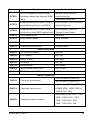
Function
Feedback Example
Line Volume:XX
Mic Volume:XX
Display status including MIC, LINE
50783%
audio, Resolution, Output Audio
on/off, Manual/ Auto-switching modes
Input:XXXX
Resolution:XXXX
Digital Sound Ouput: XXXX
Switch status: XXXX
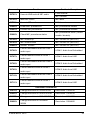
Adjustment Commands
50678%
Enable screen output adjusting
Enter Output Position Adjust
50679%
Disable screen output adjusting
Exit Output Position Adjust
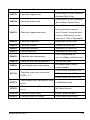
50670%
Move the image to left
Output Position Adjust X xx
50671%
Move the image to right
Output Position Adjust X xx
50672%
Move the image up
Output Position Adjust Y XX
50673%
Move the image down
Output Position Adjust Y xx
50674%
50675%
Stretch left from left side
(increase image width)
Pull right from left side
(decrease image width)
Stretch upwards from bottom side
50676%
50677%
(decrease image height)
Stretch downwards from bottom side
(increase image height)
Output Width Adjust xx
Output Width Adjust xx
Output Height Adjust xx
Output Height Adjust xx
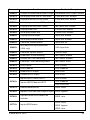
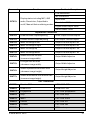
CEC Commands
50687%
Disable CEC
HDMI CEC OFF
50686%
Enable CEC
HDMI CEC ON
50901%
Play&pause
CEC cmd: play&pause
50902%
Stop
CEC cmd: stop
50903%
Menu
CEC cmd: menu
50904%
Retreat
CEC cmd: rev
50905%
Forward
CEC cmd: fwd
50906%
Up
CEC cmd: up
© Mu xLab Inc. 2015
27