1
5x1 HDMI / HDBT Multimedia Presentation Switch
Installation Guide
Contents
1. Introduction .............................................................................................................................. 5
1.1 Introduction to the 500435 .......................................................................................... 5
1.2 Features ......................................................................................................................... 5
1.3 Package Contents ........................................................................................................ 5
2. Specification............................................................................................................................. 6
3. Panel Description.................................................................................................................... 8
3.1 The 500435 Front Panel .............................................................................................. 8
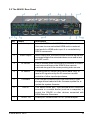
3.2 The 500435 Rear Panel.............................................................................................10
4. System Connection............................................................................................................... 11
4.1 Safety Precautions ..................................................................................................... 11
4.2 System Diagram ......................................................................................................... 11
4.3 Connection Procedure ...............................................................................................12
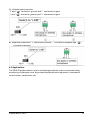
4.4 Connection of Microphone ........................................................................................12
4.5 Application....................................................................................................................14
5. Operations..............................................................................................................................15
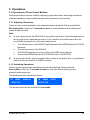
5.1 Operations of Front Panel Buttons ..........................................................................15
5.1.1 Adjusting Resolution .......................................................................................15
5.1.2 Switching Operations ......................................................................................15
5.1.3 Adjusting the Volume ......................................................................................16
5.1.4 On-Screen Display (OSD) Menu ..................................................................17
5.1.5 Software update: .............................................................................................17
5.2 Operations of IR..........................................................................................................18
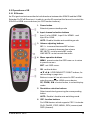
5.2.1 IR Remote.........................................................................................................18
5.2.2 IR Operations ...................................................................................................19
5.3 Operations of CEC Function.....................................................................................20
5.4 Operations of RS232 Control....................................................................................21
5.4.1 RS232 Communication Commands .............................................................21
5.4.2 Control the 500435 or 3rd Party Device locally..........................................29
5.4.3 Control the 500435 locally or remotely ........................................................30
5.5 Operations in OSD Menu ..........................................................................................31
5.5.1 Option................................................................................................................31
© Mu xLab Inc. 2015
3