1
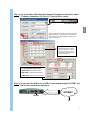
Step 5:Key in User Name & Password (User Name and Password are defaulted to “admin”
; IP address is defaulted to 192.168.1.10.). Then click OK to connect.
SYSTEM CONFIG
English
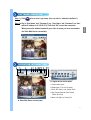
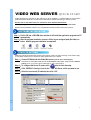
When you see the above on screen, you have been successfully
logged in the program of Video Web Server. Then please click
System Config to set up “Network Setting” & “Account”. (e.g. IP
address is 61.222.50.174)
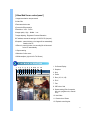
1.Please get the IP address from your
Internet Service Provider. Here we
assume it is 61.222.50.174 and the
user name and password is “dan”.
2.After the setup, please click “APPLY”
to renew the information.
To add a new User & user’s level
SUPERVISOR--control all the functions
USER LEVEL--control advanced functions
GUEST LEVEL--control basic functions only
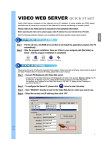
Step 6:Connect the Video Web Server by ADSL or Cable modem through RJ-45 PORT, and
then it can be operated from the Internet.
ADSL/CABLE MODEM
INTERNET
RJ-45
PC
2