1
SOFTWARE OPERATION
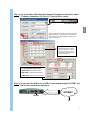
Step 1:Click
twice to enter Login setup. (You can refer to “software installation”)
Step 2:Key in “User Name” and “ Password” (e.g. “User Name” and “Password” are “dan”
and the IP address is 61.222.50.174). Then click “OK” to start the connection.
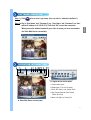
the Video Web Server successfully.
OPERATION INTRODUCTION
1
2
3
4 5
6 7 8 9 10 11 12 13
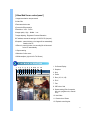
B. Digital device control panel
1.Camera video inputs
2.Quad screen, 7-9-10-13-16 screen
3.Zoom, PIP, Select, Lock, Search, Enter
4.Stop, Record, Rewind, Fast Forward,
Pause, Slow, Play
5.Menu, Left, Right, Up, Down, Exit
A. Video Web Server control panel
3
English
When you see the window below with your video, it means you have connected to