1
“This is my first RTSC system and I have four switches that
I would like to power from one unit, how do I select and
program the dip-switches for each track switch?”
Good Question!
Answer: When you receive your RTSC system, it will already
be preprogrammed to the default settings. The default
frequency setting is channel 1. So, if you open the RTSC case
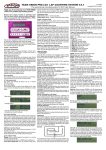
you will see two sets of five dip-switch panels in blue. Turn
the case so the dip-switches are in the up-right position. From
left to right the dip-switches are labeled as “tens & ones.”
The dip-switch setting above shows the #1 channel has been
selected. This is the “Default” setting. The dip-switch setting
below shows the #11 channel has been selected.
Once you select your first channel (IE: Ch. 1) the RTSC system
will automatically program the next three channels in series
(2, 3 & 4). The RTSC frequencies also corresponds to the
numbers on the RailLinx 900 keypad, in integers of five. So,
the total number of RTSC switches you can operate is 30 in
series or 60 in parallel. When programming your dip-switches
here are the number values available from the RailLinx 900
keypad. 1—5 / 11—15 / 21 25 / 31—35 / 41—45 / 51—55
If you have selected #1 dipswitch in the “ones” position.
The next three switches will
automatically be selected to
2, 3 & 4. If you have multiple
RTSC units, then your second
set of switches would start at 5
then the next 3 positions will be
11, 12 & 13. Depending on the
number of switches you want to
control, you can skip the number
5 position and go directly to the
11 position with your second
RTSC unit, that way your track
switches will be in consecutive
numbered order, 12, 13 & 14.
Opening & Closing Switches:
To move your switch from the
mainline to the side-track, the
sequence in which the buttons are pushed on your RailLinx
900 Transmitter is the same whether you open or close the
switch. For Example: If I selected #1 dip-switch as the
first switch I want to operate on my layout. I would press
(AUX / 1 / ENTER). This sequence will open the switch.
Page 2