1
•
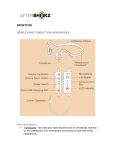
Multi-Function Button: Triangular button located on the outside of the left
transducer housing. The Multi-Function Button is raised slightly above the
surface of the transducer housing. This button is used in a variety of ways
and will be further explained in this document.
•
On the right side of the headset, as worn, there are three controls.
Starting at the back is the Volume Control, in the middle is the Micro-USB
Charging Port and at the front, the Power Button (with a small LED light).
•
Volume Control: The Volume Control is a rocker switch, located on the
right hand side of the device. There is a raised dot at the front, which
increases volume, while the opposite end of the rocker switch decreases
volume.
•
Micro-USB Charging Port: The Micro-USB Charging Port is located on the
right side of the headphones (as worn) and enclosed by a small protective
hinged cover. The hinged cover can be lifted by using a fingernail. When
the hinged cover is lifted, the Micro-USB charging port is revealed.
•
Power Button: The Power Button is a small raised button located next to
the Micro-USB Charging port, closest to the left transducer. When wearing
the headphones, press the Power Button to turn on the device. When
powering on, the headphones will vibrate and Audrey’s voice will prompt
with the phrase: “Welcome to Bluez 2”. When powering off, the
headphones will vibrate and play four descending beeps, then turn off.
•
LED Indicator: The LED Indicator, near the Power Button, is a small light
that indicates charging status visually. When fully charged, the LED
Indicator will appear blue, and when the device is being charged, the LED
Indicator will appear red.