1
How to operate Bluez 2
•
To turn on/off:
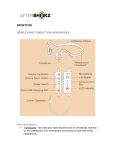
Hold down the Power Button for two seconds to turn on/off. When powering
on, the headphones will vibrate and Audrey’s voice will prompt with the
phrase: “Welcome to Bluez 2”. When powering off, the headphones will
vibrate and play four descending beeps, then turn off.
•
Pairing:
1. While the device is turned off, press and hold the Power Button for five
seconds, at which point the LED Indicator will begin flashing in alternating
red/blue and Audrey’s voice will prompt by the word: “pairing”.
2. On the electronic device that you’re pairing your headphones with, locate
the Bluetooth menu and select “Bluez 2 by AfterShokz”. Enter “0000” if a
password is required.
3. Bluez 2 will be connected within seconds and Audrey’s voice will prompt
with the word, “Device one connected”.
Note: If the Power Button is pressed and held for two seconds and then
released, Bluez 2 will turn on and automatically reconnect with the previously
paired device within 10 seconds.
If the headphones are out of range (more than 33 feet /10 meters) while
connected to a device, Bluez 2 will disconnect from the device, and there will
be a single beep every 10 seconds. If the headphones are brought back to
the range within three minutes, they will automatically reconnect and you will
hear Audrey’s voice prompt with the word, “connected”. If Bluez 2 are
disconnected for more than three minutes, you will need to press the MultiFunction Button on the headset to reconnect the device.