1
Hold the Volume Up and Volume Down button for two seconds. Audrey’s
voice will prompt you with the phrase “Equalization changed”.
Note: EQ setting will reset to default if Bluez 2 is re-paired.
•
Adjust volume:
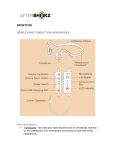
Press the button with the dot on the rocker switch to increase the volume,
and press the opposite end of the rocker switch to decrease the volume.
Note: Volume Control is only valid while Bluez 2 is playing music or in the
call.
•
Skip to next song:
Double click the Multi-Function Button to skip the song. The headphones will
beep once, and the headphones will skip to the following song.
•
Answer or end a call:
Click Multi-Function Button to answer or end a call, followed along with two
beeps or single beep separately.
•
Mute/unmute microphone:
Hold the Volume Up/Down Button for two seconds to mute or unmute a call.
You will hear Audrey’s voice prompt, “mute on” or “mute off”.
•
Redial last number:
Double click the Multi-Function Button to redial last number; the voice prompt
is “last number redial”.
•
Voice dial:
Hold the Multi-Function Button for two seconds to start the function of voice
dial.
•
Answer the second incoming call and hang up current call:
Press and hold the Multi-Function Button for two seconds.
•
Answer the second incoming call and hold on the current call:
Click the Multi-Function Button to answer the second incoming call, and click
the Multi-Function Button again to switch to the previous phone call.
Note: Some features are phone/network dependent.