1
•
Charging:
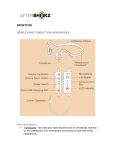
Connect Bluez 2 to a standard USB port on your PC or wall charger with the
Micro-USB Charging Cable. Bluez 2 will be fully charged within two hours.
The LED Indicator will show solid red when charging, and will turn solid blue
when the device is fully charged.
Note: Though the headphones may have power right out of the box, it’s
recommended that Bluez 2 be fully charged before their first use.
The battery is designed to last the life of the product. It should only be
removed by a recycling facility. Any attempt to remove or replace your battery
may damage the product and void the warranty.
•
Check battery status:
Press the Volume Up/Down Button Audrey’s voice will prompt with the terms,
“battery high”, “battery medium”, “battery low” or “charge me”.
Note: You can only check speaker volume status while Bluez 2 are in
standby mode.
Audrey’s voice will prompt you with, “Charge me” every two minutes when
the battery is low, and the LED Indicator will blink slowly.
•
Reset:
Enter pairing mode, then press and hold the Multi-Function Button and
Volume Up/Down Buttons for three seconds, and you will hear two beeps.
This will reset your headphones.
Note: Reset erases all paired devices stored in your headset.
•
Pause/play music:
Click the Multi-Function Button once. The headphones will beep, and your
music will pause/play.
•
Change music EQ setting: