1
DVR User Manual
Appendix B
Calculate Recording Capacity
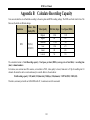
Users can calculate the size of hard disk according to the saving time and DVR recording settings. The DVR uses fixed video bit rate. The
below are the details at different settings.
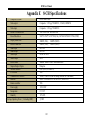
Resolution
WD1
Frame Rate
Totally(FPS)
25(PAL)/
30(NTSC)
Video Quality
Bit Rate (kbps)
Used Space(MB/h)
Highest
Higher
Medium
Low
Lower
Lowest
2.5M
1125
2M
900
1.75M
788
1.5M
675
1M
450
768
338
The calculation format is: Total Recording capacity =Used space per hour (MB/h) (coverage rate of hard disk) × recording time
(hour) ×channel numbers
For instance, one customer uses PAL cameras, set resolution to WD1, video quality to lowest, frame rate to 25 fps for enabling total 16
channels. He wants the unit to record continuously in a month. Below is the calculation:
Total Recoding capacity =338 (mb/h) X 24(hours/day) X30(days) X16(channels) = 3893760 (MB) ≈3803(GB)
Therefore, customers just install one SATA HDDs with 4T, it can almost record for one month.
101