1
If the tech support team is unable to solve the issue, they will provide instructions
regarding how to have your Kurio serviced if it is under warranty.
Find more tips and information at WWW.KURIOWORLD.COM
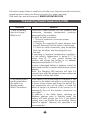
Frequently Asked Questions (FAQ)
QUESTIONS
ANSWERS
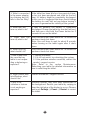
1. Why the battery
does not charge?
What to do?
There are 3 main reasons for this problem: bad
connection, improper temperature condition,
damaged battery or adapter.
To check for bad connection:
1. Check all connectors to ensure proper
connectivity.
2. Unplug the supplied AC power adapter from
the wall and verify that the outlet is functioning.
3. Check all cable connections, plug the adapter
back into the tablet, and then plug pack into
the wall.
If operating in improper temperature conditions,
i.e. the tablet’s temperature is below 0 °C or
higher than 35 °C, user should change the
location and charge the battery in an ambient
temperature between 0 °C to 35 °C.
In case of damaged battery or adapter, contact an
authorized reseller to replace the battery or power
adapter.
Note: The Charging LED indicator will light 4-5
seconds later after the adapter has been connected
to the tablet and the wall outlet.
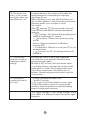
2. My battery drains
quickly even when
the tablet is in
Standby mode.
What’s the matter?
If the tablet is not in the range of a network it can
connect to, the tablet continues to send out signals
to locate a base station and drains the battery. So,
just temporarily turn off the tablet, or move the
tablet in range of a network it can connect to, or
temporarily turn off the wireless connection on
your tablet.
In addition, if the tablet keeps checking for
Windows updates even in Standby mode, the
battery will drain quickly too. This is the default
setting, user can disable this by enabling “Never
check for update”. However, this operation is not
recommended.
20