1
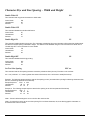
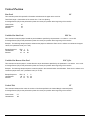
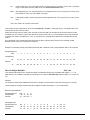
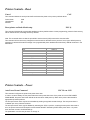
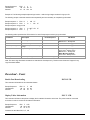
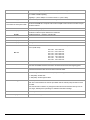
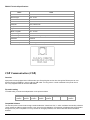
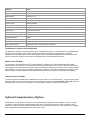
Settings
Value
Name
APEX#, where # matches the printer model
Serial Settings
115200,8,n,2,n
USB Settings
57600, 8, n, 2, n
Discoverability mode
Generally Discoverable
Connectivity mode
GAP Connectable
Security mode
Security Disabled
Fixed PIN
0 (Zero)
Set Master/Slave Policy
Always let the connecting device select the master/slave role on incoming connections
Client Profile
Disable Client Services
Server Profile
Serial Port Profile Server enabled
Wireless Multi-drop mode
disabled, forward to host only
Set Serial Interface
RS232
Configuration over Bluetooth
Enabled
Power Save mode
Allow Sleep mode only
ESC sequence timing
500ms before ESC command & 500ms thereafter
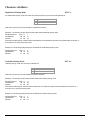
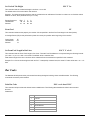
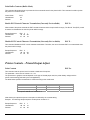
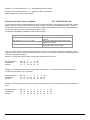
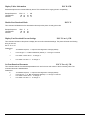
The Bluetooth™ Interface Power Modification
The Bluetooth™ interface increases the battery power consumption by 50mA. To compensate for the increased power
demand, the trickle charge rate is modified to help extend the life of the internal battery cartridge. The printer
modification is such that the printer can be set to operate in either the MANUAL POWER OFF or CONTINUOUS ON
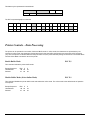
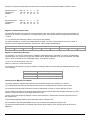
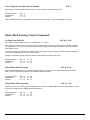
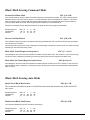
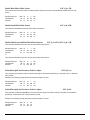
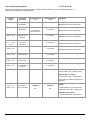
mode. For Dip Switch settings on Power Save mode please refer to the Dip Switch Table above.
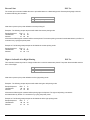
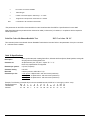
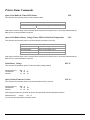
Manual Power OFF Mode
For the printer to be in Manual Power OFF mode Dip Switch # 8 must be OFF. When demonstrating RF wireless
communication, turn the printer on by pressing the ON switch located at the front of the printer. The printer will remain
active waiting for the wireless print command. Pressing the ON switch again will turn the printer OFF. For each wireless
demonstration, turn the printer on by pressing the ON switch. Operation in this fashion will greatly extend the life of the
battery cartridge. Unless the ON/OFF switch is pressed the printer will stay ON until the battery drains completely.
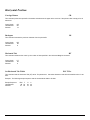
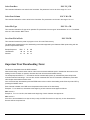
Automatic Power OFF Mode
To have the printer automatically SHUT DOWN after a period of time, turn Dip Switch # 8 ON. The printer will turn OFF
after 99 seconds. The value of the default timer can be changed by using the command ESC M n1n2 0 CR command
described earlier in the manual. Once power is cycled the printer reverts to the default 99 second value.
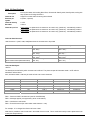
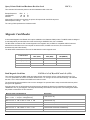
Infrared Communications (Option)
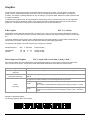
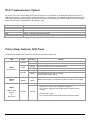
Set Dip Switch 1 to ON position. The printer can be powered up by pressing the power <ON/OFF> switch. If no IrDA
connection is made, the printer will automatically power down to a lower power level to conserve battery life. It will
remain in a “sleep” mode until an IrDA connection is made, at which time the printer will “wake” and print the requested
data. Pressing the power switch again will turn the printer <OFF>.
49