1
ACDI
ACD3180/3080 Card Dispenser-Encoder
Encode Cards - Units
1.
2.
3.
4.
5.
6.
7.
8.
9.
10.
11.
12.
13.
14.
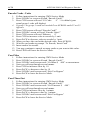
Follow instructions for entering CMX Service Mode
Press SCROLL to screen will read “Encode Cards?”
Press FWD screen will read “G1 Code:
9” ‘ 9 is default (your
actual group 1 code will display)
If group 2 or group 3 cards are needed Press SCROLL until G2 or G3
appears.
Press FWD screen will read “Encode Cash?”
Press SCROLL screen will read “Encode Units?”
Press FWD screen will read “Balance: 0”
Press FWD to increase value to encode by 1 unit.
Press BACK to decrease value to encode by 1 unit.
When you have the card at the desired value, Press SCROLL.
Wait for card reader to prompt “To Encode, Insert Card”
Insert card to be encode.
You may continue to encode as many cards as you want at this value.
Press FWD will leave the Service Mode.
Card Max
1.
2.
3.
4.
5.
6.
7.
8.
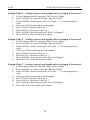
Follow instructions for entering CMX Service Mode
Press SCROLL to screen will read “Encode Cards?”
Press SCROLL until screen reads “Crd Max:$ .000” or current max.
Note you will step through several menus.
Press FWD to increase value by .01
Press BACK to decrease value by .01
Press SCROLL until screen reads “Exit Use Bypass”
Press BACK to leave the Service Mode.
Card Time Out
1.
2.
3.
4.
5.
6.
7.
8.
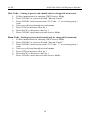
Follow instructions for entering CMX Service Mode
Press SCROLL to screen will read “Encode Cards?”
Press SCROLL until screen reads “Crd Timeout: $ .000”.
Note you will step through several menus.
Press FWD to increase value by 1 minute
Press BACK to decrease value by 1 minute
Press SCROLL until screen reads “Exit Use Bypass”
Press BACK to leave the Service Mode.
17