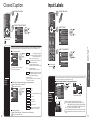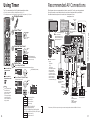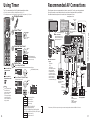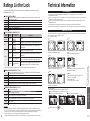
1
Lock
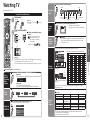
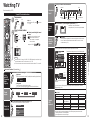
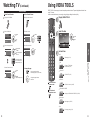
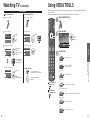
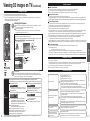
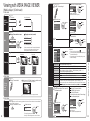
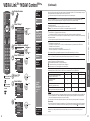
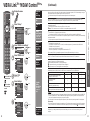
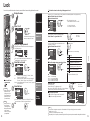
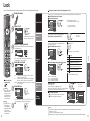
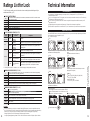
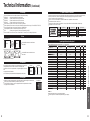
You can lock specified channels or shows to prevent children from watching objectionable content.
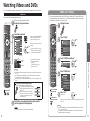
Display the menu
To select the channel or the rating of the program to lock
Select up to 7 (1-7) channels to block. These channels will be blocked regardless of the program rating.
Select “Mode” and set to “Custom”
Select a channel to lock
Menu
Select “Lock”
Menu
next
Password
Channel lock
Mode
Channel lock
Enter password.
Custom
Channel 1
-
Channel 2
-
Channel 3
-
Channel 4
-
Channel 5
-
Channel 6
-
Channel 7
-
select
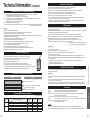
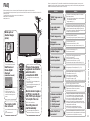
To lock/unlock all channels:
Select “Mode” and set to “All” or “Off”.
set
All: Locks all channels
Off: Unlocks all channels
- - - -
select
You will be asked to enter your password
each time you display the Lock menu.
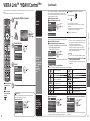
Game lock
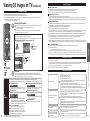
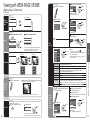
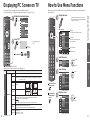
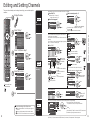
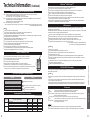
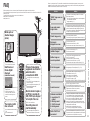
To set a rating level
“V-chip” technology enables restricted shows to lock
according to TV ratings.
Input your 4-digit password
A 4-digit code must be entered to view a blocked program or
change rating settings.
Enter password.
* * * -
Menu
Program
lock
Channel
Off
Game
Off
Program
Off
VIERA CAST
Off
set
select
Mode
On
MPAA
Off
U.S.TV
Off
C.E.L.R.
Off
C.F.L.R.
Off
set
select
Enables or disables the programs’ locks.
Program lock
Mode
On
MPAA
Off
U.S.TV
Off
C.E.L.R.
Off
C.F.L.R.
Off
next
Press to exit from
a menu screen
Unlocks all the Lock settings of “Channel”, “Game”,
“Program” and “VIERA CAST”.
All:
Locks all the inputs regardless of the Lock settings of
“Channel”, “Game”, “Program” and “VIERA CAST”.
Custom: Locks specified inputs of “Channel”, ”Game”, “Program”
and “VIERA CAST”.
Select the item
Caution
Make a note of your
password in case
you forget it. (If you
have forgotten your
password, consult
your local dealer.)
Note
When you select a
locked channel,
a message will be
displayed that allows
you to view the
channel if you input
your password.
50
Menu
Lock
Mode
select
Off
Game
Off
Program
Off
VIERA CAST
Off
“Channel”, ”Game”, “Program” and “VIERA CAST” are not
accessible unless “Custom” is selected in “Mode”.
NC- No one 17 and under admitted
17
X Adults only
To get more information (p. 58)
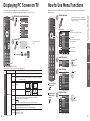
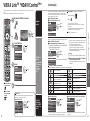
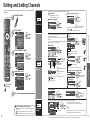
VIERA CAST lock
VIERA CAST
lock
Change
password
select
Locks VIERA CAST.
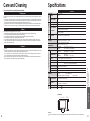
Select “VIERA CAST” in 5 and set to “On”.
When you press VIERA CAST, the “VIERA CAST Lock” screen is displayed.
Type the correct password to enter the Home screen.
To change the password
select
Change password
Set
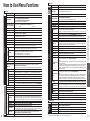
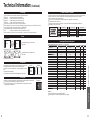
Customizes programs lock based on U.S.
No rating
General Audience: All ages admitted
Parental Guidance Suggested
Parents Strongly Cautioned:
Inappropriate for children under 13
Restricted: Under 17 requires
accompanying parent or adult guardian
MPAA: U.S. movie ratings
U.S.TV: U.S. TV program ratings
C.E.L.R.: Canadian English ratings
C.F.L.R.: Canadian French ratings
Custom
Channel
NR
G
PG
PG13
R
Change password
Off:
Example of “MPAA” (U.S. movie ratings)
Advanced
Off
Program lock
Select the rating category you wish to follow
Menu
Lock
Mode
select
In , select “Change password” and press OK
Input the new 4-digit password twice
Menu
Lock
Select the Lock mode
Select the rating to lock
Select “Mode” and set to “On”
Menu
Password
If it is your first time entering the password, enter the
password twice in order to register it.
On: Locks
Off: Unlocks
Select “Game” in 5 and set to “On”
set
Blocks access, with password protection,
to channels, programs or inputs.
Menu
select
Locks Channel 3, Channel 4, and external inputs.
On: Locks
Off: Unlocks
set
Menu
Lock
Mode
Off
Channel
Off
Game
Off
Program
Off
VIERA CAST
Off
Change password
Enter new password.
- - - -
Change password
set
Note
This television is designed to support the “Downloadable U.S. Region Rating System” when available.
(Available only in U.S.A.)
The Off rating is independent of other ratings.
When placing a lock on a specific-age-based-rating level, the Off rating and any other more restrictive ratings will also be blocked.
51