1
AGPS-Topo
Buttons :
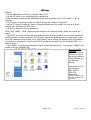
* Use the Spacebar to turn "Auto_Capture" ON or OFF.
* Use the "B" button if you forget what your options are.
* Note that some characters are underlined on the working screen like "U" for "menU" or "B" for
"Buttons" .
* The "6" button is important since it is used to control the "Location Instrument" .
* Use the "P" button to choose a Path for offsets and stations to be relative to, such as a grid or
drawing line. See also the Click-menu.
* Use the "Q" button to quit the application.
"ROD" and "LABEL" : Most Topo errors are caused by not keeping these 2 items set to what you
desire.
* The "ROD" is usually the fixed distance down between a sensing part of your Location-Instrument
and the surface you are measuring. For GPS this may be the distance down from the center of the
rover GPS antenna to the ground. For a Total Station, this is usually the distance from the middle of
the reflector to the ground. Your favorite "ROD" lengths are stored in the file "GLOBAL.ROD" for
easy selection.
* The "LABEL" is a short point description that is stored with each point. Your favorite "LABEL"s are
stored in the file "GLOBAL.LBL" .
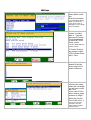
Start the AGPS
program.
Click AGPS on the
desktop. If one of
the options below is
on the desktop you
can pick that
directly.
Then select one of
the following:
Start AGPS
Ditch Pro
amwworks
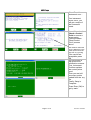
(Some computers may
start the program when
turned on)
Page 3 of 12
Revision: 10/5/2009