1
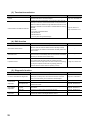
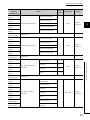
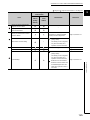
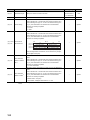
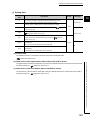
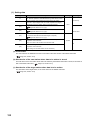
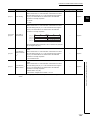
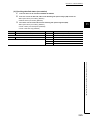
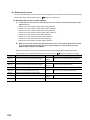
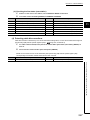
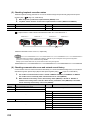
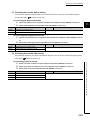
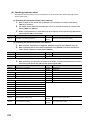
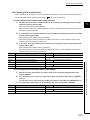
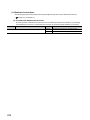
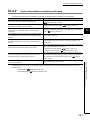
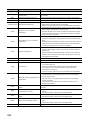
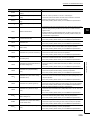
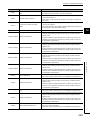
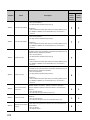
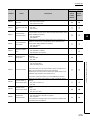
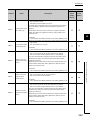
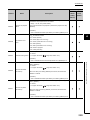
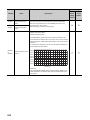
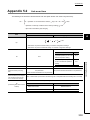
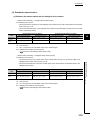
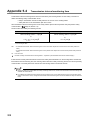
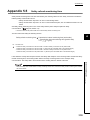
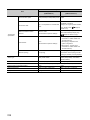
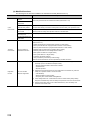
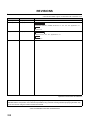
Error code
Error
Action
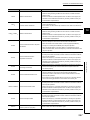
• Correct the network number at the request source of the dedicated
D24CH
Target network No. error (dedicated
instruction)
instruction, and retry the operation.
• If the request source is on another network, check if the routing
parameters are correctly set.
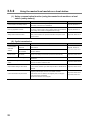
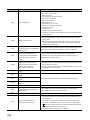
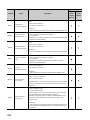
• A malfunction may have occurred due to noise. Check the wire and cable
distances and grounding condition of each device, and take measures
D24DH
Network module failure
against noise.
• Execute hardware and self-loopback tests. If a failure occurs again, the
hardware of the master/local module may be faulty. Please consult your
local Mitsubishi representative.
D24EH
D24FH
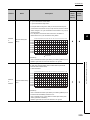
Target station setting error (dedicated
instruction)
Own station No. not set (dedicated
instruction)
• A value set for the control block of the dedicated instruction is out of
range. Correct the value, and retry the operation.
• If this error persists, please consult your local Mitsubishi representative.
• Set the station number in the network parameter dialog box, and retry the
operation.
• If this error persists, please consult your local Mitsubishi representative.
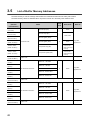
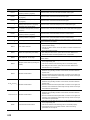
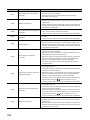
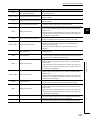
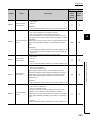
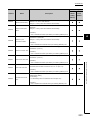
• The flash ROM may be faulty. Check the wire and cable distances and
grounding condition of each device, and take measures against noise.
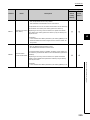
D250H
Flash ROM failure
• Execute hardware and self-loopback tests. If a failure occurs again, the
hardware of the master/local module may be faulty. Please consult your
local Mitsubishi representative.
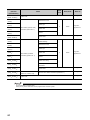
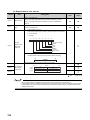
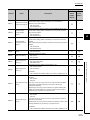
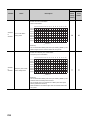
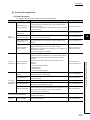
• Increase the number of resends at the request source of the dedicated
instruction, and retry the operation.
• When the own station, target station, or relay station detected an error,
D251H
Arrival check error (dedicated
instruction)
identify the cause of the error and take action.
• Reduce the frequency of transient transmission, and retry the operation.
• When the mode of the master station is "Online (High Speed Mode)",
change it to "Online (Normal Mode)" and retry the operation.
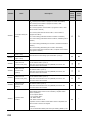
• Check if the switching hub and the cables at the request source are
connected properly.
• Check the network status using the CC-Link IE Field Network diagnostics
of the programming tool.
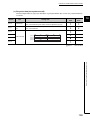
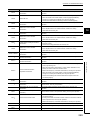
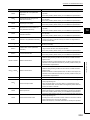
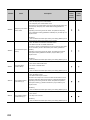
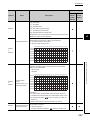
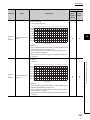
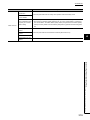
• Increase the number of resends at the request source of the dedicated
instruction, and retry the operation.
D252H
Transmission completion wait timeout
• Reduce the frequency of transient transmission, and retry the operation.
(dedicated instruction)
• When the mode of the master station is "Online (High Speed Mode)",
change it to "Online (Normal Mode)" and retry the operation.
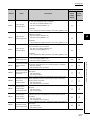
• Correct the number of link dedicated instructions that is simultaneously
executed within the range. (
Page 155, Section 10.2.1 (3))
• If this error persists, please consult your local Mitsubishi representative.
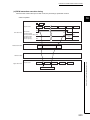
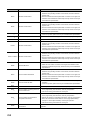
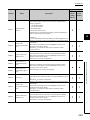
• Check the network status using the CC-Link IE Field Network diagnostics
of the programming tool.
• Increase the number of resends at the request source of the dedicated
D253H
Response timer timeout (dedicated
instruction)
instruction, and retry the operation.
• Reduce the frequency of transient transmission, and retry the operation.
• Correct the number of link dedicated instructions that is simultaneously
executed within the range. (
Page 155, Section 10.2.1 (3))
• If this error persists, please consult your local Mitsubishi representative.
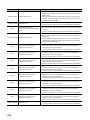
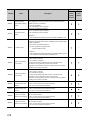
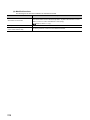
• A malfunction may have occurred due to noise. Check the wire and cable
distances and grounding condition of each device, and take measures
D254H
Network module failure
against noise.
• Execute hardware and self-loopback tests. If a failure occurs again, the
hardware of the master/local module may be faulty. Please consult your
local Mitsubishi representative.
252