1
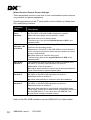
Wizard Section: Remote Control Settings
These parameters provide a new level of user customisation options and are
very powerful for special adaptations.
Specific applications include 3rd party switch control of Mode up, Mode down,
Horn and lighting functions.
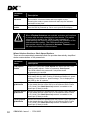
Parameter
Name
Description
ARC always
drives
Actuators
This provides an option for what the actuator 1 and 2 switches of
the DX-ARC5 or DX-ARC-SWB switchbox are used for.
Yes means they always control actuators 1 and 2.
No allows them to be a switch joystick.
To allow driving, also set the Joystick Source to ARC in the
selected profile.
ARC drives
Actuators 1&2
in Profile 0
Used in conjunction with ARC Always Drives Actuators.
Profile 0 is the accessory profile.
Yes allows the DX-ARC5 or DX-ARC-SWB to control actuator 1
and 2 in accessory mode but allows the same buttons to control
driving in other profiles.
No allows them to be used for driving only.
To allow driving also set the Joystick Source to ARC in the
selected profile.
ARC drives
Actuator 3
This provides an option for what the actuator 3 switches of the
DX-ARC5 or DX-ARC-SWB switchbox are used for.
Yes enables control of actuator 3.
No enables these switches to control the left and right indicators.
Press both switches to operate hazard lights.
ARC drives
Actuator 4
This provides an option for what the actuator 4 switches of the
DX-ARC5 or DX-ARC-SWB switchbox are used for.
Yes allows control of actuator 4.
No allows these switches to control the horn and headlights.
ARC drives
Actuator 5
This provides an option for what the actuator 5 switches of the
DX-ARC5 or DX-ARC-SWB switchbox are used for.
Yes allows control of actuator 5.
No allows these switches to control Mode up and Mode down.
These mode controls do not allow access to accessory menus on
the DX-REMG90A or T. but it does a on the REMG90. This
ensures there is always a flexible solution.
Refer to DX-ARC-SWB installation manual (GBK62297) for further details.
32
GBK64048: Issue 1 – 17/01/2005