1
The first step in using the Palm OS and the 555 report program involves learning the
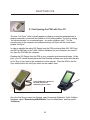
basics of the Palm Pilot or the Visor. One of the reasons, among many, why
Crossroads Software decided to write software for the Palm OS is the amazing
simplicity of a PDA. Its basic, understandable interface and its “user-friendliness,” to
use contemporary computer-speak, make it the best platform available. In addition, the
Palm Pilot and Visor, unlike laptop computers, turn on and off automatically and require
no “boot up” time; they have exceptionally long battery life; they fit in your palm and in
your pocket; and they allow officers to let the world know that they too are at the
forefront of modern technology.
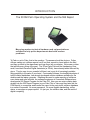
This manual does not include instructions on the basics of the Visor or the Palm Pilot.
Each PDA you purchase comes with a handbook explaining how to use and care for the
PDA. Before you can use the 555 report program, you need to learn the essentials of
the PDA itself. Please take time out to learn how to use the PDA. The most important
skill is what is called “Graffiti,” the special writing style used to enter letters and words
into the Palm Pilot and the Visor. Don't be overwhelmed, though -- you'll be surprised
how easy it is to learn the Graffiti. With a little practice, you will master it in no time.
Setting Up the Palm Pilot For the First Time ...
The first time you set up the Palm Pilot and the Palm Desktop software on your PC,
you'll have to create a new username and then “Hot Sync” the information to the Palm
Pilot. This is an important step because the username in the Palm Desktop software
will also be the username in the Palm Pilot itself. That username is also assigned to a
folder on your PC that the main Traffic Collision Database will use when you read your
555 Report from the Palm Pilot to the PC. The path name for the folder should be:
C:\Palm\[Palm username]\CASL
where “C” refers to the hard drive and “[Palm username]” signifies the folder that
contains the “CASL” folder. The 555 Report will be contained within that CASL folder.
For details on the “Hot Sync” process and using the Palm Desktop software, refer to
your Palm Pilot handbook.
Setting Up the Handspring Visor for the First Time ...
The first time you set up the Handspring Visor and the Palm Desktop software on your
PC, you'll have to create a new username and then “Hot Sync” the information to the
Palm Pilot (didn't we just say all this? Oh yeah, in the section above! Well, let's continue
being repetitive …) This is an important step because the username in the Palm
Desktop software will also be the username in the Visor itself. That username is also
assigned to a folder on your PC that the main Traffic Collision Database will use when
you read your 555 Report from the Visor to the PC. The path name for the folder should
be:
2