1
利佳興業股份有限公司
RICH ELECTRIC CO.,LTD.
INVERTEK®
SWITCH-MODE BATTERY CHARGER
(MICROPROCESSOR SYSTEM)
USER MANUAL
FOR ALL PATTERNS 1 OUTPUT
CONTENTS
Introduction............................................................................................................ 2
Technical Features ................................................................................................. 2
Advanced Charging Technique ............................................................................ 3
Safety Devices......................................................................................................... 3
Options.................................................................................................................... 4
Safety Instruction................................................................................................... 4
Installation.............................................................................................................. 5
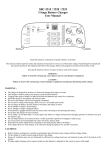
Front Panel ............................................................................................................. 6
LED Indicators....................................................................................................... 7
Instruction of Charging Curve Selection ........................................................... 7
DC Power Supply................................................................................................... 9
BTS/Remote Control ............................................................................................. 9
Trouble Shooting Guide ...................................................................................... 10
Specification ......................................................................................................... 11
1
Introduction
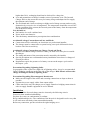
Invertek Battery Charger is small and lightweight charger that offers charging patterns
which are perfectly adapted to each battery technology (liquid electrolyte, gel electrolyte,
lead calcium, etc... ). A charging pattern may be factory set to suit your specific
application. To prolong the life of your batteries and conserve their initial capacity, the
charger is programmed with 5 three-state charging patterns:
z
BOOST Charge/FAST Charge :Restores battery capacity until 80 % in a short
space of time.
z
ABSORPTION Charge/BALANCE Charge : Complements of charge until 100 %
of battery capacity
z
FLOATING Charge/TOP-UP Charge : Compensates for constant battery drain,
while keeping the battery fully charged.
Invertek Battery Charger is the only charger on the market to allow the battery to be
connected and used constantly, while still offering a real BOOST (high voltage) charge
over short period. The charger switches back to top-up mode automatically.
In accordance with EC standards, the Invertek Battery charger is fitted with a PFC
(Power Factor Corrector) which limit peak current draw from the input power required
from the generator or Mains supply to be reduced.
Technical Features
-
Management and control by microprocessor
Charging curve of 3 states IUU type
Input voltage 230V ~ +10%/-15%
Frequency 50/60Hz
Output voltage Ubat ±1% ; output current Ibat ±5%
Operating temperature -10 to + 45°C; storage temperature -20 to +70°C
Charging curve selection by rotate switch for 5 different batteries types
Sensor used to balance charging voltage according to temperature gaps (-27mV/°C)
Automatic air vented cooling
Protection Index IP 235
2
Advanced Charging Technique
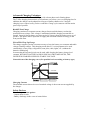
Charging curves of the 3-state IUU type, with a boost phase and a floating phase.
The 3-state charging characteristic, used on boats everywhere, saves on charging time. In
addition, the charger can be adapted to all types of battery thanks to its 5 integral
charging curves supervised by a micro controller. Charge cycle starts on with the mains
power-up of product.
BOOST/Fast Charge
Charging continues at constant current (charger Inom) until the battery reaches the
maximum boost voltage. This voltage is maintained until the charging current falls to
Inom/8 ~Inom/10 boost charge over short period (12 hours) from the mains power-up of
product. This phase makes it possible to supply the maximum amount of energy in the
least possible time.
FLOATING/Top-Up Charge
The charger supplies just the current necessary to keep the battery at a constant and stable
voltage (floating voltage). This charging mode allows 12-volt equipment to be used
continuously (water pump, refrigeration, auto pilot, radio, lights, etc.) without the
batteries discharging.
It means that the on-board circuit can be used while keeping the battery charge level
constant. WITHOUT BATTERY AND IN SPECIAL CIRCUMSTANCES, THE
INVERTEK CHARGER SUPPLIES STABLE VOLTAGE.
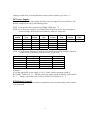
General form of the charging curve (five possible levels according to battery type)
CAPACITY Ah
CURRENT
VOLTAGE
BOOST
Fast Charge
ABSORPTION
Balance Charge
FLOATING
Top-up Charge
Charging Current
The nominal current shown in case of nominal voltage is the mean current supplied by
the charger.
Safety Devices
Electronic protection against:
- Output short-circuits
- Battery discharge in the event of mains failure
3
Disjonction protection against:
- Battery overvoltage or undervoltage
- Battery or charger overtemperature
Protection by fuses against :
- Mains input overload
- Battery polarity inversion
Anti-corrosion
Casing in aluminum with anti-corrosion paint.
Anti-impact
Resistance to impacts in normal use thanks to the 1.8 mm-thick casing (1,5mm for the
cover).
Ventilation
If the internal charger sensor exceeds 45°C, the fan starts. If the internal charger sensor
decreases to 40°C, the fan stops.
Options
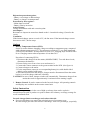
1. Battery Temperature Sensor (BTS):
Sensor is used to balance charging voltage according to temperature gaps, compared
with reference temperature 25°C. If temperature exceeds 45°C, pre-alarm starts and
LED of BTS OH flashes. If temperature exceeds 50°C, charging stops and BTS OH is
lit on. Charging restarts when temperature is less than 50°C.
Procedure of connecting BTS is:
1. Disconnect the charger from the mains (MANDATORY). To avoid short-circuit,
disconnect the batteries.
2. Extract fixing screw from wires cover and remove it
3. Connect the sensor connector to the green terminal on the PCB. (See figure A)
4. Connect charger to the mains
5. Fix the temperature sensor(s) on corresponding battery(ies) with double-sided
adhesive tape supplied with sensor.
To disconnect sensor from the charger, charger must be disconnected from the mains
before (even if the charger indicates a default).
CAUTION: In case of fault, charger switches off automatically. Disconnect charger from
mains then wait for approximately 10 minutes before starting it again.
2. Remote Control: It can be connected to the Invertek charger. All operating controls
and displays are available on the remote control unit.
Safety Instruction
A battery can generate gas in the case of high overcharge, that can be explosive.
Attention must be paid to produce no spark or flame near a battery on charge, arrange for
a well-ventilated room.
Invertek charger limits overcharges and reduces this risk.
z Excessive discharges are among the principal causes of premature wear.
Invertek charger prevents such excessive discharge. After every discharge, (especially
4
higher than 50%), recharging should not be deferred for a long time.
Low and permanent overcharge is another cause of premature wear. The Invertek
Charger delivers the current necessary for battery charge and adapts itself to supply
the optimum end of charge.
z The accidental and violent overcharge or higher end of charge current produces early
destruction by excessive rise of temperature. The temperature should not exceed 50°C.
By the regulation of the current, the Invertek protects the battery from the temperature
rise at the end of charge.
It is advisable to
z Put batteries in a well ventilated area
z Not to smoke near batteries
z Take the battery manufacturer prescriptions into consideration
z
Accidental Leakage Current between Line And Earth
z Connections will be realized by an electrician or a professional installer.
z The charger must be connected to a system having a two-pole differential circuit
breaker with 30 mA sensitivity.
Accidental Leakage Current between Charge Circuit and Earth
z To detect accidental leakage currents to earth, you must use a safety device outside
the charger.
z The rating and nature of the protection must be ensured by the installer.
z Special precautions are recommended on any installation where there is a danger of
electrolytic effects.
z Regulations require the presence of a battery cut-out on the output + pole and on
the output – pole.
Precautions Regarding Lightning Strike
In geographic zones exposed to a high risk of lightning strikes, it may be recommended
fitting a lightning conductor on the inlet side of the charger. Rich Electric will not take
charge of damaged caused by lightning strike.
Precautions Regarding Electromagnetic Interference
z Make sure the length of the cables and screening connections are kept as short as
possible.
z Separate the power supply cables from output cables.
z Cables must only carry the charger power supply. Branch or bridging connections in
order to supply another equipment are too be banned.
Installation
The location of the Invertek charger must be chosen by the following criteria:
Protection from unauthorized handling.
Dry dust free room, no condensation, no rodents.
Keep ventilation holes free. The ventilation of the Invertek is designed in such a way that
it will work most efficiently when mounted horizontally.
Before any connection, put the switch on the right charging curve.
5
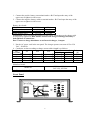
1. Connect the positive battery on terminal marker +BAT and open the entry of the
upper case to tighten it with screws.
2. Connect the negative battery cable to terminal marker –BAT and open the entry of the
upper case to tighten it with screws.
Battery fuse board:
Model No.
12V/20A
12V/60A
FUSE Atofuse (car)
1 x 25A
2 x 30A
Model No.
24V/15A
24V/50A
FUSE Atofuse (car)
1 x 15A
2 x 30A
WARNING: Check carefully the tightness of the battery connections to the charger (risk
if not properly tightened). Rich Electric will not take charge of damage caused by a
bad tightness of connections.
Don’t connect a charge distributor on an Invertek charger, 1 output.
3. Put the AC power cord in the rear panel. The charger operates on sector 90V to 250
VAC - 50/60 Hz.
4. Conductor section according to charge current cables length is as follows.
Length
Sector flex section (5m) Puissance
5m
10m
15m
Current
(W)
220V
110V
2
2
2
2
2
30A
6 mm
10
mm
16
mm
1.5 mm
2.5 mm
750
40A
10 mm2
16
mm2
25
mm2
1.5 mm2
1.5 mm2
500
2
2
2
2
2
50A
16 mm
25
mm
35
mm
1.5 mm
2.5 mm
1200
60A
25 mm2
25
mm2
35
mm2
1.5 mm2
2.5 mm2
750
Main fuse board:
12V/20A, 12V/60A,
24V/15A, 24V/50A
16A
Model No.
Temporized glass fuse 6.3x32mm
Front Panel
Invertek
SWITCH-MODE BATTERY CHARGER
MICROPROCESSOR SYSTEM
R
CAPACITY Ah
POWER
1
0
CURRENT
BATTERY TYPE
BOOST
UV/OV
OH
BOOST VOLTAGE
ABSORPTION
BTS OH
VOLTAGE
FLOATING
POWER
FLOAT VOLTAGE
FUSE OPEN
BTS
BOOTS
Fast Charge
ABSORPTION
Balance Charge
FLOATING
Top-up Charge
6
Remote
Control
LED Indicators
POWER: It is lit when the AC power has been input through the AC plug.
BOOST: It is lit as long as the battery is not fully charged at set charge current.
ABSORPTION: It is lit as long as the battery is not fully charged at set voltage.
FLOATING: It is lit when the battery is fully charged.
UV/OV:
Under Voltage---Deep battery discharge Ubat < 10V for 12V system and < 20V for 24V
system. If Ubat stays < 10V for 12V system and < 20V for 24 system
during more than 5 minutes, charger shuts down. To restart the charger:
disconnect the mains, wait few minutes and reconnect the charger on
mains.
Over Voltage--- Battery overcharge Ubat > 16V for 12V system and > 32V for 24V
system. If Ubat > 16V for 12V system and > 32V for 24V system
during more than 5 minutes, charger shuts down. To restart the charger:
disconnect the mains, wait few minutes and reconnect the charger on
mains.
OH: Over Heat---It is flashing when the heatsink of the charger reaches > 70℃. The
charger shuts down when the charger is > 80℃.
BTS OH: Battery Temperature Sensor Over Heat--- It is flashing when the BTS reaches
> 45℃. The charger shuts down when the battery temperature is > 50℃.
FUSE OPEN: Fuse is broken.
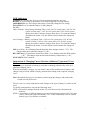
Instruction of Charging Curve Selection (4 Battery Types and 1 User
Define)
Every battery is designed according to particular technology and therefore calls for a
particular charging curve.
With Invertek battery charger, you can achieve this perfect match between battery and
charger using a switch, which is simply positioned according to the required, charging
curve.
Note: Do indicate the type of your battery when buying the charger, and position the
switch correctly before use.
The user can very easily adapt the Invertek charger to the type of battery by rotate switch
used.
To modify configuration, carryout the following steps:
STEP 1: Disconnect charger from the mains. To avoid short-circuit, disconnect the
batteries.
STEP 2: According to 4 different battery types and desired charge current (30%, 70% and
100%), choose the rotate switch from 1 to C. If the used battery is not in 4 listed
battery types, User Define is available.
7
Charge
Rotate
Current
Switch
14.4V
13.5V
100%
1
Standard lead acid unsealed
14.4V
13.5V
70%
2
14.4V
13.5V
30%
3
14.2V
13.8V
100%
4
Sealed lead acid (Gel Cell)
14.2V
13.8V
70%
5
14.2V
13.8V
30%
6
14.6V
14.0V
100%
7
Lead calcium
14.6V
14.0V
70%
8
(Standard charge)
14.6V
14.0V
30%
9
16.0V
13.8V
100%
A
Lead calcium
16.0V
13.8V
70%
B
(Deep charge) *1
16.0V
13.8V
30%
C
─
─
100%
D
User Define *2
─
─
70%
E
─
─
30%
F
*1 This curve is used to regenerate the battery electrolyte in case of deep discharge (U
Boost 16V), it is indispensable to disconnect the battery from other consumers.
BATTERY TYPE
U Boost
U Float
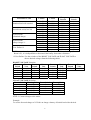
*2 User Define: Use the switches of the BOOST VOLTAGE and FLOAT VOLTAGE to
choose desired voltages from the following tables.
BOOST VOLTAGE Selection
Rotate
Boost
Rotate
Switch
Volt.
Switch
0
14.4V
5
1
14.5V
6
2
14.6V
7
3
14.7V
8
4
14.8V
9
FLOAT VOLTAGE Selection
Rotate Switch Floating Volt.
0
13.5V
1
13.6V
2
13.7V
3
13.8V
4
13.9V
Boost
Volt.
14.9V
15.0V
15.1V
15.2V
15.3V
Rotate
Switch
A
B
C
D
E
Rotate Switch
5
6
7
8
9
Boost
Volt.
15.4V
15.6V
15.8V
16.0V
14.2V
Rotate
Switch
F
Floating Volt.
14.0V
13.1V
13.2V
13.3V
13.4V
STEP 3: Connect charger to the mains.
Example:
To use the Invertek charger of 12V/60A to charge a battery of Sealed lead acid at desired
8
Boost
Volt.
14.3V
charging current 42A, users should choose rotate switch of battery type to be “5”.
DC Power Supply
Invertek charger can not only charge the battery but also supply DC power directly. The
desired voltage can be set by the following steps.
STEP 1: Choose the rotate switch of BATTERY TYPE to be“0”.
STEP 2: Use the rotate switch (0~F) of BOOST VOLTAGE to set the first two digits of
desired voltage. Refer to the below table for what 0~F represents.
Rotate
Switch
0
1
2
3
4
Boost
Volt.
13.0V
14.0V
15.0V
16.0V
16.0V
Rotate
Switch
5
6
7
8
9
Boost
Volt.
16.0V
16.0V
16.0V
16.0V
16.0V
Rotate
Switch
A
B
C
D
E
Boost
Volt.
16.0V
16.0V
16.0V
16.0V
16.0V
Rotate
Switch
F
STEP 3: Use the rotate switch (0~9) of FLOAT VOLTAGE to set the decimal of desired
voltage. Refer to the below table for what 0~9 represents.
Rotate Switch
0
1
2
3
4
Floating Volt.
0.0V
0.1V
0.2V
0.3V
0.4V
Rotate Switch
5
6
7
8
9
Floating Volt.
0.5V
0.6V
0.7V
0.8V
0.9V
Example:
To set the desired DC power supply of 14.3V, firstly, choose the rotate switch of
BATTERY TYPE to be“0”and then choose the rotate switch of BOOST VOLTAGE to
be“1”; finally, choose the rotate switch of FLOAT VOLTAGE to be“3”.
BTS/Remote Control
It is a port for phone jack of the battery temperature sensor and upcoming remote control
to be connected.
9
Boost
Volt.
16.0V
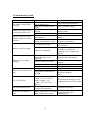
Troubleshooting Guide
Problem and Symptoms
No output voltage and/or
intensity
Intensity of charge is too
weak and less than 10%
Charger delivers a weak
output voltage but a max.
intensity
Possible Cause
No alternative current or main
fuse is melted down
Main or generating unit too
weak
Battery is almost totally
charged
Alimentation is too weak
Battery consumption > power
of the charger
One or several elements of the
battery present a short-circuit
Loss (emission of gas)
Battery is quickly empty
Sulfate on / stagnation
Battery is never totally
charged
Consumption on the battery
during the charge is too
important
Time of charge is too short
Battery temperature too weak
Defective battery
Defective battery
Battery is hot/emission of
gas
UV/OV LED ON
OH LED flashes or ON
BTS OH LED flashes or
ON
Temperature of the battery is
too high
Stop because of battery
voltage < 10 V for 12V or
battery voltage > 16V
(< 20V/> 32V for a 24V
battery )
The charger is near to the
"switch off" temperature
Solution
Check the fuse and replace it
Check the input voltage
Check that the charger is on a
floating mode
Check the input voltage
Reduce the consumption on the
battery
Check that there 's no increase
of battery temperature
Change the battery or check the
level of water
Charge / discharge several time
the battery or check the
charging curve or replace the
battery
Decrease the consumption
Choose a more powerful
charger
Use a temperature sensor
Change the battery
Replace the battery
Use a temperature sensor and/or
check the charging
curve
Disconnect the charger, wait 20
minutes and connect to the main
Ventilate the charger
Check the charging curve and
Battery temperature is too high
placed the battery in a
(with a temperature sensor)
ventilated area
10
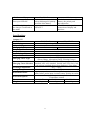
Problem and Symptoms
Fuse open LED ON
Possible Cause
Default of the battery which is
in deep discharged or polarity
inversion of the battery
No LED is lighting when
the charger is connected to
the mains
DEFAULT
Solution
Check the connection of the
battery, the polarity and
the output fuse
Check the main input, the
connection of display and
the fuses.
Specifications
Output: 12V
Model No.
Input Voltage
Output Voltage
Charging Capacity
Frequency
Output Patterns
Input Voltage U bat
Output Current I bat
Charging Curve Type
Charging Curve Selection
Working Temperature
Storage Temperature
Protection Feature
Protection Options
Dimensions
Weight
ADC-20X-122
ADC-60X-122
Input voltage 230V ~ +10%/-15%
12V
20A
60A
50Hz/60Hz
1 or 3
+/-2%
+/-10%
3 states IUU type
(Boost Charge, Absorption Charge, Floating Charge)
By SWITCH for 5 different battery types:
Standard lead acid unsealed, Sealed lead acid (Gel Cell),
Lead calcium (standard charge/deep discharge), User define
-10℃ ~ +45℃
-20℃ ~ +70℃
Against output short-circuit, battery discharge in the event of
mains failure, mains input overload, battery polarity inversion
Battery or charger overtemperature
(Temperature sensor)
310x200x70 mm
400x250x80mm
400x250x80 mm
3 kgs
6 kgs
6 kgs
11
Output: 24V
Model No.
Input Voltage
Output Voltage
Charging Capacity
Frequency
Output Patterns
Input Voltage U bat
Output Current I bat
Charging Curve Type
Charging Curve Selection
Working Temperature
Storage Temperature
Protection Feature
Protection Options
Dimensions
Weight
ADC-15X-242
ADC-50X-242
Input voltage 230V ~ +10%/-15%
24V
15A
50A
50Hz/60Hz
1 or 3
+/-2%
+/-10%
3 states IUU type
(Boost Charge, Absorption Charge, Floating Charge)
By SWITCH for 5 different battery types:
Standard lead acid unsealed, Sealed lead acid (Gel Cell), Lead
calcium (standard charge/deep discharge), User define
-10℃ ~ +45℃
-20℃ ~ +70℃
Against output short-circuit, battery discharge in the event of
mains failure, mains input overload, battery polarity inversion
Battery or charger overtemperature
(Battery Temperature Sensor)
310x200x70 mm
400x250x80mm
400x250x80 mm
3 kgs
6 kgs
6 kgs
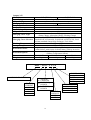
ADC – 20 X – 1 2 2 A
AC TO DC CHARGER
POWER CORD
A- American
B- UK
C- Australia
D- Europe
4-STAGE
CHARGER
HIGH-FREQ.
U:
DESIGN
LOW-FREQ.
L:
DESIGN
X:
CHARGE
CURRENT
15A
20A
50A
60A
OUTPUT
VOLTAGE
12VDC
24VDC
12
INPUT VOLTAGE
1- 90~120VAC
2- 180~240VAC
3- 90~240VAC