1
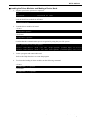
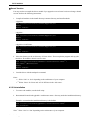
PEX-485111 Kernel Version You may need to recompile the driver module if you upgrade to a new kernel version or change a kernel version. Refer to the following instructions. 1. Compile all modules in the install directory/common directory and install modules. <dpg0100> #cd /usr/src/interface/common/dpg0100/src #make #make install <dpg0101> #cd /usr/src/interface/common/dpg0101/src #make #make install <dpg0102> for RTLinux #cd /usr/src/interface/common/dpg0102/src #make #make install 2. Move the directory to the src directory of Linux drivers. Then compile the program and copy the module to /lib/modules/<kernel version>/misc. #cd /usr/src/interface/gph4851/<architecture name>*1/ (OS name)*2/drivers/src #make #make install 3. Load the driver with the modprobe command. Notes: • *1 Write “i386” or “sh4” depending on the architecture of your computer. • *2 Writes “linux” for Linux and “rtl” for RTLinux in the <OS name>. 4.2.2 Uninstallation 1. To remove the modules, run the shell script. 2. Run uninstall located in the gph4851/<architecture name>* directory under the installation directory. Example: Assume that the installation directory is the default. #cd /usr/src/interface/gph4851/<architecture name>* #sh uninstall Note: * Write “i386” or “sh4” depending on the architecture of your computer. Interface Corporation - 18 -