1
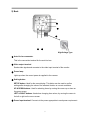
2) Back
②
④
⑤
①
③
High Voltage Type
① Auto iris lens connector
This is the connection terminal for the auto iris lens.
② Video output terminal
Sends video signals and connects to the video input terminal of the monitor.
③ Power lamp
Lights up when the correct power is supplied to the camera.
④ Setting button
SETUP button: Used for the menu display. This button can be used to confirm
settings after changing the value of the selected function or current conditions.
UP & DOWN buttons: Used for selecting items by moving the cursor up or down on
the menu screen.
LEFT & RIGHT buttons: Used when changing item values, by moving the cursor to
the left or right on the menu screen.
⑤ Power input terminal: Connects to the power appropriate to each power requirement.
8