1
4. Familiar your storage server
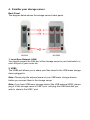
Back Panel
The diagram below shows the storage server’s back panel.
3
2
1
NS-2501
NS-2502
1. Local Area Network (LAN)
You should connect the LAN port of this storage server to your hub/switch, or
one LAN port of your router etc.
2. USB2
The USB2 port allows you to share your files stored in the USB mass storage
device plugged in.
Note: Please plug the external power of your USB mass storage devices
before you connect them to the storage server.
Note: If you have USB mass storage device (like USB external HDD), please
plug it to this storage server’s USB 2 port, and plug the USB flash disk you
wish to share to the USB 1 port.