1
|
User Manual Internet Banking FiNBOX
3
Register
step 1
To be able to receive invoices or documents from a company, you must register with the company in question.
ff Choose payments »FiNBOX» companies from the menu at the left of the screen.
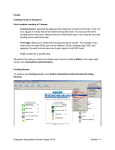
The companies screen will appear:
about this screen
This overview shows the companies with which you can register to receive documents in your FiNBOX. The companies
with which you have already registered show a green checkmark in the my companies column.
new companies
The list of companies that have recently started offering this service and with which you can register to receive
documents in your FiNBOX
all companies
The list of all companies with which you can register to receive documents in your FiNBOX.
Click information >> for more information about the documents of the company.
Click register >> to register with your selected company.