1
HUNTER-PRO 32 User Manual LED Keypads
7
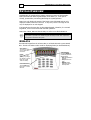
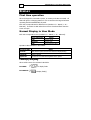
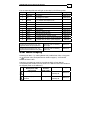
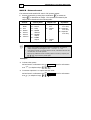
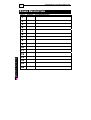
The corresponding fault LED will light as described in the following table:
LED No.
1
2
Indication
BATTERY
AC
*
3
PHONE
4
DC
5
*
*
*
ZONE
6
CLOCK
7
TAMPER
8
FUSE
*
9
BELL
*
10
I/O-W
*
*
I/O-8
12
KEYPAD
Fault Description
*
Keypad
Low battery
RXN-9/416
No voltage from mains
RXN-9/416
No communication with monitoring station
or, a problem with telephone line
RXN-9/416
Low voltage
RXN-9/416
Fault zone
RXN-9/416
Hour and/or date are not set
RXN-9/416
Open tamper
RXN-9/416
Detector’s voltage is short
RXN-9/416
External/Internal Bell fault
RXN-9/416
A problem with the wireless receiver
*
11
*
RXN-416
A problem with one of the remote expanders
RXN-416
A problem with one of the system keypads
RXN-416
* These faults should be fixed by a qualified technician/installer
Programming/connection error: The
keypad ID should be reprogrammed
Numerical LEDs are flashing
left-to-right
RXN-9/416
Programming/connection error: The
keypad is disconnected from the panel
Numerical LEDs are flashing
right-to-left
RXN-9/416
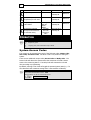
User Menu Display
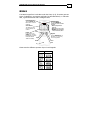
Accessing User Menu – by entering Master Code, Enabled User Code, or long press
and User Code (see System Access Codes on page 8) – turns ON the
on
ARMED and FAULT LEDs.
Pressing a programming menu key (see below table) will turn ON the
corresponding LED number (the key itself on the RXN-9 and the LED number in
the keypads panel on the RXN-416).
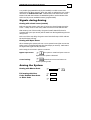
Key
After entering
Master/User Code
(short press)
Temporary bypass of zones
Secondary
Function
(long press)
-
Programming telephone
numbers
-
LED Indication
Keypad
Numerical LED 3
constantly ON
RXN-9/416
Numerical LED 6
constantly ON
RXN-9/416