1
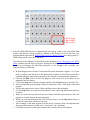
Figure 3. Digilent WaveForms - EEBOARD User Interface
Keil Microcomputer Development Kit for ARM Processors (MDK-ARM)
Lab projects will be created, built, downloaded to the microcontroller, debugged, and tested using
MDK-ARM (µVision5). This is an Integrated Development Environment (IDE) with installable
software packs for families of ARM-based microcontrollers. The evaluation version of this
package can be downloaded from the Keil web page for personal use. This version is limited to
program codes sizes of 32Kbytes, which is more than enough for the projects in this course. Refer
to the document Installing MDK-ARM, available on the course web page, for instructions on
downloading and installing this software. Documents describing the use of MDK-ARM to develop
and debug projects on the STM32L100C-Discovery board are also available on the course web
page.
THE LAB EXPERIMENT
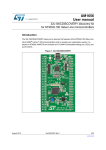
The lab instructor will issue a kit to each team, containing an EEBOARD and an STM32L100CDiscovery board, to use for the duration of the semester. The kit includes a lockable case that will
hold the project board, power supply, USB cables, and other parts. These kits are not to be
removed from the lab room.
In this lab session, you will use MDK-ARM to create a project using a given C program, build
the project, download it to the microcontroller on the STM32L100C-Discovery board, and
investigate the operation of the program using various features of the MDK-ARM debug tool.
1. Begin by creating a new project, following the instructions in the document STM32L100CDiscovery Board Projects, available on the course web page. The C program to be used for