1
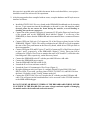
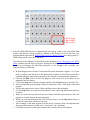
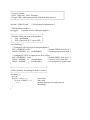
k. When the program stops at the breakpoint, step through several for loops and record the
values of local variables i and j, displayed in the Call Stack + Locals Window. Also record
the values of local variables sw1 and led1 in the main program.
l. Remove the breakpoint from the delay() function.
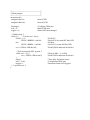
m. Add global variable “toggles” to window Watch 1.
n. Resume executing the program, manipulate the user button, and observe the value of
variable “toggles” as the program executes.
o. Exit the debug session.
4. (Time permitting.) Modify the main program to toggle the second LED, but with this LED
OFF when the first one is ON, and vice versa. Note that the second LED is connected to
GPIO pin PC9. Then rebuild the project, and test the program in the debugger, recording
your observations.
LABORATORY STATUS REPORT AND LAB NOTEBOOK
For Lab 1, each student is to submit a separate memo-style laboratory report, as described in the
syllabus. The memo should (1) begin with a brief statement of the objectives of the lab, (2) provide
a brief summary of what was accomplished and the results that were observed, and (3) conclude
with a brief statement of what was learned, and any suggestions for the lab instructors. In future
labs, when programs are written and/or circuits designed, these should be attached to the memo,
or otherwise included.
In addition, each student should enter all pre-lab and in-lab activity in the lab notebook. Lab
notebooks will be collected from all students every two weeks, beginning with week 2.