1
CONGRATULATIONS
on your purchase of the Radial ProAV2. Radial products are easy to use and this
short manual contains all the information you need to start using your ProAV2 right
away. For more information on the ProAV2, and other Radial products, visit our website, www.radialeng.com.
¼” JACKS - INSTRUMENTS
Guitar, bass and the output of effect pedals may be connected directly to the ¼” input
jacks. The signal may be thru-put to the players on-stage amplifier by using the same
channel RCA jack and adaptor.
OVERVIEW
The Radial ProAV2 is a two channel (stereo) passive direct box. This innovative DI
features a ‘Swiss army knife’ compliment of connectivity options making it the perfect
DI for professional AV integrators and rental companies that regularly deal with a
variety of system interface problems.
The Radial ProAV2 is equipped with standard ¼” instrument inputs for each channel
making it easy to connect a stereo instrument or two mono ones. Stereo RCA and
3.5mm jacks make it easy to connect -10dB audio devices like MP3 and CD players
to a microphone snake and console preamp.
At the heart of the ProAV2 are two Radial transformers that perform level and impedance conversion while isolating noise caused by ground loops. Radial transformers
are manufactured for optimum signal transfer and minimal insertion loss, and are
exceptional for their low distortion, flat frequency response and ability to handle high
input levels. The transformer is sheilded in a mu-metal can for protection against
noise caused by electromagnetic fields. It’s heavy-duty, two piece steel enclosure is
well suited for years of touring and rental use. The ProAV2 is completely passive and
does not require any power whatsoever to make it work. Enjoy!
CONNECTING THE ProAV2
Before connecting the ProAV2 make sure the sound system is turned off and all levels are set to zero. This will avoid any pops in the sound system that could damage
loudspeakers. Also confirm that the GROUND, PAD and LIFT buttons are in their
“out” positions. Phantom power will not damage the ProAV2 if applied.
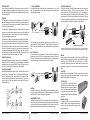
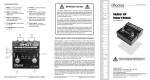
ProAV2 BLOCK DIAGRAM
Follow the block diagram from the inputs on the left to the output on the right. A really
cool feature shown in the diagram is all the hi-Z input jacks are paralleled together
in stereo. This makes any hi-Z jack a handy patch point. For example, a CD player
can be connected to the RCA jacks and the signal thru-put by the ¼” jacks to a submixers line input. The 3.5mm jack could also be used to send the CD signal to a
computer sound card.
Left ¼”
Right ¼”
Guitar
Bass
RCA Thru
Break loop here with
LIFT switch.
When connecting stereo instruments, like synthesizers and drum machines, the two ¼”
jacks are used for the left and right channels. The stereo signal may be accessed at the
RCA or 3.5mm jacks and passed to sub-mixers, computer sound cards or on-stage amplifiers.
RCA & 3.5mm JACKS
Consumer electronics with an unbalanced -10dB output, like CD and MP3 players, may
connect directly to the ProAV2 without cumbersome adaptors through the 3.5mm and
RCA inputs. The unbalanced inputs are paralleled together so any unused jacks may be
used to thru-put the signal to another device like a sub-mixer or recorder.
RCA Left & Right
3.5mm Thru
TRANSFORMER ISOLATION
The Radial transformers convert the hi-Z input signals to a low-Z, mic-level signal. A major
benefit of using transformers for signal conversion is the isolation the transformer provides
by preventing the flow of ground currents between the ProAV2s input and it’s output. This
transformer isolation effectively blocks hum and buzz caused by ground loops.
ProAV2 User Guide
Radial Engineering
AC
Mains
AC
Mains
The right channel LIFT feature can be used on devices that plug into AC mains power to reduce hum and buzz caused
by ground loops. The dashed line shows the ground loop formed between the AC mains and the signal cable ground.
GROUND
To make grounding as flexible as possible, the ProAV2 features a GROUND switch
and all connectors are isolated from the chassis to help eliminate noise caused by
ground loops. When the GROUND switch is in its “in” position, pin-1 on the XLR is
disconnected, interrupting the ground on both channels between the input and output.
Interrupting the ground can help in some situations to reduce noise caused by ground
loops.
XLR OUTPUT
Each ProAV2 channel outputs a balanced, 600 Ohm, mic-level signal that is compatible with microphone snakes and mixing console preamps. The output can drive long
cables without appreciably noise or signal loss.
Stereo
-15dB PAD
The ProAV2 is equipped with a -15dB input PAD to prevent overload distortion when interfacing high output devices like CD players. The PAD reduces the input to the left and right
transformers and will not effect the level at the paralleled jacks.
Radial Engineering
LIFT (RIGHT CHANNEL ONLY)
If the ProAV2 is used as two mono DIs a situation can arise where one source device
needs a ground path through the ProAV2 but the other source does not. This can
occure when one source is AC powered and the other is not. To accommodate this
the right channel is equipped with a separate ground lift switch labeled LIFT. Devices
powered throught the AC mains should be plugged into the right channel. When the
LIFT switch is depressed the right channel ground is interrupted between the input and
output while the left channel maintains a ground path through the ProAV2.
ProAV2 User Guide
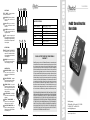
OPTIONAL J-RAK
The optional J-RAK is a high density 2RU rack
shelf for Radial DI’s and splitters that allows up to
8 Radial devices to mount in one neat 19” package.
The DI’s can be mounted with either the input side
or output side facing the front. Ideal for studio or
touring. Constructed of 14 gauge steel with a baked
enamel finish.
OPTIONAL J-CLAMP
The optional J-CLAMP can mount a single Radial device to
virtually any surface. Perfect for hiding away inside racks, on
podiums or under tables. Constructed of 14 gauge steel with
a baked enamel finish
Radial Engineering
ProAV2 User Guide