1
1
1.
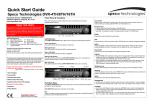
Front Panel
No
1
2
3
4
5
6
7
8
9
Button
DVD Burner
USB Port
Fast Rewind
Direction Button
Fast Forward Button
Return Button
Enter Button
Play/Pause Button
Screen Display Button
10
LED Indicator
11
12
13
14
15
16
Power Button
Search Button
Menu Button
PTZ/Focus Button
IR Sensor Window
Jog/Shuttle Knob
Function
Backup the recorded image by internal DVD burner
USB port for mouse operation or Image backup
Fast rewind during playback
Move to the desired menu position
Fast forward during playback
Cancel setup or return to previous mode
Select value or setting
Play or pause by toggle during playback
Select screen display mode
Indicates system status
Power, Record and Network status
System startup or shutdown
Go to search mode
Open system menu
Control camera PTZ and focus
Sensor Input for IR remote controller
Image playback in various speed or frame by frame
1.2
USB Port
1) To backup recorded images by using USB storage device (USB Memory Stick or USB
ODD).
2) System software upgrade
3) Mouse connection for system operation
1.4
Direction Button
1) Live Display & Playback Mode
User can change channel # by using Left & Right arrow button.
User can change display mode by using Up & Down arrow button
2) Menu Mode (when system menu is displayed)
To move to desired menu position.
3) Pan & Tilt Mode (once PTZ Button is pressed)
To move connected camera to desired direction.