1
Virtual Transport User Guide : Server
Virtual Transport 1.3
NETWORKED SYNCHRONIZATION SYSTEM
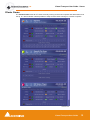
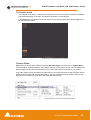
When there are too many clients to be simultaneously displayed in the Clients frame, a scroll bar
appears on the right-hand side.
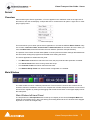
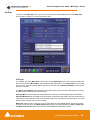
For each active client, a number of information fields are available. Described from left to right and top
to bottom, screen block by screen block:
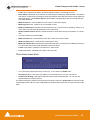
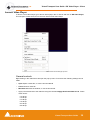
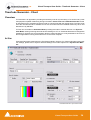
Client frame upper block
Client Frame upper block
•
The ID number of the client application. Each client running on the same machine has a unique ID.
•
The Instance number. If an application has more than one instance running, each instance has a
different Instance number.
•
Name of the application.
•
Name of the developing company.
•
The current time code of the client. The client time code could be different to the server time code
depending on the Offset set on the client and others delays.
•
A short description of the application.
•
The name of the machine on which the client is running.
•
A wrench key opens the client’s settings, when applicable
•
A blue magnifying glass shows the client’s interface
•
A red magnifying glass hides the client’s interface
•
A X (cross) closes the client
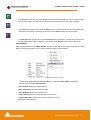
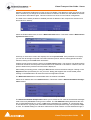
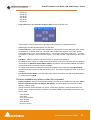
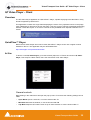
Client frame middle block
Client Frame middle block
•
Blue Offset button. Works by a) scrolling the client to the desired location, b) pressing Offset button, c) locating the TC master application to the reference position, d) pressing Offset again. The
applications are now locked with their new offset positions.
•
Red Offset button. Resets the offset setting to zero.
•
Offset time display. This field could be edited by clicking on it, in the same way the timecode field
works in the main panel.
•
Clock Master button. Indicates if an application is Clock Master. Also allows activation of an application as clock master. There can be only one Clock Master per computer.
•
TC Master button. Indicates if an application is TC Master. Also allows selection of the clock master
application. There can be only one TC Master on a computer
•
Delta (time difference) display between the Client and the local Server.
Virtual Transport User Guide
13