1
Sonar
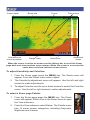
Cursor depth
Information at
cursor's position.
Brush pile
Range scale
Cursor
Fish arches
History bar
Amplitude
scope
When the cursor is active on screen use the History bar to scroll the Sonar
page back and view previous sonar returns. When the cursor is on screen the
sonar does not show real time sonar returns.
To adjust Sensitivity and Colorline:
1. F
rom the Sonar page press the MENU key. The Sonar menu will
appear. From the Sonar menu select Adjust.
2. T
he Sensitivity adjustment menu will appear. Use the left and right
arrows to make adjustments.
3. T
o adjust Colorline use the up or down arrows to select the Colorline
menu. Use the left or right arrows to make adjustments.
To select a Sonar page Palette:
1. F
rom the Sonar page press the MENU key. The Sonar
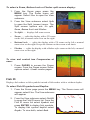
menu will appear. Select View in the Sonar menu to open
the View submenu.
2. F
rom the View submenu select Palette. The Palette menu
has 12 sonar screen categories, including Grayscale,
Nightview and Iceview.