1
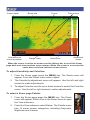
To select a Zoom, Bottom Lock or Flasher split screen display:
1. F
rom the Sonar page press the
MENU key. The Sonar menu will
appear. Select View to open the View
submenu.
2. F
rom the View submenu select Split
to open the Split (screen) menu. The
Split screen options are: No split,
Zoom, Bottom Lock and Flasher.
•
No Split — displays full sonar screen
•
Zoom — splits the display with a 2X zoom
on the left; a normal sonar view on the right
•
Bottom Lock — splits the display with a 2X zoom on the left; a normal
sonar view on the right. Keeps the bottom on the screen at all times.
•
lasher — splits the display with a flasher-style sonar on the left; a normal
F
sonar view on the right
To view and control two Frequencies at
once:
1. P
ress PAGES to access the Pages
screen. From the Pages screen Sonar
options select + Sonar combo pages.
Fish ID
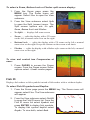
Displays fish echoes as fish symbols instead of fish arches with or without depths.
To select Fish ID symbols and Depths:
1. F
rom the Sonar page press the MENU key. The Sonar menu will
appear, select View. The View submenu
will appear.
2. F
rom the View submenu select Fish ID
to open the Fish ID menu list. From the
Fish ID menu list select Symbols and
press ENTER to display fish symbols.
To display fish symbol depths select
Depths. To view both, select Both.