1
IS-DEV KIT-9 User Manual
7850 East Gelding Drive • Scottsdale, AZ 85260-3420
9.
Character Commands for the OLED Switches
The following commands allow changing of the images being displayed. The host can download ASCII
characters to a specified location and the controller creates the image using a 7 x 10 font look up table based on
On/Off pixel colors. The host can download the On pixel colors and Off pixel colors. These colors stay in effect
unless they are changed by the host.
The host can command the controller to change the status of one or more rows of pixels to a line color. The host
can download the line color. These colors stay in effect unless they are changed by the host.
The host can specify the brightness of the OLED switches.
None of these commands affect the storage memory.
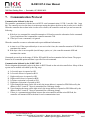
Command to specify the OLED brightness (OLED color and OLED rocker switches)
This command specifies the brightness for both OLED color and OLED rocker switches:
Command format:
Transmit format:
27H
(xxH)
4EH
(xxH)
[Brightness OLED color]
(xxAH)
[Brightness OLED rocker]
(xxAH)
[Brightness OLED color] is one byte sent in ASCII HEX format. The acceptable values are from 00H to 0FH,
where 0FH is the brightest. Default is 0FH.
[Brightness OLED rocker] is one byte sent in ASCII HEX format. The acceptable values are from 00H to 0FH,
where 0FH is the brightest. Default is 0FH.
The specified brightness levels go into effect immediately and remain in effect for the duration of the session.
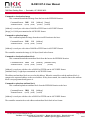
Command to specify the color for line command (OLED Color)
This command specify the color used in line command:
Command format: 27H 47H [Color]
Transmit format: (xxH) (xxH) (xxAH)
[Color] is two bytes sent in ASCII HEX format. It specifies any of over 65,000 available colors. Default is
0000H.
The specified color remains in effect only for the duration of the session.
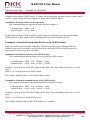
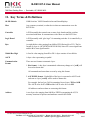
Command to specify the OFF/ON colors for Character generator commands (OLED Color)
This command specify the colors used in the character generator command.:
Command format: 27H 49H [Off color] [On color]
Transmit format: (xxH) (xxH) (xxAH)
(xxAH)
[Off color] is two bytes sent in ASCII HEX format. It specifies any of over 65,000 available colors.
Default is 0000H. This is for the background color.
[On color] is two bytes sent in ASCII HEX format. It specifies any of over 65,000 available colors.
Default is FFFFH. This is for character color.
The specified colors remain in effect only for the duration of the session.
IS-Dev Kit-79Users Manual A.doc
Toll Free 1.877.2BUYNKK (877.228.9655) • Phone 480.991.0942 • Fax 480.998.1435
www.nkkswitches.com • Email [email protected]
Page 32 of 44
0615