1
IS-DEV KIT-9 User Manual
7850 East Gelding Drive • Scottsdale, AZ 85260-3420
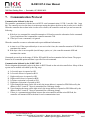
Flash Memory Organization
The Flash memory can hold up to 65,535 images and attribute blocks (Addresses 0001H to FFFFH) for the
Frameless OLED SmartSwitch. The images are pictures to be displayed. The attributes are user-defined
information on what image is to display based on the switch activity and the timer expiration. The images and
attributes need to be downloaded before operation.
Address
0001
0002
----FFFE
FFFF
OLED Switch
Image Attribute Block
Image Attribute Block
Image Attribute Block
Image Attribute Block
Image Attribute Block
Image Attribute Block
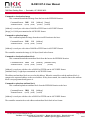
The IS-DEV KIT-9 is programmed with factory default images. The user can change the images and
programming through the use of attributes. The controller associates one address to each image and the display
shows the image at the associated address. Each address has a group of five attributes which together is called
an Attribute Block. The function of the Attribute Block is to tell the controller what image to display next,
either when the switch associated with that particular address is pressed or when the timer expires.
Address for Switch #1
0000 to FFFF
Address for Switch #2
0000 to FFFF
End of the Loop Address
0000 to FFFF
Timer #1
00 to FF
Timer #2
00 to FF
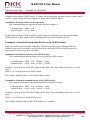
Changes based on the OLED switch presses
• When either switch number one or number two is pressed, the changes happen based on the active
attributes for that switch. It can change the active address in one or both or neither of the switches.
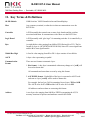
If the “Address for Switch #1” active attribute is equal to zero, there will be no change to switch one.
Otherwise, switch number one displays the image at the address indicated in “Address for Switch #1”
and the attribute of this address becomes active for switch number one.
If the “Address for Switch #2” active attribute is equal to zero, there will be no change to switch two.
Otherwise, switch number two displays the image at the address indicated in “Address for Switch #2”
and the attribute of this address becomes active for the switch number two.
•
While either of the switches is pressed, the timer for that switch pauses, if the timer is running.
IS-DEV KIT-9 User Manual A.doc
Toll Free 1.877.2BUYNKK (877.228.9655) • Phone 480.991.0942 • Fax 480.998.1435
www.nkkswitches.com • Email [email protected]
Page 7 of 44
0715