1
1 Important
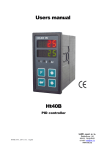
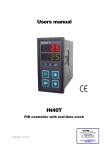
Ht40A is a temperature / process controller intended for the built-in to panel. The format of controller is 96 x 48 mm
(1/8 DIN).
The controller enables simple controlling via program… ramp and soak or controlling to stp value.
It is equipped with 1 input (thermal or process) and 3 outputs (control, auxiliary and alarm).
The controller is easy to run and operate. The parameters set can be locked and thus preventing from deleting by a user.
User manual for the controller Ht40A is divided into the particular chapters. When you install and put it into operation we
recommend proceeding in the following way:
If you are a final user, the controller is in the default setting by the suplier
If you are a final user, you will get the device in the customized setting and you can view and change only the parameters
that you need for your own work on the controller.
If you are a new user of the device, focus on the following chapters:
•
•
•
Basic terms, here it is explained the key functions, displays, and so on….
Basic mode, the description of basic mode of controller.
Controlling of stp value, program, all you need to know when you start programming.
If you are carring out the complete installation and setting of the controller
In this case you proceed in accordance with the following chapters:
• Installation, in this chapter it is described how to build in a controller into panel.
• Principals of installation, we recommend you to observe the guidelines described in this chapter.
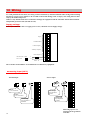
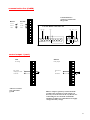
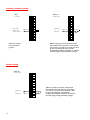
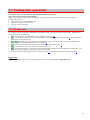
• Wiring, the description for wiring of the controller.
• Putting into operation, at first power-up you enter the initial menu in which you can configure and set the most
important parameters of controller.
According to the procedure you will perform installation, wiring and basic setting of controller. You can find out more
details on the scope of the controller and its operation in the following chapters.
For the users who have the controller completely set, we recommend to perform the setting of all the parameters in service
level, menu ConF. Initial password for the entry to service level is set to 995.
2