1
-- User Manual --
1. SYSTEM REQUIREMENT
1.1 Android
4.0 or higher versions
1.2 MicroSD slot and microSD OTG reader support (or microSD to SD adapter in SD slot)
2 GETTING STARTED
2.1 How to start SYCRET CLOUD
Step 1: Download the App “Sycret Cloud” from
Google Play and install*(1) it into your Android phone.
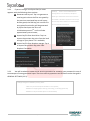
*Note(1):
Please uninstall other Sycret App(s)
beforehand to successfully install Sycret Cloud app. If
your Android phone is running with KitKat 4.4 or
Step 2: Insert Sycret Card into your Android phone
before using the App.
higher version, please unmount or remove Sycret
Card from your phone while re-installing Sycret Cloud
app on your Android phone. Otherwise, the following
Step 3: Tap the App icon on the screen to open it.
error message may occur.
2.2 First-Run Initialization
2.2.1
For the first-time user, you will be prompted to
set your password by entering it twice and then to answer
three security questions. The password can be changed in
GENERAL SETTINGS (3.2.2). Ten attempts of wrong
password input will lock your Sycret Card.
Page 3
www.kingmax.com